
Adobe Stock AI Agent
Automate image tagging and titling within the Adobe Stock contributor portal using AI
As of June 2026, Adobe Stock AI Agent has 194 users and a 3.75/5 rating from 8 reviews in the Productivity category.
Usersup 16.9 percent+16.9%
194
194
Ratingdown 2.8 percent−2.8%
3.75
8 reviews
Reviewsup 14.3 percent+14.3%
8
Version
1.6.1
Manifest V3
History
9 snapshotsTracking since Apr 3, 2026.
View as table
| Date | Users | Rating | Reviews | Version |
|---|---|---|---|---|
| Apr 3, 2026 | 166 | 3.86 | 7 | 1.6.1 |
| Apr 17, 2026 | 167 | 3.86 | 7 | 1.6.1 |
| Apr 23, 2026 | 187 | 3.75 | 8 | 1.6.1 |
| Apr 28, 2026 | 195 | 3.75 | 8 | 1.6.1 |
| May 5, 2026 | 178 | 3.75 | 8 | 1.6.1 |
| May 11, 2026 | 201 | 3.75 | 8 | 1.6.1 |
| May 16, 2026 | 213 | 3.75 | 8 | 1.6.1 |
| May 25, 2026 | 219 | 3.75 | 8 | 1.6.1 |
| Jun 4, 2026 | 199 | 3.75 | 8 | 1.6.1 |
| Now | 194 | 3.75 | 8 | 1.6.1 |
Permissions & access
- Permissions
- storageactiveTabscriptingoffscreen
- Host access
- https://contributor.stock.adobe.com/*, https://stock.adobe.com/*, https://*.ftcdn.net/*, https://openrouter.ai/*
Screenshots



About
Supercharge Your Adobe Stock Workflow with the AI Agent — Now Just $10 (Limited-Time Offer!)
Eliminate the repetitive work of titling and keywording your Adobe Stock uploads. The Adobe Stock AI Agent is a powerful Chrome extension that streamlines your contributor workflow using advanced AI, saving you hours of manual work while improving your content's visibility.
Designed with a sleek, Apple-inspired interface, the AI Agent combines smart automation with deep customization — helping both new and experienced contributors scale their portfolios with ease.

🔑 Key Features & Benefits
🚀 AI-Powered Metadata Generation
Automatically generates accurate, relevant titles and keywords for your images using advanced image analysis.

✍️ Seamless Form Filling
Instantly fills metadata fields within the Adobe Stock Contributor portal with a single click — no copy-pasting required.

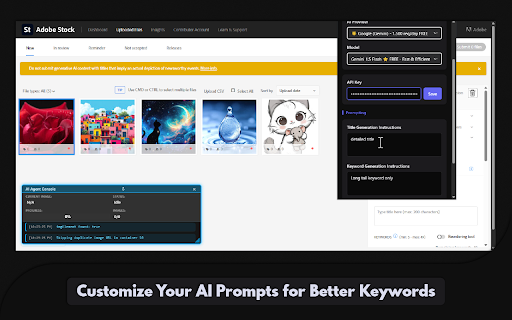
🧠 Custom Prompt Support
Guide the AI’s tone and vocabulary by writing your own instructions for title and keyword generation.

🔢 Control Keyword Quantity
Choose the exact number of keywords you want — from 10 to 49 — for optimal metadata control.


🌐 Choose Your AI Provider
Switch between major AI services in one click — the extension auto-adjusts model settings and fields for you.

🔧 Smart Automation Suite (Updates)
Enhance your workflow with intelligent automation:
✅ Auto File Type Selection – Automatically sets your preferred default (Photo or Illustration)

✅ AI Tagging Detection – Flags generative AI content automatically

✅ People/Property Selector – Auto-selects "No" when applicable for streamlined review

✅ Intelligent Field Skipping – Leaves any manually filled fields untouched


⚡ Performance & Stability Enhancements
⚡ Scan-Once Engine (NEW)
Ultra-fast DOM scanning processes your entire upload queue instantly — no lag or freezing, even on large batches.

🔔 Completion Bell (NEW)
Hear a gentle chime when your batch finishes — perfect for multitasking while the AI works.

🛠️ Improved Stability (NEW)
Centralized state handling, improved message routing, and resilient error management ensure smooth operation at scale.

🧹 Clean, Efficient Backend
Debug mode toggle, minimal console logging, and a single polling loop keep things fast and developer-friendly.


🎨 Modern, Intuitive Interface
Clean, dark theme with neon blue highlights

Built-in live console overlay displays real-time progress and feedback


🔒 Secure, Local-Only Key Handling
Your API keys are stored securely on your device and never sent to third parties.

⏱️ Reliable Batch Processing
Adaptive timing and built-in fail-safes ensure smooth handling of large image uploads.


🚀 How to Get Started
Install the Adobe Stock AI Agent from the Chrome Web Store.

Open the extension and go to the Advanced tab. Select your AI provider and enter your API key.

Customize prompts and other automation settings.

Upload your images to Adobe Stock.

Click Start Processing and let the AI Agent do the rest.


💡 Why Use the AI Agent?
⏳ Save Time – Automate time-consuming metadata entry

🧠 Improve Quality – Get consistent, relevant, search-friendly tags and titles

📈 Boost Discoverability – Increase the chance your images are found

🎯 Focus on What Matters – Spend more time creating, less time tagging


🔐 Your Privacy Matters
All processing happens on your device. Your images are analyzed in real-time — nothing is stored or shared. API keys remain secure and local.

Take your Adobe Stock submissions to the next level.
 Try the AI Agent today and experience the difference intelligent automation can make.
Technical
- Version
- 1.6.1
- Manifest
- V3
- Size
- 133KiB
- Min Chrome
- 88
- Languages
- 1
- Featured
- No
Metadata
- ID
- keadilbdikcabnnhconaenobdikehgbm
- Developer ID
- u45b09a13cb9cea6105658d5d3b16e0d0
- Developer Email
- [email protected]
- Created
- Jul 3, 2025
- Last Updated (Store)
- Feb 11, 2026
- Last Scraped
- Jun 4, 2026
- Website
- —
- Support URL
- https://adobestockai-agent.com/contact
Similar extensions
Alternatives to Adobe Stock AI Agent, ranked by description similarity.

Adobe Stock Metadata Automation
Fast AI-powered keywording automation tool for Adobe Stock contributors.
460
★ 3.0

AI Metadata Generator for Shutterstock Contributors
Bulk AI metadata generator for Shutterstock. Mass create descriptions, categories, keywords. CSV export.
559
★ 1.0

Shutterstock AI Agent
Automate image tagging and metadata for Shutterstock using AI.
62

Keyword & Tags Research Tools for Adobe Stock
Keyword & tagging & titles SEO tool for Adobe Stock creator, make more sales with it. Insights for better positioning of designs.
651
★ 5.0

Adobe Stock Image Title Generator
Generate titles and keywords for your Adobe Stock images using OpenAI API
365
★ 1.0

Stock Keyword Tool & Autofill: Autokeyworder
AI stock keyword tool: auto-fills titles, keywords & categories on Adobe Stock, Shutterstock & more, inside your upload page.
159
★ 5.0

MetaForge by TAS
Automatically generates and updates metadata for Adobe Stock images - both for new uploads and existing portfolio
5.0K
★ 5.0

Easy Keywords for AdobeStock
Easy get keywords(powered by AI) and adding keywords to AdobeStock
10.0K
★ 4.1
Data sourced from the Chrome Web Store · last verified Jun 4, 2026.