
PixelSharp
Sets the image scaling of the page to Nearest Neighbor for sharp pixels
As of May 2026, PixelSharp has 561 users and a 4.91/5 rating from 11 reviews in the Developer Tools category.
Usersup 1.8 percent+1.8%
561
561
Ratingno change0%
4.91
11 reviews
Reviewsno change0%
11
Version
1.1
Manifest V3
History
2 snapshotsTracking since Apr 24, 2026.
View as table
| Date | Users | Rating | Reviews | Version |
|---|---|---|---|---|
| Apr 24, 2026 | 551 | 4.91 | 11 | 1.1 |
| May 20, 2026 | 548 | 4.91 | 11 | 1.1 |
| Now | 561 | 4.91 | 11 | 1.1 |
Permissions & access
- Permissions
- activeTabscripting
- Host access
- None declared
Screenshots
About
PixelSharp changes the scaling of images on the current page to be pixel-perfect when activated.

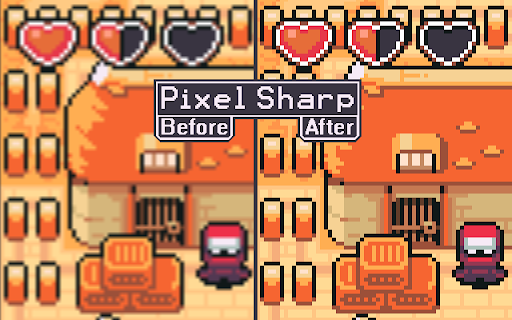
Scaled up pixel art in the browser often ends up very blurry due to the default "linear" scaling method. This scaling works well for general browsing, as most images on the web are high resolution, but is detrimental to pixel art and low resolution images. Activating PixelSharp changes the page scaling to "nearest neighbour", the intended scaling method for pixel art.


How to use:
The extension was designed to be pinned so that you can simply click the icon to activate it. You can also activate PixelSharp by first pressing the "Extensions" button next to the URL bar and then clicking on PixelSharp in the list of installed extensions.

You will need to enable "Allow access to file URLs" for the extension to work on images loaded from your computer.


Technical details:
The extension only activates when clicked. Clicking the extension icon will trigger a single update to the current page which modifies the display styles to use nearest neighbour scaling. After the page has been updated the extension stops. Reloading the page will clear the page modification, essentially reverting the images on the page back to the original browser scaling behaviour.


Image attribution:
The "before and after" image was created from real screen captures of the same image at 500% browser zoom scale, before and after using the PixelSharp extension. The pixel art used to demonstrate this ("Ninja Adventure - Asset Pack" by pixel-boy and AAA) was licensed under the Creative Commons Zero (CC0) license ("public domain").
Technical
- Version
- 1.1
- Manifest
- V3
- Size
- 4.18KiB
- Min Chrome
- 88
- Languages
- 1
- Featured
- Yes
Metadata
- ID
- kdoddkjhpcokbhchhlkbbjnfmlpcacmi
- Developer ID
- ub8fe9381a16b6fe5397d957236dc05d4
- Developer Email
- [email protected]
- Created
- Dec 10, 2015
- Last Updated (Store)
- Nov 8, 2024
- Last Scraped
- May 20, 2026
- Website
- —
- Support URL
- —
- Privacy Policy
- —
Similar extensions
Alternatives to PixelSharp, ranked by description similarity.

PerfectPixel by WellDoneCode (pixel perfect)
Drop your mockup on the live page for pixel-perfect comparison with your code.
300.0K
★ 4.3

Pixel Perfect Pro
Helps developers to make pixel perfect site layout
10.0K
★ 4.5

PixelPeek
Image details for designers: popup via context menu, overlay.
22

PixelPeek
Displays original and displayed pixel sizes of media elements when hovered.
10
★ 5.0

Pixel measurement
Pixel measurement: An online ruler for measuring pixels on screen
100.0K
★ 4.5

Measure Pixel
Discover Measure Pixel — the ultimate solution for precise pixel measurements on webpages.
1.0K
★ 4.0

Pix 2 Per
Converts pixel values to percentages.
14
★ 5.0

Browser Extension Icon Resizer
Browser Extension Icon Resizer is a simple, fast, and lightweight tool that converts a single source image into all the common icon…
9
Data sourced from the Chrome Web Store · last verified May 20, 2026.