
Shortcuts Manager — Bookmark & Link Organizer
Unlimited folder-based shortcuts and one-click link launches — organize bookmarks, tabs, and links with ease.
As of June 2026, Shortcuts Manager — Bookmark & Link Organizer has 353 users and a 4.86/5 rating from 7 reviews in the Workflow & Planning category.
Usersno change0%
353
353
Ratingdown 2.8 percent−2.8%
4.86
7 reviews
Reviewsup 40.0 percent+40.0%
7
Version
2.2.0
Manifest V3
90-day change · In the last 90 days this extension 1 version update.
History
12 snapshotsTracking since Apr 18, 2026.
View as table
| Date | Users | Rating | Reviews | Version |
|---|---|---|---|---|
| Apr 18, 2026 | — | 5.00 | 5 | 2.1.1 |
| Apr 24, 2026 | 227 | 5.00 | 5 | 2.1.1 |
| Apr 29, 2026 | 247 | 5.00 | 5 | 2.1.1 |
| May 9, 2026 | 256 | 5.00 | 5 | 2.1.1 |
| May 12, 2026 | 274 | 5.00 | 6 | 2.2.0 |
| May 16, 2026 | 277 | 5.00 | 6 | 2.2.0 |
| May 20, 2026 | 279 | 5.00 | 6 | 2.2.0 |
| May 25, 2026 | 297 | 5.00 | 6 | 2.2.0 |
| May 29, 2026 | 310 | 5.00 | 6 | 2.2.0 |
| Jun 3, 2026 | 318 | 5.00 | 6 | 2.2.0 |
| Jun 8, 2026 | 326 | 4.86 | 7 | 2.2.0 |
| Jun 14, 2026 | 344 | 4.86 | 7 | 2.2.0 |
| Now | 353 | 4.86 | 7 | 2.2.0 |
Permissions & access
- Permissions
- storageactiveTab
- Host access
- https://iywkgqrdhpmadlnvhbrl.supabase.co/*, https://zyntro.app/*
Screenshots



About
Shortcuts Manager is a lightweight bookmark & link organizer that replaces Chrome’s 10-shortcut limit with unlimited folders, subfolders, and one-click launches. Build tidy collections for Work, Social, Research, or any workflow — open any link in a single click and get back to work faster.

Key features:
● Create unlimited folders & subfolders (free: 5 folders).
● One-click quick-launch — open any link in a new tab instantly.
● Easy editing — add, rename, delete, and reorder shortcuts in seconds.
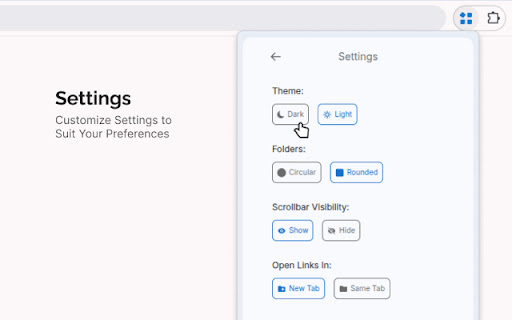
● Themes & display settings — light/dark mode and circular/rounded folders icon.
● Privacy-first — no unnecessary permissions, local storage-first design.
● Lightweight & fast — optimized for speed and minimal memory use.
● Premium unlocks unlimited folders, drag and drop functionality, and priority support.

How it works:
1. Pin the extension to Chrome.
2. Click the icon to open the popup.
3. Create folders, add links, and launch with one click.

Why users choose Shortcuts Manager:
● Faster access than bookmarks or hunting through tabs.
● Ideal for social managers, devs, researchers, and daily power users.
● Simple, secure, and built for productivity.

Privacy-first — no unnecessary permissions. Trusted by professionals and power users.

Install free — upgrade to Premium for unlimited folders & early features.

Need help? Contact [email protected] or visit zyntro.app/products/shortcuts-manager.
Technical
- Version
- 2.2.0
- Manifest
- V3
- Size
- 212KiB
- Min Chrome
- 88
- Languages
- 41
- Featured
- Yes
Metadata
- ID
- kdjdpocmfmmhlblgaohcgjdmgkhngkoe
- Developer ID
- uecaa50fc225e275a9de215b528532b10
- Developer Email
- [email protected]
- Created
- Dec 3, 2025
- Last Updated (Store)
- May 7, 2026
- Last Scraped
- Jun 14, 2026
- Website
- zyntro.app
- Support URL
- https://zyntro.app/terms-and-conditions
- Privacy Policy
- https://zyntro.app/privacy-policy
Similar extensions
Alternatives to Shortcuts Manager — Bookmark & Link Organizer, ranked by description similarity.

proBookmarkly Smart Visual Preview Bookmark Manager for Power Users
This extension helps you organize, preview, search, and open bookmarks efficiently — whether you manage dozens or thousands of links
13
★ 5.0

Link Organizer - New Tab
A beautiful link organizer for your new tab page
123
★ 4.7

Yoyo Shortcut
The official Yoyo Shortcut extension
Quickly save and organize bookmarks, navigate websites using memorable keywords, and manage…
85
★ 4.3

Readable Shortcuts
Readable Shortcuts allows you to create readable personalized shortcuts for your links that are easy to recall.
52
★ 5.0

Browser Shortcuts
Streamline your browsing and save time with custom right-click menu shortcuts that fit your workflow.
13
★ 5.0

Bookmark Enhancer
Enhance your bookmarks with notes, tags, search, and reminders
4
★ 5.0

Shortcut Manager
A personalized library for your most-used shortcuts.
62

Link Manager
Link Manager is a clean and user friendly Chrome extension that helps you save, organize, and access your favorite links all from a…
20
★ 5.0
Data sourced from the Chrome Web Store · last verified Jun 14, 2026.