
Hide AI Overviews from Google
Removes Google's AI Overview so you can focus on classic search results.
As of June 2026, Hide AI Overviews from Google has — users and a 4.31/5 rating from 13 reviews in the Productivity category.
Usersno change0%
—
—
Ratingup 1.4 percent+1.4%
4.31
13 reviews
Reviewsup 8.3 percent+8.3%
13
Version
1.2
Manifest V3
History
4 snapshotsTracking since Apr 1, 2026.
View as table
| Date | Users | Rating | Reviews | Version |
|---|---|---|---|---|
| Apr 1, 2026 | 6.0K | 4.25 | 12 | 1.2 |
| Apr 21, 2026 | 2.0K | 4.25 | 12 | 1.2 |
| May 7, 2026 | 8.0K | 4.25 | 12 | 1.2 |
| May 18, 2026 | 7.0K | 4.25 | 12 | 1.2 |
| Now | — | 4.31 | 13 | 1.2 |
Permissions & access
- Permissions
- storage
- Host access
- *://*.google.com/*
Screenshots
About
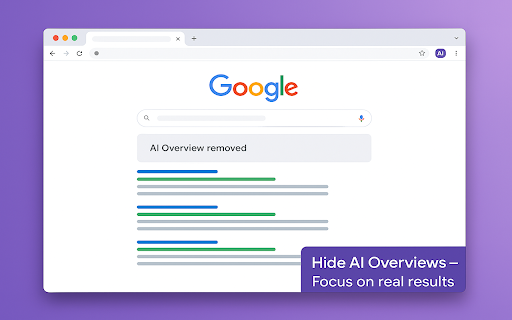
Google’s new “AI Overview” boxes promise instant answers powered by large-language models, yet for many users they add clutter, bias, and scroll friction to the familiar list of blue links we have relied on for years. Hide AI Overviews restores the clean results page you remember—no pop-up panels, no algorithmically summarised paragraphs, only the information you asked for.

Why the AI Overview needs taming
AI summaries can be helpful when accurate, but they frequently hallucinate facts, cite partial sources, or push organic results below the fold. They also break the eye-tracking habits professionals develop when scanning dozens of SERPs per hour. If you verify medical guidance, audit financial data, or simply prefer primary sources, these blocks become a distraction—and sometimes a liability. Hide AI Overviews removes the noise before the page finishes loading, so you stay focused on the results that matter.

Concrete benefits for everyday workflows
Speed and focus — Search pages render faster without the AI overhead, and the first organic result appears above the fold.

Accuracy — You rely on primary sources instead of potentially hallucinated summaries.

Consistency — Behaviour is identical on desktop, laptop, or Chromebook, and the toggle setting stays active until you close the browser.

Accessibility — Screen-reader users avoid extra landmarks, and keyboard navigators jump directly to results.

One-click reversibility — Need the AI panel for a casual query? Toggle it back on, refresh, and carry on—no reinstall required.

Who gains the most?
Researchers and academics who must cite original sources for peer review.

Journalists and fact-checkers who cannot risk quoting hallucinated text.

Developers, SEOs, and power users who analyse SERP structure and ranking shifts.

Privacy-conscious individuals uneasy with opaque AI pipelines blending personalisation with generative text.

Non-native English speakers who prefer results in their own language and find English-centric AI answers unhelpful.

Accessibility advocates who need predictable heading structures and fewer dynamic elements on the page.

Generative AI may be part of the web’s future, but it should never be forced upon you. Hide AI Overviews combines surgical precision, transparent code, and multilingual readiness to give you the final say in how your search results look—and how you use them.
Technical
- Version
- 1.2
- Manifest
- V3
- Size
- 52.67KiB
- Min Chrome
- 88
- Languages
- 40
- Featured
- No
Metadata
- ID
- kcoachoplcbgpllpicplccmknpilllbb
- Developer ID
- ud969c69941dd8d55e66f662b8efaf662
- Developer Email
- [email protected]
- Created
- Jun 24, 2025
- Last Updated (Store)
- Jun 24, 2025
- Last Scraped
- Jun 1, 2026
- Website
- —
- Support URL
- —
- Privacy Policy
- —
Similar extensions
Alternatives to Hide AI Overviews from Google, ranked by description similarity.

Hide AI Overview | Disable Google AI Overviews
Hide AI Overview — bye bye Google AI! Automatically turn off, hide, and remove AI Overview from Google Search SERP.
81
★ 1.0

AI Search Result Remover
Removes AI-generated overviews from Google search results
4

Google AI Overview Hider
Hide Google AI Overviews and AI Mode labels on Google Search with a simple on/off toggle.
—
★ 5.0

No AI Mode for Google
Removes Google AI Mode tab and AI Overview section with toggle option.
784
★ 5.0

Turn Off AI Overview (& Other Google Features)
Control your Google Search experience: Toggle AI Overview, hide elements (ads, featured snippets, etc.), and filter domains.
2.0K
★ 4.0

Hide Google AI Overview, Sponsored results and Snippet
Hide unwanted sections from Google Search results
200
★ 3.3

No AI Overview
Hides Google's AI Overview module on search result pages.
41

Brainrot Blocker - No AI
Less AI, more brain. Block or hide Google’s AI Overview and keep your search results clean, fast, and human-friendly.
26
★ 5.0
Data sourced from the Chrome Web Store · last verified Jun 1, 2026.