
ShipCenter
Add your SKU and quantity information your Amazon shipment label
As of May 2026, ShipCenter has 22 users and a 5.00/5 rating from 1 reviews in the Workflow & Planning category.
Usersno change0%
22
22
Ratingno change0%
5.00
1 reviews
Reviewsno change0%
1
Version
0.0.5
Manifest V3
History
2 snapshotsTracking since Apr 25, 2026.
View as table
| Date | Users | Rating | Reviews | Version |
|---|---|---|---|---|
| Apr 25, 2026 | 22 | 5.00 | 1 | 0.0.5 |
| May 22, 2026 | 19 | 5.00 | 1 | 0.0.5 |
| Now | 22 | 5.00 | 1 | 0.0.5 |
Permissions & access
- Permissions
- storagewebRequest
- Host access
- *://sellercentral.amazon.com/*
Screenshots

About
Must have Chrome Extension For Amazon Sellers!
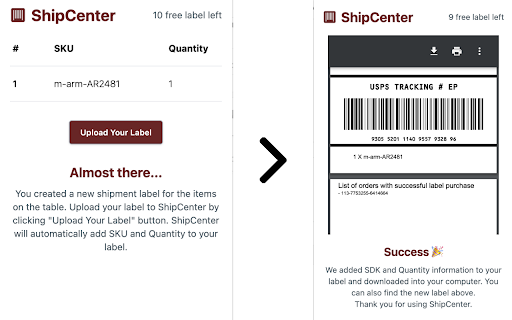
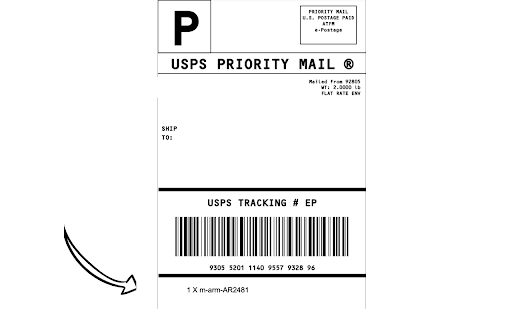
By automating the process of adding SKU and quantity information to your shipping label, you'll save valuable time and eliminate errors.

How it works
Get started with ShipCenter today and simplify your shipping process! Here's how it works:

- Download and enable the ShipCenter extension on Chrome.
- Create a shipment label for your customer in your Amazon Seller Central account.
- Open the ShipCenter extension and confirm that it has accurately detected the items in your shipment.
- Upload your shipment label to ShipCenter. Our system will automatically add the SKU and Quantity information to the label

https://ship-center-web.pages.dev
Technical
- Version
- 0.0.5
- Manifest
- V3
- Size
- 371KiB
- Min Chrome
- 88
- Languages
- 1
- Featured
- No
Metadata
- ID
- kcmjhdaokiedcophgjlhmgchlbppmian
- Developer ID
- ua50fe4afa65ffef2b9c349503172333c
- Developer Email
- [email protected]
- Created
- Mar 10, 2023
- Last Updated (Store)
- Apr 14, 2024
- Last Scraped
- May 22, 2026
- Website
- —
- Support URL
- —
- Privacy Policy
- —
Similar extensions
Alternatives to ShipCenter, ranked by description similarity.

AZ Label Printer
Print Amazon product item labels directly from Seller Central to thermal printers, no more PDF downloads or manual paper-cutting
99
★ 5.0

QuickShip
QuickShip by captainscan.com
15

SellerApp: Supercharge your Amazon Sales
SellerApp’s Chrome extension to Research and compare products on the go for Amazon Sellers
30.0K
★ 4.6

Amazon Review Requester
Automate your amazon review requests with ease.
24
★ 5.0

Wiqes: Amazon Seller Profit Ascends
Amazon Seller Assistant: Offers, Stock Levels, Profit calculator, etc.
1
★ 5.0

SellerBot StockSpy - Free Amazon Inventory Checker
Free, unlimited Amazon stock checker — see real-time inventory counts for every seller on any listing. No signup, no limits
211
★ 5.0

MySellerCentral
Our tool grades listings by category standards, offering data-driven insights for effective improvement.
7
★ 5.0

Sku Grid - eBay Marketplace Repricer & Lister
Sync CSVs between eBay and SkuGrid suite. Upload CSV from SG/SF to eBay to list or to update products. Download reports from eBay.
1.0K
★ 4.3
Data sourced from the Chrome Web Store · last verified May 22, 2026.