
Booking Scraper - Extract Booking Stays, Flights and Car Rentals
Scrape Booking stays , flights and car rentals easily with this Chrome Extension. Export booking data instantly
As of June 2026, Booking Scraper - Extract Booking Stays, Flights and Car Rentals has — users in the Productivity category.
Usersno change0%
—
—
Ratingno change0%
—
— reviews
Reviewsno change0%
—
Version
3.1
Manifest V3
History
1 snapshotsTracking since Jun 6, 2026.
Not enough history yet for this metric — the chart fills in as we collect more snapshots.
View as table
| Date | Users | Rating | Reviews | Version |
|---|---|---|---|---|
| Jun 6, 2026 | — | — | — | 3.1 |
| Now | — | — | — | 3.1 |
Permissions & access
- Permissions
- storageidentityactiveTabscriptingtabswindows
- Host access
- https://www.booking.com/*, https://booking.kayak.com/*, https://*.booking.com/*, https://www.biranaspace.com/, https://www.googleapis.com/*, https://oauth2.googleapis.com/*, https://accounts.google.com/*
Screenshots



About
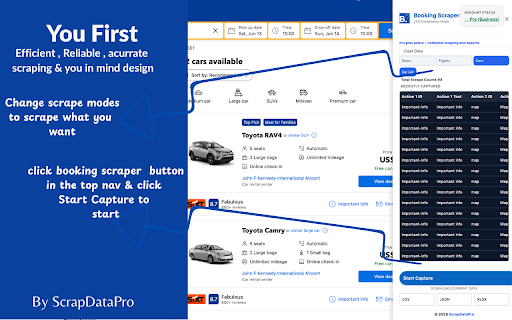
Booking.com Scraper – Export Stays, Flights & Car Rentals to CSV, Excel & JSON Instantly extract travel data from Booking.com and export it into structured datasets. Booking.com Scraper is a powerful Chrome extension designed for travel businesses, researchers, marketers, developers, and data analysts who need fast access to Booking.com data. Extract data from **Hotels & Stays, Flights, and Car Rentals** directly from Booking.com search results and detail pages. Once the page loads, simply start scraping, browse or scroll through results, and export your collected data in seconds. No coding. No complicated setup. 🚀 Key Features ✔ Scrape Booking.com Stays – Extract hotel, apartment, villa, resort, and vacation rental data. ✔ Scrape Flights – Capture airline, route, schedule, and pricing information. ✔ Scrape Car Rentals – Extract vehicle details, rental suppliers, pricing, and policies. ✔ One-Click Data Collection – Start scraping directly from Booking.com pages. ✔ Automatic Data Capture – Data is collected automatically as listings load. ✔ Multiple Export Formats – Export to CSV, Excel (.xlsx), or JSON. ✔ Real-Time Scraping Progress – Monitor collected records while scraping. ✔ Fast & Lightweight – Optimized Chrome extension with minimal resource usage. ✔ Local Processing – Data collection runs directly in your browser. ✔ Search Results & Detail Pages** – Collect both summary and detailed listing information. 🔎 Data You Can Extract 🏨 Stays Collect structured accommodation data including: • Property name • Property URL • Property type • Price and currency • Review score • Review count • Location and address • Amenities • Room information • Photos and image URLs • Check-in / Check-out details • Availability information • Sustainability badges • Property descriptions ✈️ Flights Collect flight data including: • Airline name • Flight number • Departure airport • Arrival airport • Departure time • Arrival time • Flight duration • Number of stops • Baggage information • Ticket price • Booking options 🚗 Car Rentals Collect rental information including: • Vehicle name • Vehicle category • Rental company • Daily rental price • Pick-up location • Drop-off location • Fuel policy • Mileage policy • Transmission type • Vehicle specifications • Supplier ratings Data availability depends on what Booking.com publicly displays. 📊 Export Formats Export your collected travel data instantly: CSV Perfect for Excel, Google Sheets, and reporting. Excel (.xlsx) Ideal for advanced analysis and business workflows. JSON Great for developers, APIs, automation, and integrations. 👨💻 Perfect For Travel Agencies Monitor prices, availability, and travel trends. Researchers Analyze accommodation, flight, and rental market data. Developers Build travel datasets and automate workflows. Data Analysts Create reports, dashboards, and travel intelligence systems. Travel Startups Collect structured travel data for products and services. ⚡ How It Works Option 1 – Scrape Directly from Booking.com 1. Install the extension. 2. Sign in using your Google account. 3. Open Booking.com. 4. Search for hotels, flights, or car rentals. 5. Open the Booking Scraper extension. 6. Click **Start Scraping**. 7. Browse results or scroll down to load additional records. 8. Click **Stop Scraping** when finished. 9. Export your data as CSV, Excel, or JSON. Option 2 – Use the Injected Export Button 1. Open any supported Booking.com page. 2. Click the injected **Export Data** button. 3. The scraper panel opens automatically. 4. Click **Start Capture**. 5. Scroll through results if necessary. 6. Export your collected data. No technical skills required. 🎁 Free vs Pro Free Plan • Access to core scraping features • Limited extractions • Export to CSV, Excel, and JSON • Basic support ### Premium Plan • Unlimited scraping • Unlimited exports • Stays, Flights, and Car Rentals scraping • Faster extraction speeds • Priority support • Automatic updates • Access to premium features 🔥 Bundle Plan – $19.99/month Get access to **20+ premium Chrome extensions** including: • Booking Scraper • Facebook Scrapers • Instagram Scrapers • Google Maps Scrapers • Email Extractors • Lead Generation Tools • Review Scrapers • And many more 🔐 Privacy & Security • No Booking.com login required • No passwords collected • No cookies stored • No private travel information collected • Local browser-based processing • Only publicly available information is extracted Your collected data remains under your control. 📌 Disclaimer This extension extracts publicly available information to assist research, analytics, travel intelligence, and data collection workflows. Booking.com is a trademark of its respective owners. This extension is an independent tool and is not affiliated with, endorsed by, or sponsored by Booking.com. Use this tool responsibly and in accordance with applicable laws, regulations, and website terms.
Technical
- Version
- 3.1
- Manifest
- V3
- Size
- 1.71MiB
- Min Chrome
- 88
- Languages
- 1
- Featured
- No
Metadata
- ID
- kckbelekokbeebddhkcoladbipaenkap
- Developer ID
- u533dcb700ab7ef7763e0ffbb3c9e3a2a
- Developer Email
- [email protected]
- Created
- Jun 5, 2026
- Last Updated (Store)
- Jun 5, 2026
- Last Scraped
- Jun 16, 2026
- Website
- scrapdatapro.com
- Privacy Policy
- https://www.scrapdatapro.com/privacy-policy/
Data sourced from the Chrome Web Store · last verified Jun 16, 2026.