
Sangoma Meet
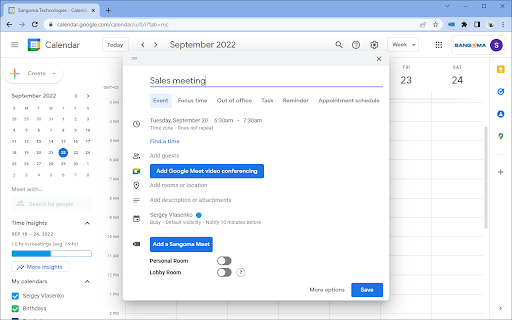
This extension adds Sangoma Meet button to Google Calendar UI to simplify adding Sangoma meeting details into a calendar invite.
As of May 2026, Sangoma Meet has 602 users and a 5.00/5 rating from 1 reviews in the Communication category.
Usersdown 3.5 percent−3.5%
602
602
Ratingno change0%
5.00
1 reviews
Reviewsno change0%
1
Version
5.8.1
Manifest V3
History
2 snapshotsTracking since Apr 25, 2026.
View as table
| Date | Users | Rating | Reviews | Version |
|---|---|---|---|---|
| Apr 25, 2026 | 624 | 5.00 | 1 | 5.8.1 |
| May 22, 2026 | 622 | 5.00 | 1 | 5.8.1 |
| Now | 602 | 5.00 | 1 | 5.8.1 |
Permissions & access
- Permissions
- backgroundnotificationsoffscreenscriptingtabs
- Host access
- https://*.meet.sangoma.com/*, https://calendar.google.com/*
Screenshots

About
Sangoma Meet is a multi-platform video conferencing service, based on WebRTC, which provides the best in video conferencing security and experience, whether on a mobile device or desktop computer. Sangoma Meet enables anyone to start a video conference on any device they want. Collaborate with co-workers on projects, keep in touch with your whole family, share some screen-time with your team or meet their family and pets and feel like you’re there with them.

Extension supports several ways to create a new meeting in Google Calendar and share Sangoma Meet connection info with participants
1. Clicking Sangoma Meet button on Chrome toolbar will open a new Google Calendar event form and will insert Sangoma Meet connection info automatically.
2. While in Google Calendar UI, click a free spot to show a Quick meeting add panel. Use Add a Sangoma Meet button to insert Sangoma Meet connection info.
3. While in Google Calendar event editor, use Add a Sangoma Meet button to insert Sangoma Meet connection info.

Once Sangoma meeting details are inserted, add the meeting title, participants, set the time to meet and send invite. You are now ready to host your video conference. Simple!
Technical
- Version
- 5.8.1
- Manifest
- V3
- Size
- 199KiB
- Min Chrome
- 88
- Languages
- 1
- Featured
- Yes
Metadata
- ID
- kcceflnmljlefienlljlndciijmpcpnf
- Developer ID
- u499fda7c94be32ee5b18e4e09df763c1
- Developer Email
- [email protected]
- Created
- May 21, 2020
- Last Updated (Store)
- Feb 26, 2025
- Last Scraped
- May 22, 2026
- Website
- —
- Support URL
- —
- Privacy Policy
- https://www.sangoma.com/privacy-policy/
Similar extensions
Alternatives to Sangoma Meet, ranked by description similarity.

RingCentral for Google
For organizations powered by Google Chrome, Workspace and ChromeOS, the browser is the primary engine of productivity. However,…
200.0K
★ 3.0

SAM.Coach Meeting Recorder
Records online and in-person meetings, generates enterprise grade summaries, and provides insights without an in-meeting bot.
55
★ 5.0

Ascend Chrome Extension
Ascend Chrome Extension
361
★ 5.0

go/meet - Instant Google Meet
Type 'go/meet' in the address bar to instantly create and join a Google Meet with link copied to clipboard
9

SoWork Meetings
Integrate your SoWork virtual office with Google Calendar or Outlook Calendar
930

RocketMeet - Google Meets from RocketChat
Allows users to easily generate GMeet links from RocketChat and send encrypted messages.
85
★ 5.0

Google Meet Recorder
Automatically record Google Meet sessions and save to Google Drive
27

Ruume Virtual Meetings
🗓️ schedule video meetings on Ruume from Google Calendar. Ruume removes screen fatigue ❤️ embeds payments 💳 and links! 🔗
17
★ 5.0
Data sourced from the Chrome Web Store · last verified May 22, 2026.