Highlights AI: Simplify reading with ChatGPT
Ask questions and gain insights from a page with contextually relevant AI anwsers.
As of May 2026, Highlights AI: Simplify reading with ChatGPT has 166 users and a 5.00/5 rating from 2 reviews in the Workflow & Planning category.
Usersup 11.4 percent+11.4%
166
166
Ratingno change0%
5.00
2 reviews
Reviewsno change0%
2
Version
0.6.0
Manifest V3
History
2 snapshotsTracking since Apr 25, 2026.
View as table
| Date | Users | Rating | Reviews | Version |
|---|---|---|---|---|
| Apr 25, 2026 | 149 | 5.00 | 2 | 0.6.0 |
| May 22, 2026 | 174 | 5.00 | 2 | 0.6.0 |
| Now | 166 | 5.00 | 2 | 0.6.0 |
Permissions & access
- Permissions
- tabsactiveTabstorage
- Host access
- None declared
Screenshots


About
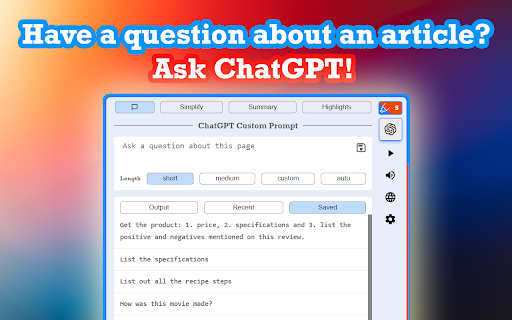
Introducing Highlights AI - the perfect tool for quickly grasping and extracting information from any webpage! You can easily listen to summaries, find key highlights, and ask questions about the current page you’re on using ChatGPT.

Features:

◼ Custom Prompts:

Obtain contextually relevant answers to all your questions by using ChatGPT on any website. Write custom prompts and ask questions that come to mind while browsing any article/page. Easily access your most recently used prompts and save your favorite ones for future reference.

◼ Summaries:

Effortlessly grasp the key points and main ideas of any page with the click of a button. Let ChatGPT generate concise summaries that provide a quick overview of the content, saving you valuable reading time.

◼ Highlights:

Instantly identify the most important sections and noteworthy information on any page. Utilize ChatGPT to generate highlights that pinpoint key insights, enabling you to focus on the interesting aspects of the content at a glance.

◼ Text-To-Speech:
Listen to all the text output generated by ChatGPT with natural-sounding speech. Choose from multiple voice options, adjust the speed to your preference, and mute the volume when desired.

◼ Action Buttons & Keyboard Shortcuts:

Boost your productivity with just one click or by using convenient keyboard shortcuts to generate summaries and highlights. Experience the full power of a personal AI assistant dedicated to supercharging your efficiency.

Try Highlights AI to see how it can help you save time understanding a page!
Technical
- Version
- 0.6.0
- Manifest
- V3
- Size
- 718KiB
- Min Chrome
- 88
- Languages
- 1
- Featured
- Yes
Metadata
- ID
- kbihopcfiikdglbglliomopclpgdedoh
- Developer ID
- uf843ba2bb625d06ef14fe0f85c79af4d
- Developer Email
- [email protected]
- Created
- Apr 28, 2023
- Last Updated (Store)
- Jun 13, 2023
- Last Scraped
- May 22, 2026
- Website
- highlights.page
- Support URL
- —
- Privacy Policy
- https://highlights.page/privacy
Similar extensions
Alternatives to Highlights AI: Simplify reading with ChatGPT, ranked by description similarity.

Google to ChatGPT
Send any webpage url to ChatGPT for instant summaries, analysis, and more – in one click.
12
★ 5.0

Ingest2AI
Seamlessly send and save web content to ChatGPT with one click
5

AI SideChat: Send Text & Images with Prompts
Boost productivity: open ChatGPT, Gemini, DeepSeek & more in a side panel. Send text & images instantly with pre-defined prompts.
3

Gepiti: ChatGPT Sidebar, Screenshot, Voice AI
All-in-one ChatGPT extension. Sidepanel chat, text summarizer, screenshot editor, voice input, translate. Works on all sites.
1

ChatGPT Focus: AI Summarizer, Auto-Highlighter & Speed Reader
AI highlights to focus, skim, or skip. Read ChatGPT replies 5x faster without info overload.
39
★ 4.7

Prompt Easy
Your Live AI Prompt Assistant Get Outstanding Results Every time.
339
★ 4.0
ChatGPT Prompts
Use ChatGPT Prompts along with web page's context.
51
★ 1.0

AI Page & Youtube Summaries using ChatGPT
AI summaries for Youtube videos, webpages and articles. Uses ChatGPT. Supports text-to-speech.
7
Data sourced from the Chrome Web Store · last verified May 22, 2026.