
GAS Folder Upload
Batch upload Apps Script files from a local folder in the editor
As of June 2026, GAS Folder Upload has 4 users in the Developer Tools category.
Usersno change0%
4
4
Ratingno change0%
—
— reviews
Reviewsno change0%
—
Version
1.2.0
Manifest V3
History
6 snapshotsTracking since May 5, 2026.
View as table
| Date | Users | Rating | Reviews | Version |
|---|---|---|---|---|
| May 5, 2026 | — | — | — | 1.2.0 |
| May 10, 2026 | — | — | — | 1.2.0 |
| May 16, 2026 | 1 | — | — | 1.2.0 |
| May 22, 2026 | 2 | — | — | 1.2.0 |
| May 28, 2026 | 4 | — | — | 1.2.0 |
| Jun 4, 2026 | 2 | — | — | 1.2.0 |
| Now | 4 | — | — | 1.2.0 |
Permissions & access
- Permissions
- identity
- Host access
- https://script.googleapis.com/*
Screenshots

About
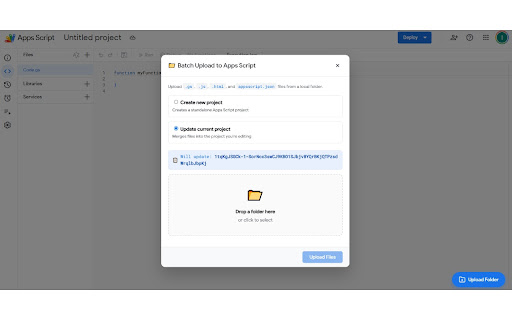
1. Go to script.google.com
2. Enable 'Google Apps Script API' in script.google.com/home/usersettings
3. Click the 📂 Upload Folder button (bottom-right corner)
4. Choose Create new or Update current project
5. Drop a folder or click to browse
6. Click Upload Files
Technical
- Version
- 1.2.0
- Manifest
- V3
- Size
- 25.17KiB
- Min Chrome
- 88
- Languages
- 1
- Featured
- No
Metadata
- ID
- kbidcikhammemlhcilkobckjapgipicl
- Developer ID
- u384bca2f5955f085c57f30ac61dca345
- Developer Email
- [email protected]
- Created
- May 4, 2026
- Last Updated (Store)
- May 4, 2026
- Last Scraped
- Jun 10, 2026
- Website
- —
- Support URL
- —
- Privacy Policy
- —
Data sourced from the Chrome Web Store · last verified Jun 10, 2026.