
SEO Pilot
SEO Pilot helps you in your daily SEO tasks such as On-Page SEO analysis, Link Checking, Tags and Assets Preview and more
As of June 2026, SEO Pilot has 4,000 users and a 4.86/5 rating from 118 reviews in the Productivity category.
Usersno change0%
4.0K
4,000
Ratingdown 0.8 percent−0.8%
4.86
118 reviews
Reviewsup 2.6 percent+2.6%
118
Version
1.0.46 Bug Fix Release
Manifest V3
90-day change · In the last 90 days this extension 1 version update.
History
5 snapshotsTracking since Apr 1, 2026.
View as table
| Date | Users | Rating | Reviews | Version |
|---|---|---|---|---|
| Apr 1, 2026 | 4.0K | 4.90 | 115 | 1.0.45 Updated Public Release |
| Apr 21, 2026 | 4.0K | 4.90 | 116 | 1.0.45 Updated Public Release |
| May 6, 2026 | 4.0K | 4.90 | 116 | 1.0.45 Updated Public Release |
| Jun 1, 2026 | 4.0K | 4.89 | 117 | 1.0.45 Updated Public Release |
| Jun 19, 2026 | 4.0K | 4.89 | 117 | 1.0.46 Bug Fix Release |
| Now | 4.0K | 4.86 | 118 | 1.0.46 Bug Fix Release |
Permissions & access
- Permissions
- activeTabtabsstorage
- Host access
- None declared
Screenshots


About
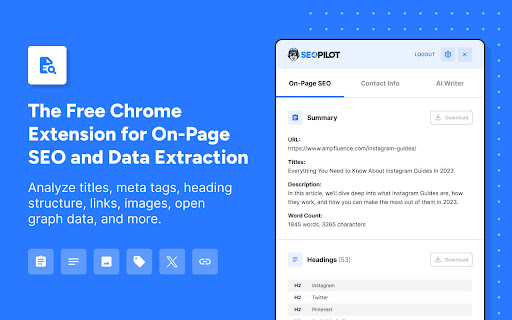
Made by marketers, SEO Pilot is an SEO Tool geared at helping you optimize your content for SEO and quickly generate new content at scale.  SEO Pilot provides accurate SEO metrics and metadata right where you need it. It allows you to check on-page meta-data and display the primary SEO metadata for any website page for the best SEO.

Analyze On-Page SEO
1. Page Metadata - Retrieve the main Meta Tags and metadata for any webpage including Meta Tags, Canonical URL, and more to help you spot and resolve any SEO Issues.
2. Find Broken Links - Check all Broken Links on a page and categorize them based on HTTP Status Code.
3. Analyze Every Link (Internal & External) - Improve the search visibility and rank of your website by assessing your internal & external links, enabling you to improve the quality of your links.
4. Extract Heading Structure - Clear and concise headings are important for SEO. They help users navigate the content and find what’s relevant to them.
5. Retrieve Image Data - Get key SEO information about your images such as the alt text, image size (to ensure image has been compressed), and more.
6. Social SEO tags - Verify OpenGraph and Twitter Card metadata so your content appears the way you want it on social.

Contact Information Extractor
1. Email Addresses - Extract all emails found on the page and export them to CSV. Build lists and use them for outreach campaigns or to suggest partnerships.
2. Social Profile URLs - Understand a site’s social presence by extracting 15+ social URLs.
3. Phone Numbers - Automatically scan the page for phone numbers and export them so you can reach out to site owners. Ring ring.

SEO Article Writer / AI Writer (Paid Feature)
1. Overview - Our AI Writer enables you to take an existing page as inspiration to generate a new article.  Want to take an existing top-ranking page and create something similar or want to re-write some of your existing pages?  No problem, our AI Writer does exactly that.  Sign up for a paid plan on SEOPilot.io to access this feature!

2. AI Writing Process - creating an article is a simple three step process:
a) Extract Headings - Retrieve headings from an existing webpage inside your current browser tab.
b) Refine Your Article Outline - Customize the headers (H1-H6) to suit your needs. Remove, re-write, or add your own new headings.
c) Generate the Article - Our AI Writer will then craft an SEO-optimized article based on your input. You can then export and publish your article on your website or wherever you need.

SEO Pilot replaces all the popular SEO tools (paid or non-paid) in the Chrome store.

People Also Ask Section (PAA) on google search page
a) After enabling PAA feature from the SEO Pilot Extension settings, a section will appear at the right side of the google search page. That section shows People Also Ask questions as a list.
b) You can change the extraction level (from level 1 to level 5) to get more People Also Ask questions.
c) You can download the data as CSV. The data points are PAA, Description and URL.

Search Results on google search page
a) Below the PAA section, there's another section named Search Results.
b) You can download the Organic Search Results as CSV. The data points are TITLE, Description and URL.

Permissions explained:
Allow this extension to read and change all your data on websites you visit - This is necessary to retrieve all of the necessary HTML and SEO metadata from any page in which you open the extension.
Technical
- Version
- 1.0.46 Bug Fix Release
- Manifest
- V3
- Size
- 567KiB
- Min Chrome
- 88
- Languages
- 1
- Featured
- Yes
Metadata
- ID
- kbhghidlilegihmipoohlboebekiigli
- Developer ID
- u37bded4b79f2947bc1d45542cb66f9cd
- Developer Email
- [email protected]
- Created
- Jul 30, 2023
- Last Updated (Store)
- May 20, 2026
- Last Scraped
- Jun 19, 2026
- Website
- seopilot.io
- Support URL
- https://seopilot.io/contact/
- Privacy Policy
- https://seopilot.io/privacy-policy/
Similar extensions
Alternatives to SEO Pilot, ranked by description similarity.

SEO Helper
Analyze SEO elements of any webpage including meta tags, Open Graph, Twitter Cards, and check indexation status in search engines.
8

AEO Analyzer: AI Website Optimizer
Professional AEO and SEO analysis tool for optimizing web content
151
★ 3.7

SEO SERP Extraction Tool
The SEO SERP Extraction Tool is a powerful and easy-to-use extension to quickly extract URL in search results.
2.0K
★ 5.0

SEO & AI Search Auditor by AIO
SEO audit for AI search. Meta tags, schema, passages, entities, crawler access, render diff, Core Web Vitals, brand compliance.
35
★ 5.0

SEO & GEO Analyzer by Vecdoor
Optimize pages for search engines & AI. Analyze keywords, headlines, schema & content for SEO & GEO.
182
★ 5.0

AEO/GEO Audit Tool - AI readiness check
Quick AI readiness audit for any webpage. Check if your page is optimized for AI platforms like ChatGPT, Claude, and Perplexity.
411
★ 3.0

GrowMatic On-Page SEO Optimizer & SERP Keywords Scraper
Scrape keywords and n-grams from SERPs and optimize pages for SEO
593
★ 4.9

Onpage.ai - SEO & Content Management Tool
Onpage.ai is the ultimate web assistant for SEO analysis and content management, enhance productivity and streamline your research.
364
★ 2.3
Data sourced from the Chrome Web Store · last verified Jun 19, 2026.