ChatGPT Sidebar by cloudHQ
ChatGPT sidebar as your AI assistant on any page
As of June 2026, ChatGPT Sidebar by cloudHQ has 5,000 users and a 4.47/5 rating from 34 reviews in the Productivity category.
Usersno change0%
5.0K
5,000
Ratingno change0%
4.47
34 reviews
Reviewsno change0%
34
Version
2.0.2.39
Manifest V3
History
1 snapshotsTracking since Apr 18, 2026.
View as table
| Date | Users | Rating | Reviews | Version |
|---|---|---|---|---|
| Apr 18, 2026 | 5.0K | 4.47 | 34 | 2.0.2.39 |
| Now | 5.0K | 4.47 | 34 | 2.0.2.39 |
Permissions & access
- Permissions
- scriptingstoragebackgroundtabscontextMenusclipboardWrite
- Host access
- https://mail.google.com/, https://mail-attachment.googleusercontent.com/, https://inbox.google.com/, https://www.cloudhq.net/, https://*.openai.com/, https://*.chatgpt.com/, https://chatgpt.com/
Screenshots

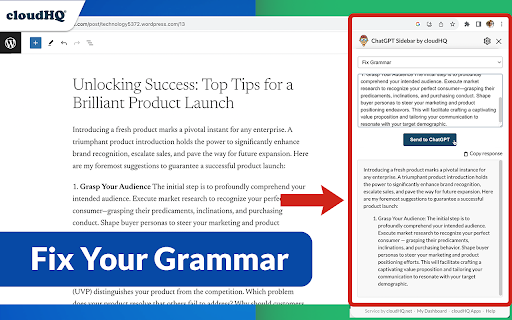
About
Welcome to the ChatGPT Sidebar by cloudHQ, an AI assistant that emerges from the side of any webpage you browse.

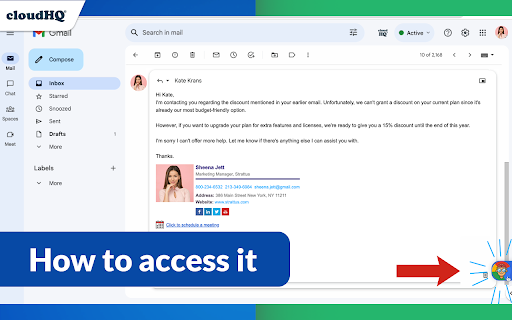
As you navigate different webpages, your email inbox, or any online document, ChatGPT Sidebar can be accessed with just a click of a button.  The information you get with this handy sidebar provides you with straightforward knowledge about whatever it is that you're browsing.

Whether you're deciphering a dense article, exploring new topics, or just casually browsing, our ChatGPT Sidebar is designed to enrich your understanding, streamline information, and answer any queries you might have—immediately.

How to use ChatGPT Sidebar?
1. Go to any website
2. Select the text
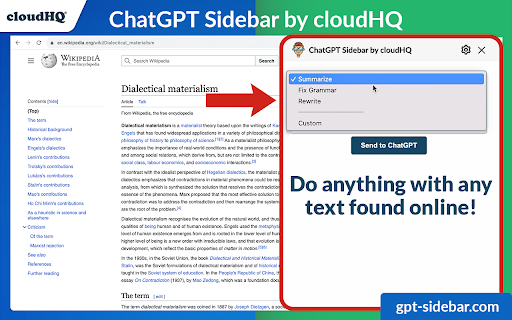
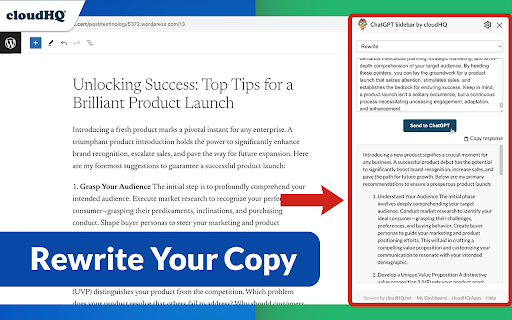
3. Click on ChatGPT Sidebar icon on the right side of your screen, select the prompt and click on "Send to ChatGPT".

~~~~ 3 Benefits of ChatGPT Sidebar by cloudHQ ~~~~

1. Use ChatGPT prompts across websites for tasks like:
✔️ Summarize
✔️ Rewrite
✔️ Check Grammar
✔️ Translate
✔️ Clarify code
✔️ Summarize the web page
✔️ Your own prompts

2. Access our ready-to-use prompt library, where you can further customize any prompts for your own needs.

3. Full support for both ChatGPT-4 and ChatGPT-3.5

4. Full support for Open AI API

5. Full prompt management

Refine your web experience with ChatGPT, and become smarter in 1 click! 🌟

cloudHQ website: https://www.cloudhq.net/
App website: https://www.gpt-sidebar.com
Pricing: https://www.gpt-sidebar.com/pricing
Support page: https://support.cloudhq.net/category/browser-extensions/chatgpt-sidebar/
FAQ page: https://support.cloudhq.net/chatgpt-sidebar-faq-frequently-asked-questions/
Blog: https://blog.cloudhq.net

cloudHQ is trademark of cloudHQ LLC. https://www.cloudhq.net/trademark
Technical
- Version
- 2.0.2.39
- Manifest
- V3
- Size
- 1.96MiB
- Min Chrome
- 88
- Languages
- 11
- Featured
- Yes
Metadata
- ID
- kapoabaoamgiilmlanmfejgfomlnccph
- Developer ID
- u81f3c56dc2f94f2a56d81700433a9954
- Developer Email
- [email protected]
- Created
- Aug 22, 2023
- Last Updated (Store)
- Nov 29, 2025
- Last Scraped
- Jun 3, 2026
- Website
- https://www.gpt-sidebar.com/
- Privacy Policy
- https://www.cloudhq.net/privacy
Similar extensions
Alternatives to ChatGPT Sidebar by cloudHQ, ranked by description similarity.

My ChatGPT Sidebar
Easily access ChatGPT from your browser's sidebar.
528

ChatGPT AI Sidebar
Access ChatGPT in your browser sidebar for quick and convenient assistance
3

Simple ChatGPT Sidebar
Quick access to ChatGPT in a sidebar. Select text and ask ChatGPT about it, or reference entire pages with customizable prompts.
37

AI Sidebar
Open ChatGPT, Claude, Gemini, Grok, Copilot & More in Sidebar
10.0K
★ 3.9

ChatGPT Question Sidebar
Display all your ChatGPT questions in a convenient sidebar. Click any question to smoothly scroll to it.
13
★ 5.0
ChatsNow: ChatGPT AI Sidebar (o1-preview, GPT-4o, Claude 3, Gemini)
ChatsNow is an AI tool uses GPT-4o, GPT - 5.4, o1-preview, Claude3, Gemini to provide services, e.g. AI search, read, PDF and write
10.0K
★ 4.8

Smart Page Analyzer
Analyze web pages using AI to extract insights, summaries, and structured data
5

WebChatGPT: Prompt library with web access
Augment your ChatGPT prompts with relevant web search results through web browsing.
1.0M
★ 4.3
Data sourced from the Chrome Web Store · last verified Jun 3, 2026.