
Zenito
Block distracting sites and stay focused. Set your blocklist, schedule, and temporary unblocks.
As of June 2026, Zenito has — users in the Productivity category.
Usersno change0%
—
—
Ratingno change0%
—
— reviews
Reviewsno change0%
—
Version
1.0.1
Manifest V3
90-day change · In the last 90 days this extension 1 version update, changed permissions.
History
5 snapshotsTracking since Apr 14, 2026.
View as table
| Date | Users | Rating | Reviews | Version |
|---|---|---|---|---|
| Apr 14, 2026 | 1 | — | — | 1.0.0 |
| Apr 21, 2026 | 1 | — | — | 1.0.0 |
| May 11, 2026 | — | — | — | — |
| May 17, 2026 | — | — | — | 1.0.1 |
| Jun 13, 2026 | 1 | — | — | 1.0.1 |
| Now | — | — | — | 1.0.1 |
Changelog
- May 11, 2026permissions
(empty)
storage, webNavigation, alarms, tabs
- May 11, 2026name
Unknown
Zenito
- May 11, 2026category
(empty)
productivity/tools
- May 11, 2026host_permissions
(empty)
<all_urls>
- May 11, 2026description
(empty)
Zenito helps you stay focused by blocking access to websites you choose.

• Block by domain, by keyword in the URL, or by category (e.g. social media, news). Add as many sites as you like.
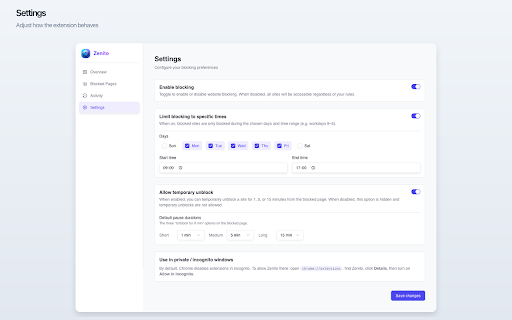
• Set active hours so blocking applies only when you need it (e.g. workdays 9–5).
• Temporarily unblock a site for 1, 5, 15, 30, or 60 minutes when you need quick access.
• Manage everything from the Zenito dashboard: enable/disable blocking, edit your list, and adjust schedule and pause durations.
• No account required to use core features.

Install Zenito, add the sites you want to limit, and take back control of your time.
- May 11, 2026short_description
(empty)
Block distracting sites and stay focused. Set your blocklist, schedule, and temporary unblocks.
- Apr 21, 2026description
Zenito helps you stay focused by blocking access to websites you choose.

• Block by domain, by keyword in the URL, or by category (e.g. social media, news). Add as many sites as you like.
• Set active hours so blocking applies only when you need it (e.g. workdays 9–5).
• Temporarily unblock a site for 1, 5, 15, 30, or 60 minutes when you need quick access.
• Manage everything from the Zenito dashboard: enable/disable blocking, edit your list, and adjust schedule and pause durations.
• No account required to use core features.

Install Zenito, add the sites you want to limit, and take back control of your time.
(empty)
- Apr 21, 2026short_description
Block distracting sites and stay focused. Set your blocklist, schedule, and temporary unblocks.
(empty)
- Apr 21, 2026name
Zenito
Unknown
- Apr 21, 2026category
productivity/tools
(empty)
- Apr 21, 2026host_permissions
<all_urls>
(empty)
- Apr 21, 2026permissions
storage, webNavigation, alarms, tabs
(empty)
Permissions & access
- Permissions
- storagewebNavigationalarmstabs
- Host access
- <all_urls>
Screenshots


About
Zenito helps you stay focused by blocking access to websites you choose.

• Block by domain, by keyword in the URL, or by category (e.g. social media, news). Add as many sites as you like.
• Set active hours so blocking applies only when you need it (e.g. workdays 9–5).
• Temporarily unblock a site for 1, 5, 15, 30, or 60 minutes when you need quick access.
• Manage everything from the Zenito dashboard: enable/disable blocking, edit your list, and adjust schedule and pause durations.
• No account required to use core features.

Install Zenito, add the sites you want to limit, and take back control of your time.
Technical
- Version
- 1.0.1
- Manifest
- V3
- Size
- 87.81KiB
- Min Chrome
- 88
- Languages
- 1
- Featured
- No
Metadata
- ID
- kalegnddoeanomjpcahibjhkihceecfd
- Developer ID
- u2b1f83ada035f59c05bc7fe5f1ca1add
- Developer Email
- [email protected]
- Created
- Apr 13, 2026
- Last Updated (Store)
- Apr 28, 2026
- Last Scraped
- Jun 13, 2026
- Website
- —
- Support URL
- —
- Privacy Policy
- https://zenito.web.app/privacy
Data sourced from the Chrome Web Store · last verified Jun 13, 2026.