
HelloSign: Online signatures made easy
HelloSign is the easiest way to sign documents online.
As of May 2026, HelloSign: Online signatures made easy has 90,000 users and a 3.99/5 rating from 385 reviews.
Usersdown 10.0 percent−10.0%
90.0K
90,000
Ratingno change0%
3.99
385 reviews
Reviewsdown 0.3 percent−0.3%
385
Version
1.22
Manifest V2
90-day change · In the last 90 days this extension lost 10.0K users.
History
2 snapshotsTracking since Apr 25, 2026.
View as table
| Date | Users | Rating | Reviews | Version |
|---|---|---|---|---|
| Apr 25, 2026 | 100.0K | 3.99 | 386 | 1.22 |
| May 22, 2026 | 90.0K | 3.99 | 386 | 1.22 |
| Now | 90.0K | 3.99 | 385 | 1.22 |
Permissions & access
- Permissions
- None declared
- Host access
- None declared
Screenshots

About
Need to get a document signed? HelloSign makes it easy to request signatures as well. Your first three documents are free every month.


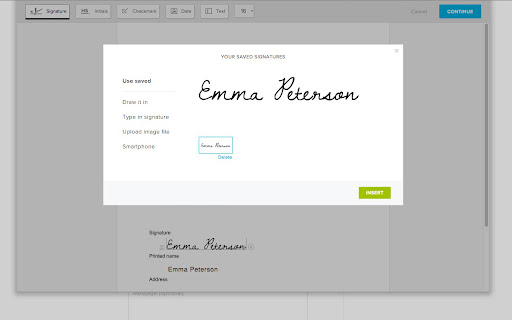
HelloSign takes paper out of the equation. You'll never need to print, sign and scan documents again! Simply open your file, add a signature (or text, date, checkmark, etc.) and let HelloSign do the rest. It’s legally binding and takes less than a minute.


Integrate Google Drive & HelloSign and you’ll be on your way to a paperless office. HelloSign has three primary features:

1) Sign and send documents

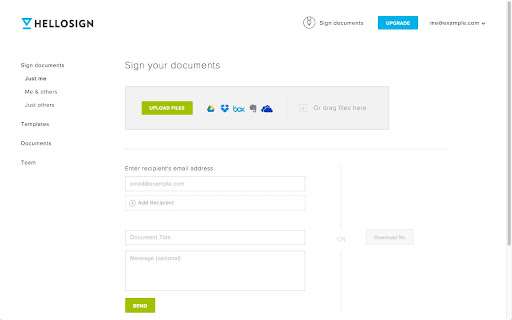
Choose any file in Google Drive and add your signature (or text, date, checkmark, etc.)  It’s that simple. You can sign and send any type of document (PDF, Word, Excel, etc.).

2) Request signatures

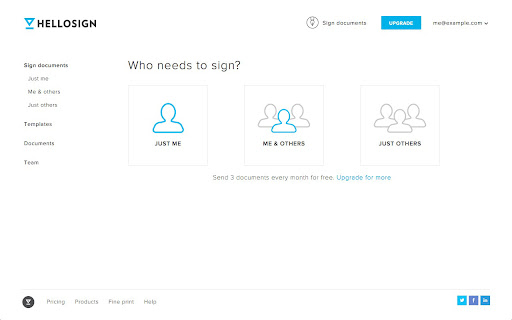
Need a vendor to sign an invoice? Need a new employee to complete a 1099? Simply upload the document they need to sign, assign the signature field and send off your request.

3) Reusable documents

Reusable documents makes it easy to setup your most commonly signed documents. Create a template for easy completion and even create a unique, reusable link that can be hosted on your site or sent via email.


Why download the HelloSign app?

By downloading the HelloSign App, you can have the functionality of HelloSign with any file in your Google Drive folder.

After integrating with HelloSign, you’ll get a HelloSign folder in your Google Drive account.  This folder will be automatically populated with your signed documents and signature requests.


In addition to Google Drive, HelloSign is also integrated with Dropbox, Box and Evernote.
Technical
- Version
- 1.22
- Manifest
- V2
- Size
- 14.5KiB
- Min Chrome
- —
- Languages
- 19
- Featured
- No
Metadata
- ID
- kajjckmbclbffbpecfbiecehkfgopppd
- Developer ID
- u02129ebdc894f89973781a9f40c42b8a
- Developer Email
- —
- Created
- Sep 27, 2012
- Last Updated (Store)
- Apr 4, 2018
- Last Scraped
- May 22, 2026
- Website
- https://www.hellosign.com/
- Support URL
- http://faq.hellosign.com/
- Privacy Policy
- —
Similar extensions
Alternatives to HelloSign: Online signatures made easy, ranked by description similarity.

SignRequest
Sign yourself or get documents signed right from Google Docs. Easy, secure, legally binding and free.
—
★ 4.4

Secured Signing - Secure Digital Signature
Securely Send Your Documents For Digital Signing From Within Google Docs + Google Drive. 3 Documents/Month Free!
30
★ 5.0

HelloFax
HelloFax makes it easy to sign documents and send faxes online. You'll never need to print, sign and fax documents again!
200.0K
★ 4.0

CoSign Digital Signatures
The Secure Way to Sign on the Go - easily add digital signatures to your PDF, Word and Excel documents.
1.0K
★ 3.2
Docusign eSignature for Chrome
Access Docusign eSignature anytime you’re in Chrome.
300.0K
★ 4.3

Legally Binding Electronic Signatures
Super simple signatures
Upload a document now — get it legally signed blazing fast
Are you struggling to sign
documents…
22

PDF Editor for Docs:Edit, Fill, Sign, Print
Easily edit, annotate, eSign and transform any PDF from Google Drive into a fillable PDF form.
700.0K
★ 1.7

PDF Sign
Boost productivity with PDF Sign editor: Easily sign documents online and fill forms. Streamline workflow with a pdf signer tool.
651
★ 5.0
Data sourced from the Chrome Web Store · last verified May 22, 2026.