Continue Reading
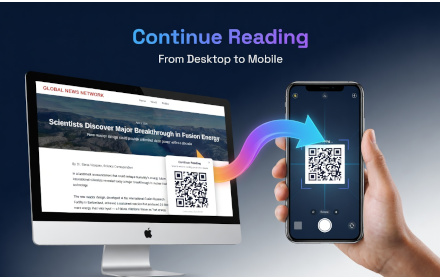
Scan a QR code to continue reading this page on another device, right where you left off.
As of June 2026, Continue Reading has — users in the Productivity category.
Usersno change0%
—
—
Ratingno change0%
—
— reviews
Reviewsno change0%
—
Version
1.1.0
Manifest V3
History
4 snapshotsTracking since Apr 5, 2026.
View as table
| Date | Users | Rating | Reviews | Version |
|---|---|---|---|---|
| Apr 5, 2026 | — | — | — | 1.1.0 |
| Apr 18, 2026 | — | — | — | 1.1.0 |
| Apr 23, 2026 | 1 | — | — | 1.1.0 |
| May 7, 2026 | 2 | — | — | 1.1.0 |
| Now | — | — | — | 1.1.0 |
Permissions & access
- Permissions
- activeTabscripting
- Host access
- https://continueread.live/*
Screenshots

About
Continue Reading is a reading app that lets you instantly move any webpage or article from your computer to your smartphone with a simple QR code scan—no accounts, no logins, and no manual copying.

How It Works

Step 1: While reading an article on your computer, click the Continue Reading browser extension or button. A small pop-up appears, displaying a unique QR code linked to the exact page you’re viewing.

Step 2: Open your phone’s camera and scan the QR code shown on your screen.

As soon as the code is scanned, the same article opens automatically in your mobile browser, allowing you to continue reading comfortably on your phone.
Technical
- Version
- 1.1.0
- Manifest
- V3
- Size
- 71.12KiB
- Min Chrome
- 88
- Languages
- 1
- Featured
- No
Metadata
- ID
- jpofebpjojheclilmloobkpjabbhbifg
- Developer ID
- ua54055d06e3f063bff021d3e25109d01
- Developer Email
- [email protected]
- Created
- Apr 5, 2026
- Last Updated (Store)
- Apr 5, 2026
- Last Scraped
- Jun 15, 2026
- Website
- —
- Support URL
- —
- Privacy Policy
- https://continueread.live/privacy.html
Data sourced from the Chrome Web Store · last verified Jun 15, 2026.