
Bullet Points: summarize Web pages with GPT-3
Extract three key points from every Web page to quickly understand its contents. Reduce the time needed to read news and articles.
As of June 2026, Bullet Points: summarize Web pages with GPT-3 has 324 users and a 1.50/5 rating from 2 reviews in the Workflow & Planning category.
Usersdown 3.6 percent−3.6%
324
324
Ratingno change0%
1.50
2 reviews
Reviewsno change0%
2
Version
0.9.4
Manifest V3
History
3 snapshotsTracking since Apr 23, 2026.
View as table
| Date | Users | Rating | Reviews | Version |
|---|---|---|---|---|
| Apr 23, 2026 | 336 | 1.50 | 2 | 0.9.4 |
| May 12, 2026 | 347 | 1.50 | 2 | 0.9.4 |
| Jun 7, 2026 | 345 | 1.50 | 2 | 0.9.4 |
| Now | 324 | 1.50 | 2 | 0.9.4 |
Permissions & access
- Permissions
- activeTabidentityidentity.emailstoragecontextMenus
- Host access
- https://*/*, http://*/*
Screenshots

About
Bullet Points is a browser extension that allows you to quickly summarize any Web page you are browsing into three bullet points. With Bullet Points, you no longer have to read long articles or news pieces. Instead, the extension will extract the three main points from the text and provide them in an easy-to-read format, allowing you to quickly gain an understanding of the overall content without having to read through it in its entirety.

Bullet Point uses a powerful GPT-3 artificial intelligence model to scan each page, extracting the most relevant information and condensing it into these three points. The result is a concise summary of what’s on the page that can be consumed quickly and easily. This makes it especially useful for busy professionals who need to stay up-to-date with their industry but don't have time to read every article they come across.

It also works great as a research tool for students who need quick summaries of articles or other texts for their studies. By using Bullet Points, they can get an overview of what's contained within each page without having to spend time reading through all of it. This can save them valuable time when doing research projects or studying for exams.

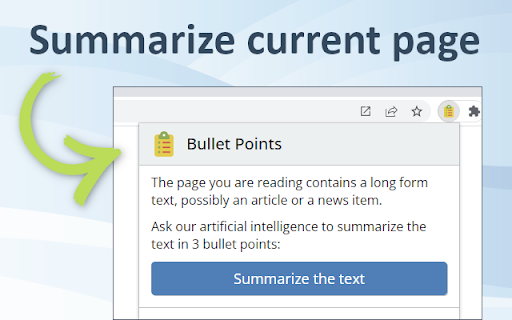
Using this extension couldn't be easier - just install it onto your browser browser and click the Bullet Points icon when you're on a page that you want to summarize. It will then do its magic, automating the summarization process so that you get three bullet points in seconds.

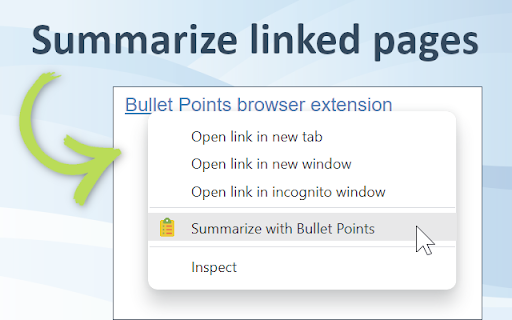
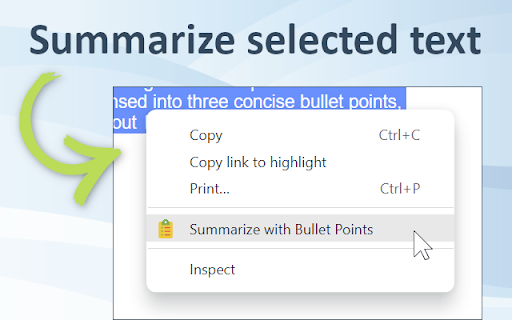
You can also summarize any linked page by right-clicking on the link and choosing the "Summarize" option. After reading the page summary you can decide whether you want to follow the link to read the full page. Finally, you can also select any amount of text on the page and let the extension summarize just the text you've selected.

Bullet Points can also be a great help for those who have trouble understanding long texts due to language barriers or reading difficulties. The extension simplifies complex information into an easy-to-understand format, allowing anyone to quickly understand what’s being presented on the page without having to read through it all themselves.

In addition to this, Bullet Points also makes it easier for people who are short on time but still want to stay up-to-date with their industry by providing them with quick summaries of articles or news pieces. By having longer texts condensed into three concise bullet points, they can gain an understanding of the content without having to read through it all in detail.

Overall, Bullet Points is an excellent browser extension for anyone who wants a quick summary of any Web page. It’s very easy to use and requires no manual input, making it a great choice for busy professionals, students, or those with language barriers or reading difficulties. With just one click, Bullet Points will provide you with three concise bullet points that summarize the content of any page.
Technical
- Version
- 0.9.4
- Manifest
- V3
- Size
- 393KiB
- Min Chrome
- 92
- Languages
- 1
- Featured
- Yes
Metadata
- ID
- jplmenmeefpebcnpbefgefkednemdenl
- Developer ID
- uc87a0f77e84c5cc5d7f677b474923bf2
- Developer Email
- [email protected]
- Created
- Dec 17, 2022
- Last Updated (Store)
- Jan 20, 2023
- Last Scraped
- Jun 7, 2026
- Website
- —
- Support URL
- —
- Privacy Policy
- https://www.fullpicture.app/privacy
Similar extensions
Alternatives to Bullet Points: summarize Web pages with GPT-3, ranked by description similarity.

GPT Summarizer
Summarize a text selection with Chat-GPT
12

SimpliSum
A summarizing tool
—

Summary Panda
🐼 Instantly transform web content into summaries and social media posts using AI
6

QuickAI Summary For Articles
AI-driven tool that creates concise summaries of online articles.
3
★ 5.0
ShortMe
ShortMe Chrome Extension
124
★ 4.6

TLDR This - Free automatic text summary tool
Automatically summarize any article, text, document, webpage or essay in a click.
60.0K
★ 3.7

Page summary
Summarizes page content using ChatGPT
144
★ 1.7

Sumup Extension
Easily summarize any text with Sumup!
8
Data sourced from the Chrome Web Store · last verified Jun 7, 2026.