
BeePainter
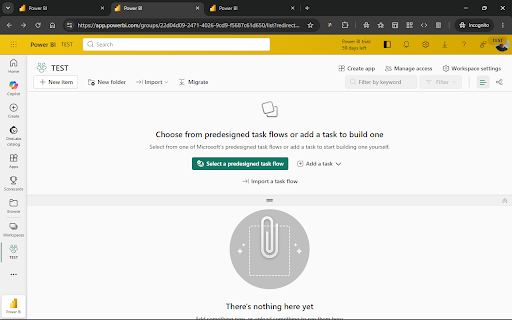
Colors the top bar of Microsoft Fabric & Power BI individually per workspace, so you always know which environment you're in.
As of July 2026, BeePainter has — users in the Productivity category.
Usersno change0%
—
—
Ratingno change0%
—
— reviews
Reviewsno change0%
—
Version
0.1.0
Manifest V3
History
1 snapshotsTracking since Jul 11, 2026.
Not enough history yet for this metric — the chart fills in as we collect more snapshots.
View as table
| Date | Users | Rating | Reviews | Version |
|---|---|---|---|---|
| Jul 11, 2026 | — | — | — | 0.1.0 |
| Now | — | — | — | 0.1.0 |
Permissions & access
- Permissions
- storage
- Host access
- https://app.powerbi.com/*, https://app.fabric.microsoft.com/*
Screenshots



About
Ever deployed to PROD when you thought you were on DEV? BeePainter gives every Microsoft Fabric / Power BI workspace its own color and label in the top bar, so you can tell at a glance which environment you're working in.

• Assign a custom color and label (e.g. PROD, TEST, DEV) to each workspace
• Workspace is detected automatically from the URL
• 8 color presets plus a free color picker
• Works on app.powerbi.com and app.fabric.microsoft.com
• No accounts, no tracking, no data collection. Settings are stored locally in your browser.
Technical
- Version
- 0.1.0
- Manifest
- V3
- Size
- 42.51KiB
- Min Chrome
- 88
- Languages
- 2
- Featured
- No
Metadata
- ID
- jpcpgappgnbfhefmpdjaipkdkichgbhd
- Developer ID
- udff0222faa66395594bbd517bc6b9fb5
- Developer Email
- [email protected]
- Created
- Jul 10, 2026
- Last Updated (Store)
- Jul 10, 2026
- Last Scraped
- Jul 11, 2026
- Website
- —
- Support URL
- —
- Privacy Policy
- https://spiessii.github.io/BeePainter/privacy.html
Data sourced from the Chrome Web Store · last verified Jul 11, 2026.