
Mobicip Parental Control with Screen Time
Create a safe experience for your family using Mobicip's powerful parental control software with internet filter and screen time.
As of June 2026, Mobicip Parental Control with Screen Time has 1,000 users and a 3.06/5 rating from 52 reviews in the Workflow & Planning category.
Usersno change0%
1.0K
1,000
Ratingno change0%
3.06
52 reviews
Reviewsno change0%
52
Version
4.1.2
Manifest V3
History
2 snapshotsTracking since Apr 23, 2026.
View as table
| Date | Users | Rating | Reviews | Version |
|---|---|---|---|---|
| Apr 23, 2026 | 1.0K | 3.06 | 52 | 4.1.2 |
| May 12, 2026 | 2.0K | 3.06 | 52 | 4.1.2 |
| Now | 1.0K | 3.06 | 52 | 4.1.2 |
Permissions & access
- Permissions
- tabsstorageproxyalarmsidentityidentity.emailmanagementidledeclarativeNetRequest
- Host access
- <all_urls>
Screenshots



About
Mobicip is the most popular Internet filter and screen time parental control software for families to enjoy a safe and secure experience on Chromebook.

With Mobicip, parents can:
- Filter the internet & block objectionable content
- Limit screen time
- Monitor browsing history & online activity
- Use intuitive web portal or mobile app in Parent Mode, 24x7 on the go

Take charge of your family’s digital experience! Enjoy quality family time with Mobicip, the perfect app for today’s “constantly connected” digital family.

1. Set daily screen time limits on your child’s Chromebook to ensure healthy levels of digital immersion and manage bedtime and family time; or set recurring weekly screen time schedules.

2. Block websites, keep a watchful eye and draw a healthy boundary around the web. Stay on top of the usage/browsing history to spot online threats. Block pornography, gambling, violence and other inappropriate web content.

3. Instantly lock all devices for dinnertime or family-time.

4. Check your kids' browsing history on the go or set up weekly or daily reports to see a snapshot of their browsing trends.

5. Invite another parent to help manage and be informed of your kids' digital experience and ensure digital safety.

6. Keep track of the entire family's devices through an intuitive dashboard on the web or mobile 24x7 on the go.

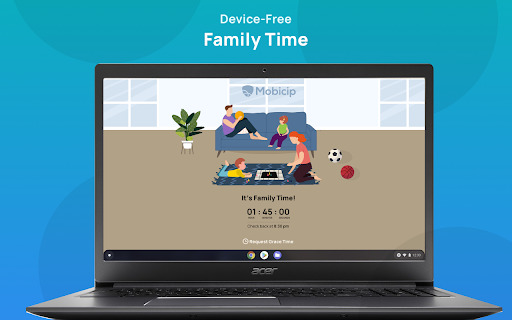
FAMILY TIME

Family Time allows parents to lock down all the family devices instantly with a single touch for a certain period. Now family meals, bedtimes, family interactions and outdoor time can be completely device-free & without distractions!

CROSS-PLATFORM PROTECTION

As your children and teens move across a wide variety of devices, Mobicip allows you to monitor and control all such devices irrespective of the platform or OS.

“Mobicip is designed for the modern multi-device family, and its range of supported platforms is impressive” - PCMag.

PRICING PLANS

Parents can choose from our annual pricing bundles: $49.99 for 5 devices, $89.99 for 10 devices, $124.99 for 15 devices, & $159.99 for 20 devices. As an introductory offer, the 5-device plan is offered at $39.99 per year.

HELP & SUPPORT

Please visit our helpdesk (www.mobicip.com/support) for how-tos, videos, and articles. For additional assistance, contact us at [email protected].
Technical
- Version
- 4.1.2
- Manifest
- V3
- Size
- 657KiB
- Min Chrome
- 88
- Languages
- 1
- Featured
- No
Metadata
- ID
- jpafaidkicnfcohbcfegbokibbghpnee
- Developer ID
- u3b53d91b41a507907a89167e47cc7747
- Developer Email
- [email protected]
- Created
- Dec 18, 2015
- Last Updated (Store)
- Mar 12, 2025
- Last Scraped
- Jun 7, 2026
- Website
- —
- Support URL
- https://www.mobicip.com/support
- Privacy Policy
- https://www.mobicip.com/privacy
Similar extensions
Alternatives to Mobicip Parental Control with Screen Time, ranked by description similarity.
FamiSafe
FamiSafe extension
793
★ 3.0

Parent Website Controller
Blocks every website except for ones specified in the app.
5

SafeSearch - Web Filter for Safe Browsing & Search
A web filter extension for safe browsing and search in Chrome.
289
★ 4.7

IMTLazarusv3
IMTLazarus's remote filtering agent.
—
★ 1.2

iGuard Kids
Helps parents protect children online by blocking harmful content and encouraging healthy browsing habits.
—

Qustodio
Qustodio extension
7.0K
★ 2.2
classroom.cloud Student
classroom.cloud delivers a set of stress-free, simple yet effective cloud-based teaching, online safety/safeguarding and technician…
—
★ 1.5

Parental Control: Porn Blocker
Parental control app that denies access to porn sites. It uses a semantic parser that scans and blocks all kinds of adult content.
283
Data sourced from the Chrome Web Store · last verified Jun 7, 2026.