
ChatGPT Wallpapers & Readability Tools
Customize ChatGPT with wallpapers, live text styles, opacity, and readability scores. Fast, seamless, no page reload!
As of June 2026, ChatGPT Wallpapers & Readability Tools has 7 users in the Functionality & UI category.
Usersdown 12.5 percent−12.5%
7
7
Ratingno change0%
—
— reviews
Reviewsno change0%
—
Version
1.4
Manifest V3
History
4 snapshotsTracking since Apr 20, 2026.
View as table
| Date | Users | Rating | Reviews | Version |
|---|---|---|---|---|
| Apr 20, 2026 | 8 | — | — | 1.4 |
| May 5, 2026 | 9 | — | — | 1.4 |
| May 16, 2026 | 7 | — | — | 1.4 |
| May 29, 2026 | 10 | — | — | 1.4 |
| Now | 7 | — | — | 1.4 |
Permissions & access
- Permissions
- storagescripting
- Host access
- https://chat.openai.com/*, https://chatgpt.com/*, https://chat.qwen.ai/*, https://chat.mistral.ai/*, https://grok.com/*
Screenshots



About
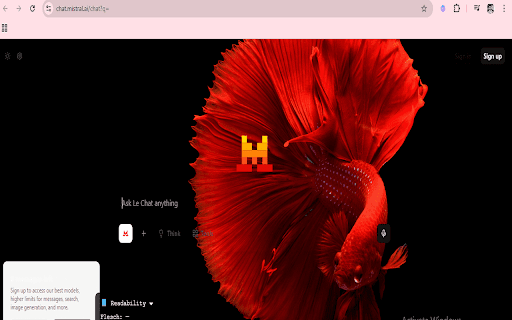
ChatGPT Themes+ — Wallpapers & Readability Enhancer

Transform your ChatGPT interface with beautiful wallpapers, live style customization, and real-time readability stats — all with zero page reloads.

🔹 Wallpapers – Choose from handpicked backgrounds or upload your own
🔹 Live Customization – Instantly change text color, font (Courier New), and background opacity
🔹 Readability Metrics – See Flesch Reading Ease, Grade Level, and SMOG Index as ChatGPT generates
🔹 Real-Time Word & Sentence Count – Updates live while responses are being typed
🔹 Compact & Intuitive UI – Clean, professional popup with grid-style previews
🔹 Minimize/Expand Options – Hide readability panel when not needed
🔹 Import/Export Settings – Save and load your custom themes easily
🔹 Lightweight – No lag, no reloads, just seamless personalization

No Tracking. No Accounts. 100% Privacy-Focused.
Your settings and images stay local to your browser. This extension never collects, stores, or transmits any personal data.

How to Use

Install the extension

Click the ChatGPT Themes+ icon (top-right of your browser)

Pick or upload a background image

Adjust text color and opacity

Refresh the webpage to apply the selected changes .

Enjoy your personalized ChatGPT interface — instantly!

Coming Soon:
⭐ More fonts
⭐ Additional  metrics
Technical
- Version
- 1.4
- Manifest
- V3
- Size
- 15.81KiB
- Min Chrome
- 88
- Languages
- 1
- Featured
- No
Metadata
- ID
- joommlkiglbbidlebdbfcnjdlfjdbhlb
- Developer ID
- u967f9b79d7ae2b0455544154b2f7ab85
- Developer Email
- [email protected]
- Created
- Aug 4, 2025
- Last Updated (Store)
- Aug 4, 2025
- Last Scraped
- Jun 9, 2026
- Website
- crama7333.blogspot.com
- Privacy Policy
- —
Similar extensions
Alternatives to ChatGPT Wallpapers & Readability Tools, ranked by description similarity.

ChatGPT Themes
Apply custom themes to the ChatGPT
127
★ 5.0

GPThemes - ChatGPT Widescreen, Fonts & Color
Redesign ChatGPT: custom color, fonts & layouts — widescreen mode, chat bubbles, expandable chatbox, hide header/footer & more
5.0K
★ 4.9

ChatGPTBuff - Enhance Your ChatGPT Web Experience
Customize interface and add utilities to ChatGPT Web
61
★ 5.0

Nebula UI | ChatGPT Background Themes
A chrome extension for ChatGPT Background UI
16
★ 2.9

ChatGPT Styler
Improve the appearance of code snippets in ChatGPT code snippets.
28
★ 3.0

ChatGPT Accent Customizer
Override ChatGPT's accent and chat bubble colors using CSS variables.
6
★ 5.0

GPTimizer
Optimizes ChatGPT long chats by collapsing old messages and lazy-loading heavy content.
13

Themes+ New Tab
Video wallpapers and customizable backgrounds for your new tab - plus tasks, notes, bookmarks, timers, and tab manager.
2.0K
★ 4.7
Data sourced from the Chrome Web Store · last verified Jun 9, 2026.