
AI Mood Board Collector — Buddy
Collect reference images from any site into Mood Boards and add them to your Agentic Hat chat with a style prompt ready.
As of July 2026, AI Mood Board Collector — Buddy has — users in the Productivity category.
Usersno change0%
—
—
Ratingno change0%
—
— reviews
Reviewsno change0%
—
Version
0.2.0
Manifest V3
History
1 snapshotsTracking since Jul 6, 2026.
Not enough history yet for this metric — the chart fills in as we collect more snapshots.
View as table
| Date | Users | Rating | Reviews | Version |
|---|---|---|---|---|
| Jul 6, 2026 | — | — | — | 0.2.0 |
| Now | — | — | — | 0.2.0 |
Permissions & access
- Permissions
- storageunlimitedStoragesidePaneltabsscripting
- Host access
- <all_urls>
Screenshots


About
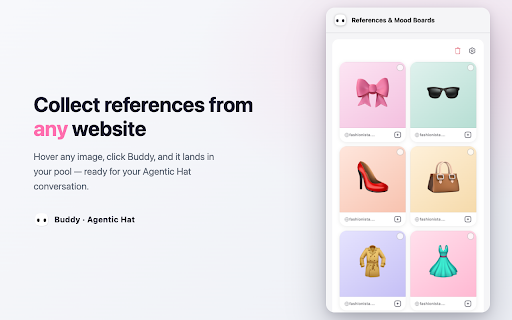
Buddy is the reference collector for Agentic Hat — the autonomous AI agent platform for creative work. See an image anywhere on the web, click, and it becomes a reference for your next AI creation.

HOW IT WORKS
1. On any website, hover over an image — Buddy pops up on it.
2. Click Buddy to collect the image.
3. Open Agentic Hat (agenti.chat) — the latest image is attached to your conversation automatically.
4. In the side panel, tap the circle on images to select several and add them to the chat in one go.
5. Use “Add to Mood Board…” to group references into boards — add a whole board to the chat anytime.
6. “Add to chat with style prompt” also pre-fills a style-analysis prompt: describe what you want and create in that style. Customize the prompt in the panel settings.

WHY YOU’D WANT THIS
Reference images are the raw material of AI creative work. Whether you are turning a product photo into studio-grade shots, dressing an AI model in a garment you found while browsing, or restyling your own photos — the workflow starts with “I saw this image somewhere.” Buddy removes the download-then-reupload dance: see it, click it, create with it.

FEATURES
• Works on any website — Buddy appears when you hover an image
• Mood Boards: group references per project, add a whole board to the chat in one click
• Style prompt: send a board with a ready-made style-analysis prompt (customizable)
• Multi-select with a floating action bar; large preview on click
• Original page link kept with every image; duplicate-safe per conversation
• Minimum image size filter and per-site disable list
• Available in English, Español, 简体中文, 繁體中文

PRIVACY, PLAINLY
• Collected images are stored locally in your browser. Nothing is uploaded to our servers by the extension.
• An image only reaches your Agentic Hat conversation when it is added to a tab you have open and are signed in to.
• No analytics, no tracking, no browsing-history collection. Buddy only acts when you click.
Full policy: https://agenti.chat/en/extension-privacy

REQUIREMENTS
A free Agentic Hat account at https://agenti.chat. Buddy collects; the creating happens in the app.
Technical
- Version
- 0.2.0
- Manifest
- V3
- Size
- 180KiB
- Min Chrome
- 88
- Languages
- 4
- Featured
- No
Metadata
- ID
- jojcecckmmnpbnicmbghjalfoffmnfoj
- Developer ID
- ud42af45565ab900c56e677b09cd10841
- Developer Email
- [email protected]
- Created
- Jul 5, 2026
- Last Updated (Store)
- Jul 5, 2026
- Last Scraped
- Jul 6, 2026
- Website
- agenti.chat
- Support URL
- —
- Privacy Policy
- https://agenti.chat/en/extension-privacy
Data sourced from the Chrome Web Store · last verified Jul 6, 2026.