VideoMark - Take notes on YouTube, Coursera
VideoMark is a simple tool that can help you take notes on YouTube, Coursera, Udemy.
As of June 2026, VideoMark - Take notes on YouTube, Coursera has 1,000 users and a 4.00/5 rating from 12 reviews in the Workflow & Planning category.
Usersno change0%
1.0K
1,000
Ratingno change0%
4.00
12 reviews
Reviewsno change0%
12
Version
0.0.33
Manifest V3
History
1 snapshotsTracking since Apr 23, 2026.
View as table
| Date | Users | Rating | Reviews | Version |
|---|---|---|---|---|
| Apr 23, 2026 | 1.0K | 4.00 | 12 | 0.0.33 |
| Now | 1.0K | 4.00 | 12 | 0.0.33 |
Permissions & access
- Permissions
- identitytabsstoragecookiesunlimitedStoragenotifications
- Host access
- *://*.coursera.org/, *://*.udemycdn.com/*, https://drive.google.com/, https://vm.gameaibo.com/, https://account.videomark.app/, http://*/*, https://*/*
Screenshots



About
🌟 Now Supporting ChatGPT-Assisted Video Summary Generation! 🌟
🌟 Now Supporting Udemy and Coursera Video Notes! 🌟
📝 Export Your Notes to Google Docs Instantly! 📝

+++++++

VideoMark is your go-to solution for annotating videos across platforms. With a user-friendly interface and intuitive drawing tools, you can easily take notes directly on YouTube videos and highlight key frames.

+++++++

🎯 What Makes VideoMark Unique?

- Capture and Save: Effortlessly save subtitles and screenshots, making it an ideal tool for educational purposes and capturing essential video content.
- Your Data, Your Rules: Unlike other note-taking tools, we respect your privacy. We neither own your notes nor your videos, and we promise never to display ads or sell your information.

+++++++

🪄 Features
- 🖍 Draw annotations on online videos
- 📝 Take notes on YouTube, Coursera, and Udemy
- 📸 Save screenshots and subtitles directly from videos
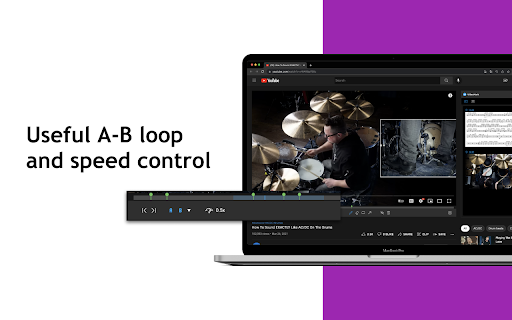
- ⏩ Convenient speed control and A-B loop features
- ☁️ Autosave to Google Drive
- 🏷 Use hashtags to categorize your notes
- 📤 Export options include PDF, TXT, and Word

+++++++

🌝 Who Can Benefit?
🎓 Learners
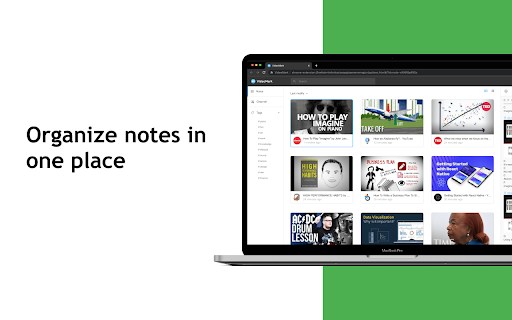
Whether you're acquiring new skills in tech, design, or music through platforms like YouTube, Coursera, or Udemy, VideoMark consolidates your video notes in one place. Focus on gaining insights and inspiration to transform your life through education.


🎥 YouTubers
Struggling to manage a plethora of video clips and screenshots? VideoMark allows you to quickly browse, tag, and organize your content effortlessly.

+++++++

🛠 Coming Soon
- 🔄 Enhanced autosave options, including Dropbox, Evernote, and Notion
- 🔍 Full-Text Search Capability

+++++++


📨 Support
For additional help and information, visit VideoMark.app

+++++++

😘 Love VideoMark? Rate Us!
Support VideoMark by leaving us a ★★★★★ 5-STAR REVIEW!

+++++++
Technical
- Version
- 0.0.33
- Manifest
- V3
- Size
- 4.41MiB
- Min Chrome
- 88
- Languages
- 11
- Featured
- Yes
Metadata
- ID
- jogmoeadejjblbhmaelnammnebhpbcaa
- Developer ID
- u57a1a244a1e52a0b7bc503793a030032
- Developer Email
- [email protected]
- Created
- Apr 25, 2022
- Last Updated (Store)
- Nov 3, 2023
- Last Scraped
- Jun 7, 2026
- Website
- videomark.app
- Support URL
- https://videomark.app/submit-a-request/
- Privacy Policy
- https://videomark.app/privacy-policy/
Similar extensions
Alternatives to VideoMark - Take notes on YouTube, Coursera, ranked by description similarity.

TubeMemo – Notes, Summaries & Insights from Video
Take notes, summarize, extract insights, and revisit ideas — all from any YouTube video.
299
★ 4.0

VideoNotes Pro
Take timestamped notes on any YouTube video. Click any note to jump back instantly.
—

TubeNotes
Take notes directly on YouTube. Add one-click timestamps, hide distractions, and copy formatted study guides with a single click.…
3

YouTube Chapter Saver Notes
Save YouTube video chapters with notes - Development Mode
20
★ 5.0

Askify - Youtube Notes
Take Notes From Youtube
20.0K
★ 4.6

DapperMark - Summarize, Translate, Bookmark YouTube Videos with CHATGPT
Instantly Summarize transalate transcriptions, Bookmark, and Rediscover your favorite YouTube videos
29
★ 5.0

VidScholar
🎓 VidScholar 2.3 — Turn YouTube into a Real Learning Platform
VidScholar 2.3 is a powerful browser extension that transforms…
1
★ 5.0

Annotate: Web Annotations with Screen Sharing
Annotate web pages, PDFs, Google Slides, and Google Docs to improve engagement. Annotate in Google Meet when screen sharing.
100.0K
★ 4.2
Data sourced from the Chrome Web Store · last verified Jun 7, 2026.