
OrgSight for Salesforce
Field intelligence, permissions, automation analysis & org health auditing for Salesforce admins and architects. By Mashtrix.
As of June 2026, OrgSight for Salesforce has 205 users and a 5.00/5 rating from 4 reviews in the Developer Tools category.
Usersno change0%
205
205
Ratingno change0%
5.00
4 reviews
Reviewsno change0%
4
Version
3.3.6
Manifest V3
90-day change · In the last 90 days this extension 1 version update, changed permissions.
History
10 snapshotsTracking since Apr 18, 2026.
View as table
| Date | Users | Rating | Reviews | Version |
|---|---|---|---|---|
| Apr 18, 2026 | — | — | — | 1.2.0 |
| Apr 23, 2026 | — | — | — | 1.2.0 |
| Apr 28, 2026 | 5 | 5.00 | 1 | 1.2.0 |
| May 6, 2026 | 10 | 5.00 | 1 | 1.2.0 |
| May 11, 2026 | 19 | 5.00 | 2 | 1.2.0 |
| May 16, 2026 | 55 | 5.00 | 4 | 1.2.0 |
| May 23, 2026 | 148 | 5.00 | 4 | 1.2.0 |
| May 29, 2026 | 172 | 5.00 | 4 | 1.2.0 |
| Jun 5, 2026 | 174 | 5.00 | 4 | 3.3.6 |
| Jun 12, 2026 | 180 | 5.00 | 4 | 3.3.6 |
| Now | 205 | 5.00 | 4 | 3.3.6 |
Changelog
- May 29, 2026description
OrgSight is a powerful Salesforce inspection and analysis tool designed for admins and developers.

Key Features:
• Explore objects, fields, and metadata
• Analyze flows and configurations
• Perform real-time audits of your Salesforce org
• Lightweight and fast — runs directly in your browser

Security & Privacy:
• No Salesforce data is stored externally
• All API calls go directly to your Salesforce org
• No tracking, analytics, or third-party data sharing
• Uses your active Salesforce session securely

OrgSight works entirely within your browser and helps you gain insights into your Salesforce org without any setup.
OrgSight is the all-in-one Salesforce admin and developer toolkit that surfaces the information you need without leaving your browser. Alt-click any field on any record page to instantly see how that field is used across your entire org.

FIELD INSPECTOR
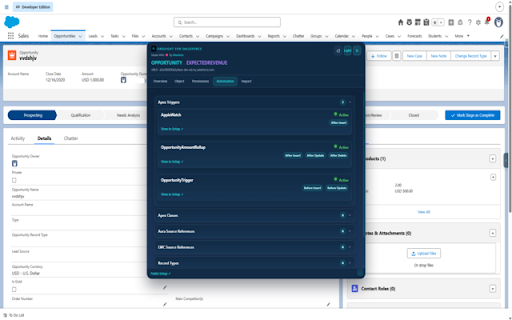
Alt-click any field to open a six-tab panel showing everything about that field. The Overview tab shows field metadata, a usage score based on seven signals, data population rate, and a picklist value distribution chart. The Permissions tab lists every profile and permission set with field-level security, with direct links to open each one in Setup. The Automation tab scans Apex triggers, Apex classes, LWC and Aura components, flows, and validation rules for references to that field — with code snippets showing exactly where and how it is used. The Impact tab shows page layout coverage, a blast radius grid, and a safe deletion checklist. The Graph tab renders a visual dependency diagram you can filter by type and open at full size.

METADATA EXPLORER
Browse all metadata types in your org organised into 13 groups. Select components individually or by type, generate a valid package.xml instantly, and retrieve your metadata as a ZIP file directly from the browser using the Salesforce Metadata API.

FLOW HEALTH ANALYSER
Scans all active flows for SOQL in loops, DML in loops, missing fault paths, unfiltered scheduled queries, and seven other patterns that cause governor limit errors in production. Results load progressively and are cached against flow modification dates so repeat opens are instant.

SOQL RUNNER
A full SOQL and Tooling API query editor with up to 15 independent tabs. Results display in a bordered table with sortable columns. Salesforce IDs are clickable — open the record in All Fields, query it directly, view it in Salesforce, or copy the ID. Export results as CSV, JSON, or Excel.

ALL FIELDS
See every field on the current object with values from the live record. Filter by type, required, editable, and more. Edit fields inline with native date pickers, tall textareas for long text, and picklist dropdowns. Alt-click any row to open the full six-tab field inspector without leaving the page.

ENVIRONMENT BAR
Add a configurable colour-coded bar to every Salesforce page so you always know which org you are working in.

OrgSight makes no external network requests. All data stays between your browser and your Salesforce org.
- May 29, 2026host_permissions
*://*.salesforce.com/*, *://*.force.com/*, *://*.salesforce-setup.com/*, *://*.cloudforce.com/*
*://*.salesforce.com/*, *://*.force.com/*, *://*.lightning.force.com/*, *://*.salesforce-setup.com/*, *://*.cloudforce.com/*, *://*.my.salesforce-setup.com/*
- May 29, 2026permissions
activeTab, storage, cookies
activeTab, storage, cookies, downloads
Permissions & access
- Permissions
- activeTabstoragecookiesdownloads
- Host access
- *://*.salesforce.com/*, *://*.force.com/*, *://*.lightning.force.com/*, *://*.salesforce-setup.com/*, *://*.cloudforce.com/*, *://*.my.salesforce-setup.com/*
Screenshots


About
OrgSight is the all-in-one Salesforce admin and developer toolkit that surfaces the information you need without leaving your browser. Alt-click any field on any record page to instantly see how that field is used across your entire org.

FIELD INSPECTOR
Alt-click any field to open a six-tab panel showing everything about that field. The Overview tab shows field metadata, a usage score based on seven signals, data population rate, and a picklist value distribution chart. The Permissions tab lists every profile and permission set with field-level security, with direct links to open each one in Setup. The Automation tab scans Apex triggers, Apex classes, LWC and Aura components, flows, and validation rules for references to that field — with code snippets showing exactly where and how it is used. The Impact tab shows page layout coverage, a blast radius grid, and a safe deletion checklist. The Graph tab renders a visual dependency diagram you can filter by type and open at full size.

METADATA EXPLORER
Browse all metadata types in your org organised into 13 groups. Select components individually or by type, generate a valid package.xml instantly, and retrieve your metadata as a ZIP file directly from the browser using the Salesforce Metadata API.

FLOW HEALTH ANALYSER
Scans all active flows for SOQL in loops, DML in loops, missing fault paths, unfiltered scheduled queries, and seven other patterns that cause governor limit errors in production. Results load progressively and are cached against flow modification dates so repeat opens are instant.

SOQL RUNNER
A full SOQL and Tooling API query editor with up to 15 independent tabs. Results display in a bordered table with sortable columns. Salesforce IDs are clickable — open the record in All Fields, query it directly, view it in Salesforce, or copy the ID. Export results as CSV, JSON, or Excel.

ALL FIELDS
See every field on the current object with values from the live record. Filter by type, required, editable, and more. Edit fields inline with native date pickers, tall textareas for long text, and picklist dropdowns. Alt-click any row to open the full six-tab field inspector without leaving the page.

ENVIRONMENT BAR
Add a configurable colour-coded bar to every Salesforce page so you always know which org you are working in.

OrgSight makes no external network requests. All data stays between your browser and your Salesforce org.
Technical
- Version
- 3.3.6
- Manifest
- V3
- Size
- 336KiB
- Min Chrome
- 88
- Languages
- 1
- Featured
- No
Metadata
- ID
- joellpmaagdomhfmgbaklpngnaoaddgg
- Developer ID
- uc8ff3785bdc628228562be2c32254deb
- Developer Email
- [email protected]
- Created
- Apr 17, 2026
- Last Updated (Store)
- May 27, 2026
- Last Scraped
- Jun 12, 2026
- Website
- —
- Support URL
- —
Data sourced from the Chrome Web Store · last verified Jun 12, 2026.