Full Screen
Add fullscreen button to the Chrome toolbar and to the context (right-click) menu
As of June 2026, Full Screen has 1,000 users and a 3.50/5 rating from 10 reviews in the Functionality & UI category.
Usersno change0%
1.0K
1,000
Ratingno change0%
3.50
10 reviews
Reviewsno change0%
10
Version
2.0
Manifest V3
History
1 snapshotsTracking since Apr 23, 2026.
View as table
| Date | Users | Rating | Reviews | Version |
|---|---|---|---|---|
| Apr 23, 2026 | 1.0K | 3.50 | 10 | 2.0 |
| Now | 1.0K | 3.50 | 10 | 2.0 |
Permissions & access
- Permissions
- storagecontextMenus
- Host access
- None declared
Screenshots

About
📚 DESCRIPTION

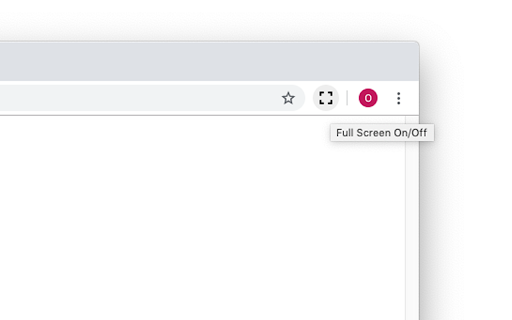
This is just a full-screen button, added to the toolbar and the context menu. It does exactly the same as the keyboard shortcuts (F11 on Windows or fn+F on Mac). You can change the icon to match your chrome theme and that's it.

I made this because I need to be able to click a button/menu item with the mouse, not all of my browsers come with keyboard. When in full screen, I need the context menu to get back. That's why this extension adds itself in the right-menu also. And that's it.

🛠 OPTIONS

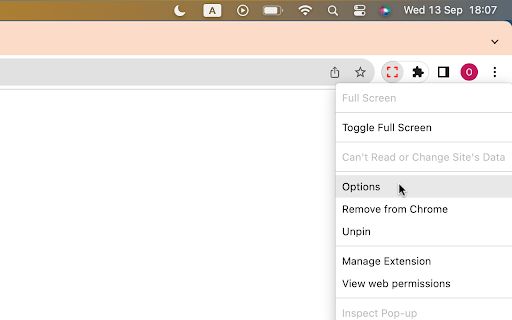
To change the default settings, simply right-click on the extension icon and select "Options". On the settings page, you can change the icon to a different color  (to match your Chrome theme or simply because you don't like the default black color) or even set your own icon.

🔒 PERMISSIONS

Rest assured, this extension doesn't require any special or risky permissions. The only permissions it needs are "contextMenu" and "storage." It doesn't access your data or sites. Its sole purpose is to add the buttons to the toolbar and context menu while saving the selected icon in local storage.
Technical
- Version
- 2.0
- Manifest
- V3
- Size
- 22.7KiB
- Min Chrome
- 88
- Languages
- 2
- Featured
- Yes
Metadata
- ID
- joddbgdiaecgbenoeloffehlpclnppfa
- Developer ID
- u6ba4dcaf9004dfc3a3c881b6a8c74628
- Developer Email
- [email protected]
- Created
- Oct 9, 2019
- Last Updated (Store)
- Sep 14, 2023
- Last Scraped
- Jun 7, 2026
- Website
- https://openaddons.com/
- Support URL
- https://openaddons.com/full-screen-button/
- Privacy Policy
- https://openaddons.com/privacy
Similar extensions
Alternatives to Full Screen, ranked by description similarity.

Quick Settings Launcher
Open Chrome settings instantly — toolbar button, keyboard shortcut, or right-click. Jump straight where you need.
395
★ 5.0

Browser Links
Quick access to Chrome pages in the context menu.
357
★ 4.0

Custom Right-Click Menu
Custom Right-Click Menu: Personalize context menu
158

Right click allow - copy & save
Unblock right click menu, save as menu, highlighting and copying for all websites
441

Easy Open Bookmarks
Click the button to open the Chrome bookmarks page
27

Quick access
A clean, intuitive new tab page where you can access your Favorites, Reading List, and Tab Groups with just one click.
23

Easy Open History
Click the button to open the Chrome history page
19

Finder Bookmarks
A bookmarks manager like macOS Finder.
2.0K
★ 4.4
Data sourced from the Chrome Web Store · last verified Jun 7, 2026.