
Sentinel — Scam Blocker, Phishing & Privacy Protection
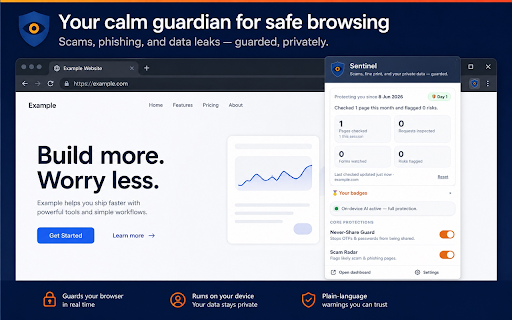
On-device scam & phishing protection. Warns about risky sites and stops data leaks — private, nothing leaves your device.
As of June 2026, Sentinel — Scam Blocker, Phishing & Privacy Protection has — users in the Privacy & Security category.
Usersno change0%
—
—
Ratingno change0%
—
— reviews
Reviewsno change0%
—
Version
1.0.0
Manifest V3
History
1 snapshotsTracking since Jun 12, 2026.
Not enough history yet for this metric — the chart fills in as we collect more snapshots.
View as table
| Date | Users | Rating | Reviews | Version |
|---|---|---|---|---|
| Jun 12, 2026 | — | — | — | 1.0.0 |
| Now | — | — | — | 1.0.0 |
Permissions & access
- Permissions
- storagealarms
- Host access
- https://urlhaus.abuse.ch/*
Screenshots


About
Sentinel is your calm, private guardian for everyday browsing. It quietly
watches for scams, phishing, and data leaks — and speaks up only when something
genuinely matters.

Powered entirely by Chrome's built-in on-device AI, Sentinel does its thinking
right inside your browser. Your browsing, your messages, and what you type never
leave your device. Nothing is sent to us — ever.


WHAT SENTINEL PROTECTS YOU FROM

- Never-Share Guard — warns you before a one-time code (OTP), password, card CVV,
  or PIN is sent somewhere it shouldn't go. If someone in a chat asks for your
  code, Sentinel steps in — because no real bank or company ever needs it.

- Scam & phishing detection — checks the pages you visit for fake, high-pressure,
  and impersonating sites designed to trick you.

- Lookalike-link warning — catches links to copycat domains (like "paypa1") that
  mimic real brands.

- Wrong-site password alert — warns if you're about to enter a password on a site
  that isn't the real one — a classic phishing trap.

- Background data watch — notices when a page quietly tries to send your
  information to an unknown destination, and lets you allow or block it.

- Agreement guard — explains, in one plain sentence, what a cookie banner or
  terms box is really asking you to agree to.

- Dark-pattern flag — points out manipulative tricks like fake countdowns and
  pre-checked boxes.

- Sneaky-download alert — warns when a page tries to start a download you didn't
  ask for.

- Redactor — helps you avoid pasting sensitive personal details into places like
  AI chat boxes.


WHY SENTINEL (AND NOT JUST YOUR SPAM FILTER)

Your email filter catches spam in the inbox. Sentinel protects you at the moment
you're about to be tricked — on the page, in the chat, where scams actually
succeed. Most scams end the same way: you're pressured to hand over a code, a
password, or your card details. That's the moment Sentinel is built to catch.


PRIVATE BY DESIGN

- All analysis runs on your device using Chrome's built-in AI.
- Sentinel does not collect, sell, or share your personal data.
- Your activity and settings stay on your device — nothing about your browsing
  is sent to us.
- The only thing Sentinel downloads is a public list of known scam sites, to
  keep its protection current. No information about you is ever sent in return.


HONEST ABOUT WHAT IT DOES

Sentinel protects your browsing inside Chrome. It is not antivirus and does not
protect your whole computer, your phone calls, email apps, or other programs.
For complete safety, pair Sentinel with two-factor authentication, a password
manager, and keeping your software up to date — Sentinel will even remind you.

Sentinel warns and informs; it never claims a site is "100% safe." The goal is
to help you pause and decide for yourself.


REQUIREMENTS

Sentinel's AI features use Chrome's built-in on-device AI, available on Chrome
desktop with supported hardware. Where it isn't available, Sentinel falls back
to its built-in safety checks.
Technical
- Version
- 1.0.0
- Manifest
- V3
- Size
- 122KiB
- Min Chrome
- 128
- Languages
- 1
- Featured
- No
Metadata
- ID
- jnojbkhaefbibfojhbmnlpbanohmdffg
- Developer ID
- u3c46733d86e4ba0e3769d025b88df250
- Developer Email
- [email protected]
- Created
- Jun 11, 2026
- Last Updated (Store)
- Jun 11, 2026
- Last Scraped
- Jun 12, 2026
- Website
- —
- Support URL
- —
- Privacy Policy
- https://gigaikripaservices.com/sentinel-privacy/
Data sourced from the Chrome Web Store · last verified Jun 12, 2026.