
ElementHider: Hide Content & Spoilers
Automatically hide or blur unwanted text, spoilers, and distracting page elements using your own custom keywords
As of June 2026, ElementHider: Hide Content & Spoilers has 8,000 users and a 4.39/5 rating from 89 reviews in the Productivity category.
Usersup 33.3 percent+33.3%
8.0K
8,000
Ratingdown 0.7 percent−0.7%
4.39
89 reviews
Reviewsup 3.5 percent+3.5%
89
Version
1.0.4
Manifest V3
90-day change · In the last 90 days this extension gained 2.0K users, 1 version update.
History
3 snapshotsTracking since Apr 19, 2026.
View as table
| Date | Users | Rating | Reviews | Version |
|---|---|---|---|---|
| Apr 19, 2026 | 6.0K | 4.42 | 86 | 1.0.2 |
| May 25, 2026 | 6.0K | 4.43 | 87 | 1.0.2 |
| Jun 14, 2026 | 7.0K | 4.43 | 88 | 1.0.2 |
| Now | 8.0K | 4.39 | 89 | 1.0.4 |
Changelog
- Jun 14, 2026description
ElementHider: Hide content based on keywords

ElementHider is a browser extension I built to help you hide or blur any part of a web page as easily as possible. I got tired of constant distractions from ads, spoilers, and irrelevant content, so I made this to create a cleaner, more focused browsing experience. Just type in the keywords you don't want yo see and ElementHider takes care of the rest.

Features
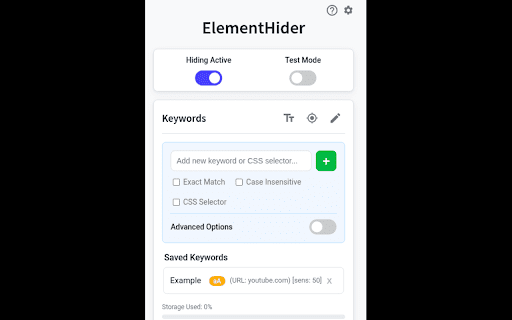
 * Hide by Keyword: This is the main feature. You can automatically hide any content that contains specific words or phrases you define. It's a powerful way to filter out spoilers or topics you aren't interested in.

 * Hide Anything Else: If a keyword isn't enough, you can also use a point and click method to hide any individual element on the page, like a sidebar, an ad, or a "suggested for you" box.

 * Blur Instead of Hide: If you don't want to completely remove content, blur it instead. Just hover over the blurred area to reveal it when you're ready.

 * Extension is built to hide unwanted content, even on dynamic sites like social media feeds where new content loads as you scroll.

 * Customizable Site-Specific Rules: For more control, you can apply rules to specific websites only. Use a safe test mode to highlight what will be hidden before it disappears. You can also adjust hiding sensitivity and set keywords to be case-insensitive or exact match.

ElementHider was designed to work on any website, including YouTube, X (Twitter), Facebook, news sites, and shopping sites.

Extension permissions are required to read the sites to detect the elements and keywords on the site but no data is collected or sent to the developer or any 3rd party. All the data (keywords, settings) are saved into your Chrome sync storage so everything stays within Chrome and your Google account.
ElementHider: Hide or blur content based on keywords

Tired of constant distractions, movie spoilers, and irrelevant web clutter? ElementHider puts you back in control of your browser. It’s a lightweight extension that lets you easily hide or blur any part of a webpage. Just type in the keywords you want to avoid, and ElementHider takes care of the rest - creating a cleaner, more focused browsing experience.

Features
Hide by Keyword: Instantly filter out spoilers, toxic topics, or annoying trends. If a section contains your defined words or phrases, it's gone.

Point & Click Hiding: Keywords not enough? Just click on any individual element—like an annoying sidebar, floating ad, or "suggested for you" box—to zap it from the page.

Blur Mode: If you don't want content completely removed, blur it instead. Just hover your mouse over the blurred area to reveal the text when you're ready.

Built for Dynamic Sites: Seamlessly hides unwanted content even as new posts load while you scroll. Works perfectly on YouTube, X (Twitter), Facebook, news sites, and shopping feeds.

Site-Specific Rules & Precision: Apply your filters everywhere, or limit them to specific websites. Use the safe "Test Mode" to highlight what will be hidden before it disappears. You can also adjust hiding sensitivity and toggle exact-match or case-insensitivity.

Private & Secure
ElementHider needs standard permissions to scan the sites you visit for your keywords, but no data is collected or sent to the developer or any third party. All your custom keywords and settings are saved locally to your Chrome sync storage, meaning everything stays securely within your own Google account.
- Jun 14, 2026short_description
Hides elements that contain keywords set by user
Automatically hide or blur unwanted text, spoilers, and distracting page elements using your own custom keywords
- Jun 14, 2026name
ElementHider
ElementHider: Hide Content & Spoilers
Permissions & access
- Permissions
- storagetabs
- Host access
- *://*/*
Screenshots


About
ElementHider: Hide or blur content based on keywords

Tired of constant distractions, movie spoilers, and irrelevant web clutter? ElementHider puts you back in control of your browser. It’s a lightweight extension that lets you easily hide or blur any part of a webpage. Just type in the keywords you want to avoid, and ElementHider takes care of the rest - creating a cleaner, more focused browsing experience.

Features
Hide by Keyword: Instantly filter out spoilers, toxic topics, or annoying trends. If a section contains your defined words or phrases, it's gone.

Point & Click Hiding: Keywords not enough? Just click on any individual element—like an annoying sidebar, floating ad, or "suggested for you" box—to zap it from the page.

Blur Mode: If you don't want content completely removed, blur it instead. Just hover your mouse over the blurred area to reveal the text when you're ready.

Built for Dynamic Sites: Seamlessly hides unwanted content even as new posts load while you scroll. Works perfectly on YouTube, X (Twitter), Facebook, news sites, and shopping feeds.

Site-Specific Rules & Precision: Apply your filters everywhere, or limit them to specific websites. Use the safe "Test Mode" to highlight what will be hidden before it disappears. You can also adjust hiding sensitivity and toggle exact-match or case-insensitivity.

Private & Secure
ElementHider needs standard permissions to scan the sites you visit for your keywords, but no data is collected or sent to the developer or any third party. All your custom keywords and settings are saved locally to your Chrome sync storage, meaning everything stays securely within your own Google account.
Technical
- Version
- 1.0.4
- Manifest
- V3
- Size
- 75.11KiB
- Min Chrome
- 88
- Languages
- 1
- Featured
- Yes
Metadata
- ID
- jnbamieaacddlfcoanmbkclnpoafhmie
- Developer ID
- u6c21dc7661edebcf77105953bb3132ae
- Developer Email
- [email protected]
- Created
- Feb 8, 2017
- Last Updated (Store)
- Jun 14, 2026
- Last Scraped
- Jun 14, 2026
- Website
- —
- Support URL
- —
- Privacy Policy
- —
Similar extensions
Alternatives to ElementHider: Hide Content & Spoilers, ranked by description similarity.

ElementHider
Hide page elements with a DevTools-like picker
2

Element Hider - By MigMind
Temporarily remove elements from webpages for clean screenshots and recordings
3

HideThis
Hide unwanted words or phrases on websites with fun effects.
14
★ 5.0

Smart Hide
A smart way to hide elements on web pages with layout preservation
54

Element Blur
Blur or highlight any element, region, or text on a web page with customizable colors and intensity.
6
★ 5.0

Hide Elements
Hide Elements Chrome Extension lets you hide, disable, or restore HTML elements on any webpage and keeps your changes saved.
323
★ 5.0

CleanView - Hide what you don't need
Hide unwanted webpage elements with a click. Create unlimited rules to remove ads, pop-ups & distractions permanently.
51
★ 3.0

SpoilerBlocker
Automatically blur sensitive keywords & images on YouTube, Facebook, X, Reddit & more. Stop spoilers before they ruin the fun.
7
Data sourced from the Chrome Web Store · last verified Jun 14, 2026.