
Louder
This addon enables you to enhance the sound beyond the maximum level.
As of June 2026, Louder has 2,000 users and a 3.45/5 rating from 20 reviews in the Accessibility category.
Usersno change0%
2.0K
2,000
Ratingno change0%
3.45
20 reviews
Reviewsno change0%
20
Version
1.0.4
Manifest V3
History
2 snapshotsTracking since Apr 23, 2026.
View as table
| Date | Users | Rating | Reviews | Version |
|---|---|---|---|---|
| Apr 23, 2026 | 2.0K | 3.45 | 20 | 1.0.4 |
| May 12, 2026 | 3.0K | 3.45 | 20 | 1.0.4 |
| Now | 2.0K | 3.45 | 20 | 1.0.4 |
Permissions & access
- Permissions
- activeTabcontextMenus
- Host access
- None declared
Screenshots


About
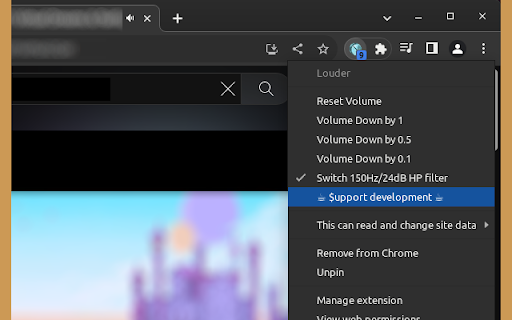
The extension is useful when the sound on a webpage is too quiet despite setting it to the maximum volume. It can sometimes help to balance the volume of sound when it varies significantly over time. It works on both video and audio elements on pages that allow it. The extension is activated by clicking the left mouse button on its icon. After clicking on the extension's icon with the right mouse button, a menu with additional options appears, which can be useful in certain situations. To fully reset the sound after adjusting the volume using the extension, it is recommended to reload the page.

Known issues:
-    On some pages, it is not possible to adjust the volume of the played elements. This is due to how the specific page is designed.
-    On some pages, when clicking on the extension button, the browser may mute the sound. This is due to the security configuration of the specific page or the server it is hosted on and unfortunately cannot be detected from the extension's point of view.

If you find this extension useful, you may consider supporting the author with a donation of any amount. Check the menu by right-clicking the extension button.
Technical
- Version
- 1.0.4
- Manifest
- V3
- Size
- 65.81KiB
- Min Chrome
- 88
- Languages
- 1
- Featured
- No
Metadata
- ID
- jmpnkhemdplokdmeffenjlbpggphdapc
- Developer ID
- u548b807ae588dbca7af527b6448e9ac4
- Developer Email
- [email protected]
- Created
- Sep 29, 2019
- Last Updated (Store)
- Jul 26, 2023
- Last Scraped
- Jun 7, 2026
- Website
- —
- Support URL
- —
- Privacy Policy
- —
Similar extensions
Alternatives to Louder, ranked by description similarity.

Video Speed Up
Accelerates video playback with a single click on the extension button. Works with HTML5 videos and audio elements.
1.0K
★ 3.0

Simple Volume Booster
Simple volume booster in your browser - increase your volume with sound control and bass booster
60.0K
★ 4.7

Volume Booster
Boost audio up to 600%, mute the current page, and restore normal volume instantly.
13

Sound Booster
Boost the audio volume of web pages with advanced controls.
—

Volume Boost
Professional volume amplification extension with clean architecture
625
★ 5.0

StereoToMono
This extension monofies the currently playing video or audio source with a single click on the extension button.
9.0K
★ 4.3

Volume Master 4 You
Volume booster up to 600% with fine-grained control for any tab
13

Volume Booster Pro
Boost or reduce volume per tab from 25% up to 500%, with a built-in limiter to reduce distortion.
10
★ 5.0
Data sourced from the Chrome Web Store · last verified Jun 7, 2026.