
Inspectcn
Chrome extension to inspect and extract shadcn-style theme tokens from any website, then bring them into your project.
As of June 2026, Inspectcn has 10 users in the Developer Tools category.
Usersup 900.0 percent+900.0%
10
10
Ratingno change0%
—
— reviews
Reviewsno change0%
—
Version
1.0.1
Manifest V3
History
7 snapshotsTracking since Apr 1, 2026.
View as table
| Date | Users | Rating | Reviews | Version |
|---|---|---|---|---|
| Apr 1, 2026 | 1 | — | — | 1.0.1 |
| Apr 17, 2026 | 1 | — | — | 1.0.1 |
| Apr 22, 2026 | 6 | — | — | 1.0.1 |
| Apr 27, 2026 | 7 | — | — | 1.0.1 |
| May 10, 2026 | 7 | — | — | 1.0.1 |
| Jun 4, 2026 | 9 | — | — | 1.0.1 |
| Jun 10, 2026 | 8 | — | — | 1.0.1 |
| Now | 10 | — | — | 1.0.1 |
Permissions & access
- Permissions
- storage
- Host access
- None declared
Screenshots



About
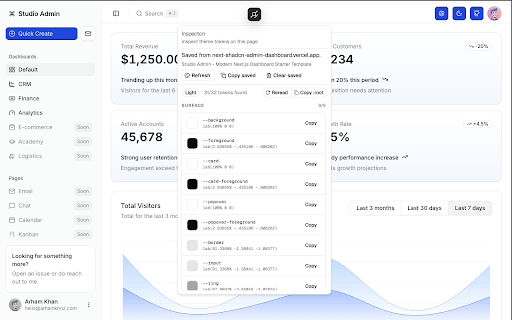
Inspectcn lets you inspect and extract shadcn-style theme tokens from any website.

Open any page, click the Inspectcn badge, and instantly view the active theme tokens used on that screen including colors, surfaces, borders, rings, radius, charts, and other semantic values.

It’s built for developers and designers who want to understand how modern UI themes are structured, recreate a visual style, or quickly bring a theme into their own project without digging through source code.

With Inspectcn you can:

- Inspect active shadcn-style theme tokens on any page
- Copy tokens in a ready-to-use format
- Capture and reuse themes in your own projects
- Understand how a site’s design system is structured

Inspectcn runs locally in your browser, stores minimal state like saved captures and badge position, and does not rely on external services to process theme data.
Technical
- Version
- 1.0.1
- Manifest
- V3
- Size
- 296KiB
- Min Chrome
- 88
- Languages
- 1
- Featured
- No
Metadata
- ID
- jmpjlakfdenblabkjbdcepoolnphdgen
- Developer ID
- u4d03ccca30942b1ba631a1c65b18e671
- Developer Email
- [email protected]
- Created
- Mar 24, 2026
- Last Updated (Store)
- Mar 31, 2026
- Last Scraped
- Jun 10, 2026
- Website
- —
- Support URL
- https://github.com/arhamkhnz/inspectcn
Data sourced from the Chrome Web Store · last verified Jun 10, 2026.