
AirForShare - Share Files & Text Instantly, No Signup & Limits!
Share text and files instantly across devices on the same Wi-Fi network, just like AirForShare.
As of June 2026, AirForShare - Share Files & Text Instantly, No Signup & Limits! has 85 users and a 5.00/5 rating from 1 reviews in the Communication category.
Usersup 4.9 percent+4.9%
85
85
Ratingno change0%
5.00
1 reviews
Reviewsno change0%
1
Version
1.0
Manifest V3
History
3 snapshotsTracking since Apr 20, 2026.
View as table
| Date | Users | Rating | Reviews | Version |
|---|---|---|---|---|
| Apr 20, 2026 | 81 | 5.00 | 1 | 1.0 |
| May 5, 2026 | 90 | 5.00 | 1 | 1.0 |
| Jun 4, 2026 | 99 | 5.00 | 1 | 1.0 |
| Now | 85 | 5.00 | 1 | 1.0 |
Permissions & access
- Permissions
- None declared
- Host access
- https://air-exchange.onrender.com/*
Screenshots

About
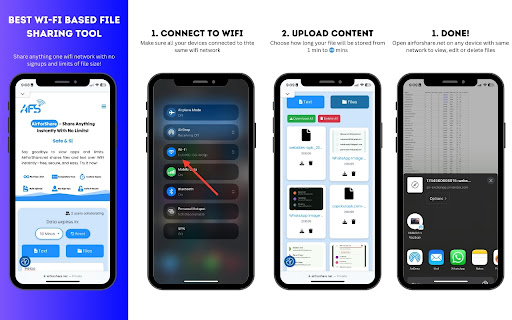
🌐 AirForShare – Real-Time File and Text Sharing Over Wi-Fi (No Signup Required!) Share Instantly. No Apps. No Limits. Just Wi-Fi. Tired of complicated file-sharing apps, sign-ups, or storage limits? AirForShare is a fast, free, and secure Wi-Fi file-sharing extension that lets you send text and files between any devices connected to the same Wi-Fi network — in real-time. No need to install anything or create an account! Whether you're collaborating in the office, sharing media at events, helping classmates, or just moving stuff from your phone to your PC — AirForShare makes it instant, private, and effortless. ⚡ Key Features ✅ No Sign-Up Required – Just open the extension or website and start sharing instantly. ✅ No File Size Limits – Share videos, PDFs, presentations, or any large files without restrictions. ✅ Real-Time Transfer Over Wi-Fi – Send and receive files or text instantly across devices. ✅ Supports Files, Text & Links – Whether it’s a note, a video, or a web link, share it in seconds. ✅ Set Expiry Time – Choose how long shared files/text remain available: 30 mins to 2+ hours. ✅ Works on Any Device or Browser – PC, Mac, Android, iOS – if it has a browser, it works! ✅ Offline-Ready – Files stay accessible even if the sharer disconnects. ✅ One-Click File Removal – Manually delete shared items anytime for better privacy. ✅ Progress Bars – Know exactly how your uploads/downloads are progressing. ✅ Live User Indicator – See how many users are connected to your sharing space. ✅ Image/Video Preview – View shared media before downloading. ✅ Notifications – Instant alerts for uploads, deletions, and new content. 🚀 How It Works (In 5 Simple Steps) Connect Devices to Same Wi-Fi – All devices must be on the same network. Open AirForShare.net or the Extension – No installation or login required. Upload Files or Text – Drag-and-drop or paste your content. Receive Instantly – Connected users see shared content in real time. Control Expiry or Delete – Set timer or remove files with one click. 📌 Why Use AirForShare? Perfect for classrooms – Share notes, slides, and documents instantly. Great for offices – Send files to teammates during meetings without email delays. Ideal for events – Upload and share media with groups without needing contact info. Useful in cafés or public Wi-Fi – Share without using Bluetooth or cloud logins. Efficient for developers & tech teams – Share logs, code, or config files quickly. 💡 Real-World Use Cases Teachers & Students – Share study material instantly. Corporate Teams – Collaborate on files live without attachments. Photographers & Event Hosts – Distribute event media to many users at once. Cafés, Airports & Coworking Spaces – Share instantly on public networks. Tech Support Teams – Send log files or patches without cloud setups. 🔐 Privacy & Security First ✔ Files are not stored on the cloud ✔ All transfers are local to your Wi-Fi ✔ Set auto-expiry or manually delete files anytime ✔ No account, no tracking, no third-party access 🧠 Advanced Features Saved Text History – View shared notes with timestamps anytime. Multiple Devices Support – Unlimited users on the same Wi-Fi can join. Bulk Downloads – Download everything in one go. Live Preview – Check photos or videos without downloading. Extension + Web Combo – Use the Chrome extension or head directly to AirForShare.net. 🌍 Who Is It For? 👨🏫 Teachers 👩💻 Office Workers 👨🔧 IT Support & Developers 👨🎓 Students 📸 Event Planners 📶 Coworking Teams 👨👩👧👦 Families 🌐 Public Wi-Fi Users Anyone who wants quick, local, real-time file and text transfers without the internet, app installs, or login frustration. 🆓 100% Free. Forever. No trials. No limits. No ads. Just a powerful free tool to connect and share—without friction. 📥 Ready to Try It? Install the AirForShare Chrome Extension now or visit https://airforshare.net to begin sharing in seconds. Perfect for office collaboration, school file sharing, or simple device-to-device transfers. Start sharing smarter, faster, and safer with AirForShare. → Download now and experience next-level file sharing!
Technical
- Version
- 1.0
- Manifest
- V3
- Size
- 80.15KiB
- Min Chrome
- 88
- Languages
- 1
- Featured
- No
Metadata
- ID
- jmnjgcebddnlnfmgjkniohpidpabmdcb
- Developer ID
- ue7aec997617c68532cb9d2140b2d19ba
- Developer Email
- [email protected]
- Created
- Apr 23, 2025
- Last Updated (Store)
- Apr 23, 2025
- Last Scraped
- Jun 4, 2026
- Website
- https://airforshare.net/
- Support URL
- https://airforshare.net/contact/
- Privacy Policy
- https://airforshare.net/privacy-policy/
Similar extensions
Alternatives to AirForShare - Share Files & Text Instantly, No Signup & Limits!, ranked by description similarity.

NoBridge – Private Chat, Calls & Screen Sharing
Peer-to-peer browser extension for private chat, audio calls, screen sharing, and file transfers — no logins or installs.
80
★ 5.0

LAN Chatroom + Screen Share
⭐ LAN Chatroom + Screen Share
Real-time local chat and screen sharing, right from your browser.
LAN Chatroom + Screen Share lets…
51

QR Colors - Code Generator
Generate customizable QR codes with colors, logos, and smart history tracking.
—
★ 5.0
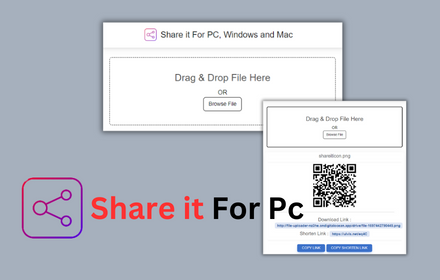
Shareit For PC, Windows and Mac Download
Shareit for PC Share files seamlessly on PC, Windows, and Mac with Share it - Lightning-fast,secure and free
7.0K
★ 3.7

Zipshot
Takes Easy and secure screenshots
60
★ 3.8

Send Note to Device
Send Note to Device allows you to send current URL with a note (message) to different devices.
423
★ 3.0

Google Meet - File Transfer
This extension is to send files when in a google meet
300
★ 4.6

HiYo
Chat anonymously with anyone on the same website in real time — plus detect AI-generated text with a built-in on-device AI detector.
30
★ 5.0
Data sourced from the Chrome Web Store · last verified Jun 4, 2026.