
Leo Page Assistant
AI-powered assistant for instant answers about any webpage.
As of June 2026, Leo Page Assistant has 169 users and a 5.00/5 rating from 1 reviews in the Productivity category.
Usersdown 4.5 percent−4.5%
169
169
Ratingno change0%
5.00
1 reviews
Reviewsno change0%
1
Version
7.2
Manifest V3
History
3 snapshotsTracking since Apr 23, 2026.
View as table
| Date | Users | Rating | Reviews | Version |
|---|---|---|---|---|
| Apr 23, 2026 | 177 | 5.00 | 1 | 7.2 |
| May 12, 2026 | 182 | 5.00 | 1 | 7.2 |
| Jun 7, 2026 | 181 | 5.00 | 1 | 7.2 |
| Now | 169 | 5.00 | 1 | 7.2 |
Permissions & access
- Permissions
- activeTabscriptingstorage
- Host access
- *://*/*
Screenshots
About
Leo Page Assistant: Your Privacy-Safe AI-Powered Web Companion

Transform your browsing with Leo Page Assistant, the intelligent Chrome extension that provides instant, contextual answers and insights about any webpage you’re on. Leo turns your web pages into an interactive experience, helping you learn, research, and gather information—all in natural language.

Key Features:
- Instant Answers: Simply ask Leo about the page you’re viewing, and get accurate, relevant responses in seconds.
- Context-Aware Responses: Leo understands the content you're browsing and tailors answers to fit the context, making information more precise and helpful.
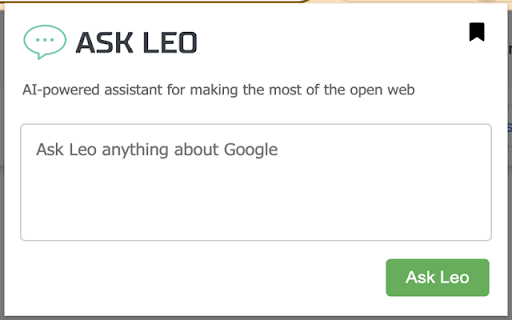
- Effortless Interface: A clean, user-friendly popup lets you interact with Leo smoothly, without disrupting your browsing flow.
- Privacy-First Design: Leo is secure and privacy-conscious, keeping your browsing data private and local.
- Broad Compatibility: Works across virtually any webpage, making it a versatile tool for any online task.

How Leo Helps You:
> Quick Research: Leo answers questions directly from the page content, helping students and researchers get summaries, explanations, or deeper insights fast.
> Productivity Booster: Professionals can quickly digest complex articles, analyze reports, or extract key points without switching between tabs.
> Enhanced Curiosity: For the curious, Leo is a knowledgeable assistant, always ready to dive deeper into topics you encounter online.

How It Works:
Go to any webpage you’re interested in.
1. Click the Leo Page Assistant icon in your Chrome toolbar.
2. Type your question in the popup.
3. Click “Ask Leo” and get instant answers—just like chatting with a knowledgeable friend.

Why Leo?
Leo leverages cutting-edge AI to understand the context of each webpage, interpret your questions, and deliver insightful answers. From pulling key insights to suggesting data points, Leo makes navigating the web smarter and more enjoyable.

Boost your web experience with Leo Page Assistant. Download today and explore the web in a whole new way!
Technical
- Version
- 7.2
- Manifest
- V3
- Size
- 72.16MiB
- Min Chrome
- 88
- Languages
- 1
- Featured
- No
Metadata
- ID
- jmmpjoplhjdhaokpmpalkohpkliigllc
- Developer ID
- uf8d0eea6f8a7027f3143bf3fddeaca56
- Developer Email
- [email protected]
- Created
- Jul 20, 2024
- Last Updated (Store)
- Dec 4, 2024
- Last Scraped
- Jun 7, 2026
- Website
- —
Similar extensions
Alternatives to Leo Page Assistant, ranked by description similarity.

Private AI Assistant
Private AI Assistant helps you quickly answer, generate, summarize, and translate text. It can also analyze images.
5

Readance
A Chrome extension for enhancing your reading experience
7
★ 5.0

LongTail: AI Sidebar
Agent mode for your browser.
14
★ 5.0

CleverPage AI - Instantly Chat with Any Website
Interact with any webpage using AI - chat about the content or get instant summaries
12
★ 4.5

AI Web Reader
Read and understand any webpage, then chat with an AI about its content.
7

WebPage Assistance
Smart assistant for any webpage
2
★ 5.0

Nimrobo AI
Context Agent
2

Browsersky AI
A browser-based AI assistant that analyzes web pages and answers questions using page context
2
Data sourced from the Chrome Web Store · last verified Jun 7, 2026.