
RedeepSeek Screenshot Helper
Capture screenshot, write query and redirect to AI.
As of May 2026, RedeepSeek Screenshot Helper has — users and a 5.00/5 rating from 1 reviews in the Communication category.
Usersno change0%
—
—
Ratingno change0%
5.00
1 reviews
Reviewsno change0%
1
Version
1.0
Manifest V3
History
3 snapshotsTracking since Apr 20, 2026.
View as table
| Date | Users | Rating | Reviews | Version |
|---|---|---|---|---|
| Apr 20, 2026 | 7 | 5.00 | 1 | 1.0 |
| May 5, 2026 | 7 | 5.00 | 1 | 1.0 |
| May 29, 2026 | 8 | 5.00 | 1 | 1.0 |
| Now | — | 5.00 | 1 | 1.0 |
Permissions & access
- Permissions
- activeTab
- Host access
- https://redeepseek.com/*
Screenshots


About
Redeepseek is your smart AI-powered assistant built for professionals and creators. With this Chrome extension, you can:

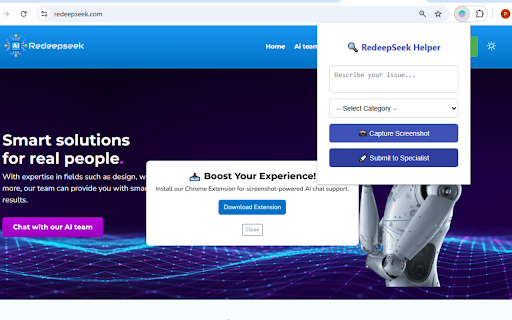
✅ Instantly capture a screenshot of your browser
✅ Enter a question or query
✅ Choose a category (like SEO, design, copywriting, and more)
✅ Automatically get redirected to a relevant AI expert for instant help

Whether you’re stuck on content writing, social media strategy, design feedback, or language issues—Redeepseek connects you to the right AI in seconds.

Perfect for:

Digital marketers
Designers
Writers
Business owners
Students

Say goodbye to searching endless forums. Let Redeepseek handle your task with just a screenshot and a question.
Technical
- Version
- 1.0
- Manifest
- V3
- Size
- 9.15KiB
- Min Chrome
- 88
- Languages
- 1
- Featured
- No
Metadata
- ID
- jmmaehelmjlmaihcbemcmplbbecendkj
- Developer ID
- u9f71421eebbb467c7692b0339c1e9683
- Developer Email
- [email protected]
- Created
- May 19, 2025
- Last Updated (Store)
- May 19, 2025
- Last Scraped
- May 29, 2026
- Website
- —
- Support URL
- —
- Privacy Policy
- https://redeepseek.com/pages/extension-privacy-policy
Similar extensions
Alternatives to RedeepSeek Screenshot Helper, ranked by description similarity.

AskGenieAI
An AI extension to allow users to chat with any website using natural language.
27

Ask AI about a website
Sends website content to Pollinations.AI to answer your questions. No API key required.
31
★ 5.0

AI Comment Generator
AI Comment and reply generator for any platform
5

1Stroke AI: Instant writing, rephrasing & explanations on any website
Your browser’s AI co-writer: create, rephrase, understand faster
14
★ 5.0

GPT.ga – Email & Messenger ChatGPT Support
🤖 AI replies for email, chat & CRM. Save prompts, respond faster, boost productivity — directly in your browser.
31
★ 5.0

JustRewrite – AI Writing Assistant
Rewrite, paraphrase, and perfect any text in seconds with AI
5
★ 5.0

Repli AI Pro - Your AI-Powered Social Media Assistant
Write better social media replies instantly. Get AI suggestions for LinkedIn, Twitter & Facebook comments in your preferred style.
1

Lookup AI
Just highlight and click - Lookup AI is a minimalistic lookup assistant that helps you look up information instantly.
18
Data sourced from the Chrome Web Store · last verified May 29, 2026.