
Elements Inspektor
Elemets Inspektor! Unleash the full potential of web development with Elements Inspector! This robust Chrome extension empowers you…
As of June 2026, Elements Inspektor has 47 users in the Accessibility category.
Usersup 23.7 percent+23.7%
47
47
Ratingno change0%
—
— reviews
Reviewsno change0%
—
Version
1.0
Manifest V3
History
3 snapshotsTracking since Apr 23, 2026.
View as table
| Date | Users | Rating | Reviews | Version |
|---|---|---|---|---|
| Apr 23, 2026 | 38 | — | — | 1.0 |
| May 12, 2026 | 43 | — | — | 1.0 |
| Jun 7, 2026 | 41 | — | — | 1.0 |
| Now | 47 | — | — | 1.0 |
Permissions & access
- Permissions
- activeTab
- Host access
- None declared
Screenshots


About
Elemets Inspektor!
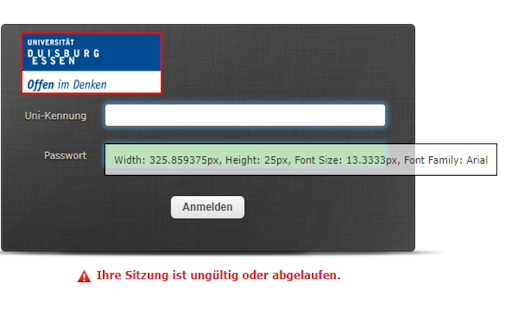
Unleash the full potential of web development with Elements Inspector! This robust Chrome extension empowers you to easily inspect various elements on any webpage. Designed for precision and ease, Elements Inspector delivers accurate measurements of an element's height, width, font size, and font family, all with just a simple shift + click.

Ideal for developers, designers, and anyone in need of detailed web page analysis, Elements Inspector eliminates the guesswork in your tasks. Just press shift + click to mark an element, and all its details will be displayed. If your element contains text, you'll also see the font size and font family. And for a clutter-free workspace, simply click the element again to clear all markings and measurements.

Upgrade your web development toolkit today with Elements Inspector. Experience the seamless, straightforward approach to web inspection, tailored to save you time and boost your productivity.

Note: While Elements Inspector is designed to work with all websites, its functionality may vary depending on the structure of individual pages. To ensure an undisturbed browsing experience, the extension operates only when activated.

Version: 1.0

What's New: Introduction of font size and font family inspection features.

Reach out to our dedicated support team if you have any queries or need assistance. Happy inspecting with Elements Inspector!
Technical
- Version
- 1.0
- Manifest
- V3
- Size
- 38.18KiB
- Min Chrome
- 88
- Languages
- 1
- Featured
- Yes
Metadata
- ID
- jmkfnhojkplhlmjelcjiajlpgoongdfp
- Developer ID
- u5be9a64ebb48cd8c0d50f69cde1873ff
- Developer Email
- [email protected]
- Created
- Jun 15, 2023
- Last Updated (Store)
- Jun 15, 2023
- Last Scraped
- Jun 7, 2026
- Website
- —
- Support URL
- —
- Privacy Policy
- —
Similar extensions
Alternatives to Elements Inspektor, ranked by description similarity.

Accessibility Content Inspector
Displays accessibility content attribute- by Juny Kallukalam
81

InspecteurA11y
Outil permettant de rapidement trouver des composants sur une page
557
★ 5.0

WCAG SC 2.5.8 Target Size Checker
Identifies interactive elements that don't meet WCAG 2.2 SC 2.5.8 Level AA (24x24 CSS pixels) requirements.
194

Web Font Size Changer
7 accessible font sizes that remember your preference for each website
11

WeAccess Scan
Web pages accessibility testing Chrome extension
61
★ 5.0

Better Font Sementics
Base Level Extension
18
★ 4.7

1-Click Font Changer
Stable V4 Architecture with RTL & LineHeight support.
206
★ 5.0

Siteimprove Accessibility Checker
Jumpstart your web accessibility efforts directly in Chrome.
60.0K
★ 3.2
Data sourced from the Chrome Web Store · last verified Jun 7, 2026.