
Scout - AI Screenshot Assistant
Scout your screen. Ask Claude AI anything about what you see.
As of June 2026, Scout - AI Screenshot Assistant has 8 users in the Productivity category.
Usersno change0%
8
8
Ratingno change0%
—
— reviews
Reviewsno change0%
—
Version
1.1.1
Manifest V3
90-day change · In the last 90 days this extension 2 version updates.
History
7 snapshotsTracking since Apr 25, 2026.
View as table
| Date | Users | Rating | Reviews | Version |
|---|---|---|---|---|
| Apr 25, 2026 | — | — | — | 1.0.0 |
| May 2, 2026 | — | — | — | 1.0.0 |
| May 9, 2026 | 2 | — | — | 1.0.0 |
| May 13, 2026 | 5 | — | — | 1.0.0 |
| May 19, 2026 | 5 | — | — | 1.1.0 |
| May 25, 2026 | 5 | — | — | 1.1.1 |
| Jun 1, 2026 | 6 | — | — | 1.1.1 |
| Now | 8 | — | — | 1.1.1 |
Changelog
- May 13, 2026description
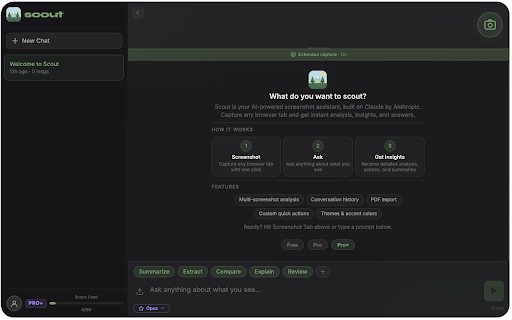
Scout is your AI-powered screenshot assistant for Chrome. Capture any browser tab and ask AI anything about what you see — no technical skills required.

Built on Claude by Anthropic, Scout is the easiest way to use AI. Simply screenshot what you're working on and get instant analysis, summaries, explanations, and actionable insights. Whether you're a student, professional, or just curious — Scout makes AI accessible to everyone.

WHAT CAN SCOUT DO?
- Summarize articles, reports, and documents in seconds
- Extract key data from tables, charts, and dashboards
- Compare screenshots side by side for differences
- Explain complex content in simple language
- Review code, designs, and presentations
- Answer any question about what's on your screen

HOW IT WORKS
1. Screenshot — Capture any browser tab with one click
2. Ask — Type a question or use a quick action prompt
3. Get Insights — Receive detailed AI-powered analysis and answers

It's that simple. No prompts to memorize, no AI experience needed.

FEATURES
- AI screenshot analysis — powered by Claude (Anthropic)
- Multi-screenshot support — attach up to 3 screenshots (15 on Pro+)
- Conversation history — pick up where you left off
- Custom quick actions — create your own prompt shortcuts
- PDF export — save and share conversations
- Themes and accent colors — light mode, dark mode, and custom colors
- Extended capture — capture full pages, not just the visible area
- Beginner friendly — designed for people who have never used AI before

PLANS
- Free: 5 AI scans/day, Haiku model — no credit card required
- Pro ($8/mo): 15 scans/day, Sonnet model, extended capture
- Pro+ ($18/mo): 50 scans/day, Sonnet + Opus models, extended capture

Perfect for students, researchers, marketers, designers, developers, and anyone who wants to get more out of their browser. Start for free — upgrade anytime from Settings.

Support: [email protected]
Privacy: https://scoutai-app.github.io/legal/privacy.html
Terms: https://scoutai-app.github.io/legal/terms.html
Scout is your AI-powered screenshot assistant for Chrome. Capture any browser tab and ask AI anything about what you see — no technical skills required.

Built on Claude by Anthropic, Scout is the easiest way to use AI. Simply screenshot what you're working on and get instant analysis, summaries, explanations, and actionable insights. Whether you're a student, professional, or just curious — Scout makes AI accessible to everyone.

WHAT CAN SCOUT DO?
- Summarize articles, reports, and documents in seconds
- Extract key data from tables, charts, and dashboards
- Compare screenshots side by side for differences
- Explain complex content in simple language
- Review code, designs, and presentations
- Answer any question about what's on your screen

HOW IT WORKS
1. Screenshot — Capture any browser tab with one click
2. Ask — Type a question or use a quick action prompt
3. Get Insights — Receive detailed AI-powered analysis and answers

It's that simple. No prompts to memorize, no AI experience needed.

FEATURES
- Try before you sign up — get free scans instantly, no account needed
- AI screenshot analysis — powered by Claude (Anthropic)
- Multi-screenshot support — attach up to 3 screenshots (15 on Pro+)
- Conversation history — pick up where you left off
- Custom quick actions — create your own prompt shortcuts
- PDF export — save and share conversations
- Themes and accent colors — light mode, dark mode, and custom colors
- Extended capture — capture full pages, not just the visible area
- Beginner friendly — designed for people who have never used AI before

PLANS
- Free: 5 AI scans/day, Haiku model — no credit card required
- Pro ($8/mo): 15 scans/day, Sonnet model, extended capture
- Pro+ ($18/mo): 50 scans/day, Sonnet + Opus models, extended capture

Perfect for students, researchers, marketers, designers, developers, and anyone who wants to get more out of their browser. Start for free — upgrade anytime from Settings.

Support: [email protected]
Privacy: https://scoutai-app.github.io/legal/privacy.html
Terms: https://scoutai-app.github.io/legal/terms.html
Permissions & access
- Permissions
- activeTabtabsscriptingstoragesidePanel
- Host access
- https://ssakemevsvdssiastsxq.supabase.co/*
Screenshots



About
Scout is your AI-powered screenshot assistant for Chrome. Capture any browser tab and ask AI anything about what you see — no technical skills required.

Built on Claude by Anthropic, Scout is the easiest way to use AI. Simply screenshot what you're working on and get instant analysis, summaries, explanations, and actionable insights. Whether you're a student, professional, or just curious — Scout makes AI accessible to everyone.

WHAT CAN SCOUT DO?
- Summarize articles, reports, and documents in seconds
- Extract key data from tables, charts, and dashboards
- Compare screenshots side by side for differences
- Explain complex content in simple language
- Review code, designs, and presentations
- Answer any question about what's on your screen

HOW IT WORKS
1. Screenshot — Capture any browser tab with one click
2. Ask — Type a question or use a quick action prompt
3. Get Insights — Receive detailed AI-powered analysis and answers

It's that simple. No prompts to memorize, no AI experience needed.

FEATURES
- Try before you sign up — get free scans instantly, no account needed
- AI screenshot analysis — powered by Claude (Anthropic)
- Multi-screenshot support — attach up to 3 screenshots (15 on Pro+)
- Conversation history — pick up where you left off
- Custom quick actions — create your own prompt shortcuts
- PDF export — save and share conversations
- Themes and accent colors — light mode, dark mode, and custom colors
- Extended capture — capture full pages, not just the visible area
- Beginner friendly — designed for people who have never used AI before

PLANS
- Free: 5 AI scans/day, Haiku model — no credit card required
- Pro ($8/mo): 15 scans/day, Sonnet model, extended capture
- Pro+ ($18/mo): 50 scans/day, Sonnet + Opus models, extended capture

Perfect for students, researchers, marketers, designers, developers, and anyone who wants to get more out of their browser. Start for free — upgrade anytime from Settings.

Support: [email protected]
Privacy: https://scoutai-app.github.io/legal/privacy.html
Terms: https://scoutai-app.github.io/legal/terms.html
Technical
- Version
- 1.1.1
- Manifest
- V3
- Size
- 367KiB
- Min Chrome
- 88
- Languages
- 1
- Featured
- No
Metadata
- ID
- jmioahlgcgaldhflmkiljdekaegnhdbg
- Developer ID
- ud40e5ea061bf7b1f33a757557b676325
- Developer Email
- [email protected]
- Created
- Apr 24, 2026
- Last Updated (Store)
- May 19, 2026
- Last Scraped
- Jun 7, 2026
- Website
- —
- Support URL
- https://scoutai-app.github.io/legal/
- Privacy Policy
- https://scoutai-app.github.io/legal/
Data sourced from the Chrome Web Store · last verified Jun 7, 2026.