
SpyKeys
Real-time alphanumeric and symbol keys logger.
As of June 2026, SpyKeys has 53 users and a 5.00/5 rating from 1 reviews in the Accessibility category.
Usersup 3.9 percent+3.9%
53
53
Ratingno change0%
5.00
1 reviews
Reviewsno change0%
1
Version
1.0
Manifest V3
History
3 snapshotsTracking since Apr 23, 2026.
View as table
| Date | Users | Rating | Reviews | Version |
|---|---|---|---|---|
| Apr 23, 2026 | 51 | 5.00 | 1 | 1.0 |
| May 12, 2026 | 52 | 5.00 | 1 | 1.0 |
| Jun 7, 2026 | 61 | 5.00 | 1 | 1.0 |
| Now | 53 | 5.00 | 1 | 1.0 |
Permissions & access
- Permissions
- activeTabstorage
- Host access
- None declared
Screenshots
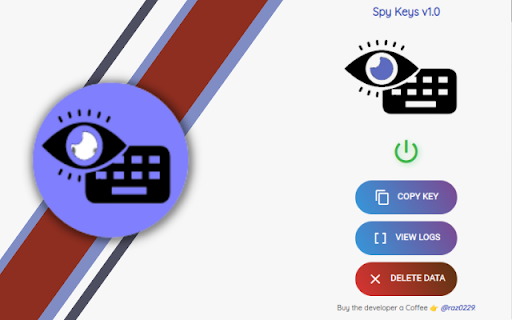


About
This extension lets you log all the keystrokes you enter on various websites and saves them in a secure remote database with AES encryption.

PLEASE RESTART THE BROWSER FOR CHANGES TO TAKE EFFECT

Each User has its own unique UUID that is created when the app runs for the first time and your data can be accessed anywhere on web, using the API key that you created.
Your keylogs can be accessed here:
https://spykeys.vercel.app

The data that is saved in the database is encrypted using Advanced Encryption Standard (AES), so no one can have access to it even in case of a breach.

You have complete access to your data stored in SpyKeys and it can all be removed with one click on "Delete Data" button.

--------------------------------------------
Contact for more information
Technical
- Version
- 1.0
- Manifest
- V3
- Size
- 421KiB
- Min Chrome
- 88
- Languages
- 1
- Featured
- Yes
Metadata
- ID
- jmijmfdhfmcbddpgpgnicnnajcocpmgk
- Developer ID
- u5accbb760d24e7a6e93299c1c1a659c9
- Developer Email
- [email protected]
- Created
- Jan 17, 2023
- Last Updated (Store)
- Jan 17, 2023
- Last Scraped
- Jun 7, 2026
- Website
- —
- Support URL
- https://github.com/raz0229
- Privacy Policy
- https://github.com/raz0229
Similar extensions
Alternatives to SpyKeys, ranked by description similarity.

Pressd.
Get the history of your keystrokes for the last 1 hour of any page!
—

Xlsdeal User Credentials
It will Save User ID/Name and Password Locally inside your browser for Convenient Access.
14
★ 5.0

Blur-It
Automatically detects and blurs sensitive credentials (passwords, API keys, emails, credit cards) on web pages. Hover to reveal.
3
Password Peeper
Show your password on the web page filled in by browser. Double click to copy your password to clipboard in case you forgot it.
100
★ 5.0

Powerful note
A powerful note.
2

gPass
gPass : global password manager
217
★ 4.3

ByteLock Password Manager
Autofill passwords, detect login forms, and save new credentials from any website. Works with your ByteLock vault.
2
★ 5.0

Private Bookmarks
Private Bookmarks By ImFullStack.dev
181
★ 3.0
Data sourced from the Chrome Web Store · last verified Jun 7, 2026.