
Odexly Tabs – Save & Restore Tab Groups
Save tabs into task groups, reopen them in one click, and keep your browser organized without an account.
As of June 2026, Odexly Tabs – Save & Restore Tab Groups has 1 users in the Workflow & Planning category.
Usersno change0%
1
1
Ratingno change0%
—
— reviews
Reviewsno change0%
—
Version
1.0.1
Manifest V3
90-day change · In the last 90 days this extension 1 version update.
History
3 snapshotsTracking since May 16, 2026.
View as table
| Date | Users | Rating | Reviews | Version |
|---|---|---|---|---|
| May 16, 2026 | — | — | — | 1.0.0 |
| May 22, 2026 | — | — | — | 1.0.0 |
| Jun 10, 2026 | 1 | — | — | 1.0.0 |
| Now | 1 | — | — | 1.0.1 |
Changelog
- Jun 10, 2026name
Tab Ordex – Save & Restore Tab Groups
Odexly Tabs – Save & Restore Tab Groups
Permissions & access
- Permissions
- tabsstoragealarms
- Host access
- None declared
Screenshots


About
Tab Ordex helps you save, organize, and restore your browser tabs with ease.

Whether you are working on ads, SEO research, coding, content planning, or daily tasks, Tab Ordex lets you keep related tabs together and reopen them whenever you need.

✨ Key Features

📌 Save tab groups
Create named groups from your current tabs and keep your workspace organized.

🔁 Restore tabs anytime
Reopen saved tab groups with one click and continue your work faster.

📝 Add notes to groups
Write short notes so you remember why each group was saved.

🔍 Search saved groups and tabs
Quickly find the group or website you need.

🧩 Manage saved tabs
Expand saved groups, remove individual tabs, add URLs, or add your current tab to an existing group.

🗂️ Drag to reorder groups
Move your important groups to the top and organize your workflow your way.

🧹 Trash & recovery
Deleted groups go to Trash first, so you can restore them or remove them permanently later.

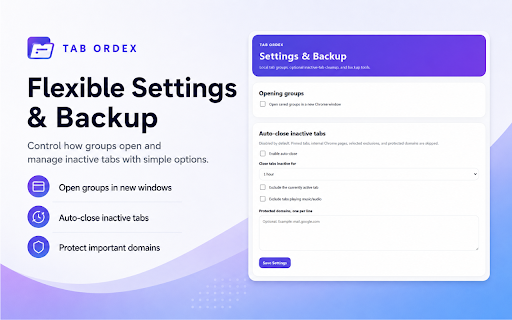
⚙️ Flexible settings
Choose how saved groups open and configure inactive-tab cleanup options.

💾 Backup & restore
Export and import your saved data when needed.

Tab Ordex is designed for people who work with many tabs and want a cleaner, faster, and more organized browsing experience.

No account required. Simple, local, and easy to use.
Technical
- Version
- 1.0.1
- Manifest
- V3
- Size
- 26.54KiB
- Min Chrome
- 88
- Languages
- 1
- Featured
- No
Metadata
- ID
- jmfljelokcloeichkhcciephhblmfbmh
- Developer ID
- u87bbb70b5a3b2f5c98d17dfac150f88c
- Developer Email
- [email protected]
- Created
- May 15, 2026
- Last Updated (Store)
- Jun 10, 2026
- Last Scraped
- Jun 10, 2026
- Website
- —
- Support URL
- —
- Privacy Policy
- —
Data sourced from the Chrome Web Store · last verified Jun 10, 2026.