
Tape
Measurement tools, rulers and grids
As of June 2026, Tape has 10,000 users and a 4.62/5 rating from 155 reviews in the Developer Tools category.
Usersno change0%
10.0K
10,000
Ratingno change0%
4.62
155 reviews
Reviewsdown 0.6 percent−0.6%
155
Version
2.2
Manifest V3
History
2 snapshotsTracking since Apr 23, 2026.
View as table
| Date | Users | Rating | Reviews | Version |
|---|---|---|---|---|
| Apr 23, 2026 | 10.0K | 4.62 | 156 | 2.2 |
| May 12, 2026 | 20.0K | 4.62 | 155 | 2.2 |
| Now | 10.0K | 4.62 | 155 | 2.2 |
Permissions & access
- Permissions
- activeTabscripting
- Host access
- None declared
Screenshots

About
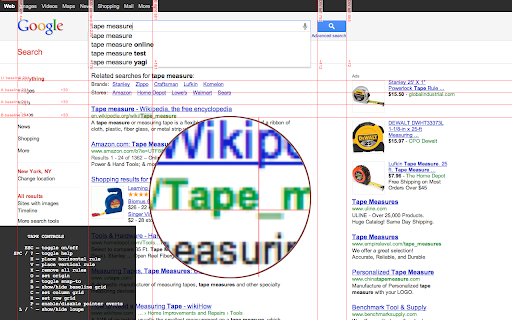
Tape is a tool for pixel-perfect website development. It lets you put down guides that snap intelligently to the page content (and stick to it if it moves on scroll or resize), and helps you easily measure positions and sizes of elements. It knows about borders and padding, and will even snap to the baseline of text. There is on-screen help, the ability to display user-defined column and row grids, a built-in magnifying glass for pixel-perfect measurement, and all guides can be quickly toggled on and off with a single keystroke.

Unlike some extensions it will not interfere with any webpage you visit unless you click the Tape icon.

Once installed:
  Click icon to activate. Read help, or press Space to dismiss it.
  Mouse over document, observe that rules snap to useful positions
  (including baselines!), and use keys as follows:

  H – drop Horizontal rule here (or remove if there's one here already)
  V – drop Vertical rule here (or remove if there's one here already)
  B - drop Both horizontal and vertical rules here
  arrow keys – fine adjustment (+shift, +alt for larger adjustment)
  S – toggle snapping on and off.
  P – toggle pointer events on and off
  O – set origin to current position.
  C / R – set column or row grid
  L or backquote – toggle loupe. (To refresh loupe image, press L twice.)
  Space – toggle help

  Press ESC to toggle everything on and off. Press X to reset all guides on a page.
Technical
- Version
- 2.2
- Manifest
- V3
- Size
- 12.68KiB
- Min Chrome
- 88
- Languages
- 1
- Featured
- Yes
Metadata
- ID
- jmfleijdbicilompnnombcbkcgidbefb
- Developer ID
- uaef21db63794ade092d78e5e2b8e9d45
- Developer Email
- [email protected]
- Created
- Aug 5, 2011
- Last Updated (Store)
- May 22, 2024
- Last Scraped
- Jun 7, 2026
- Website
- —
- Support URL
- —
- Privacy Policy
- —
Similar extensions
Alternatives to Tape, ranked by description similarity.

Page Ruler - Measure Pixels on Screen
Measure any element on a webpage in pixels. Drag to measure areas, hover to see dimensions. Free ruler for designers.
20

Browser Ruler
Measure UI elements and create guide lines on any webpage.
33

Page Ruler
Page Ruler: Drag guidelines and inspect element properties for perfect UI practice in browser.
10.0K
★ 3.3

Screen Ruler - Measure and Inspect the Web
Web inspector for designers & developers. Measure elements, extract CSS & colors, capture screenshots & more.
50.0K
★ 4.4

Pixel Ruler
Measure any element on a webpage - drag to measure, element highlight, guides & multiple units
17

New Grid Ruler
Overlay adjustable grid lines and measure accurate distances directly on live webpages—fast and distraction-free.
50
★ 5.0

Page Ruler
Measure elements and distances with box mode or draggable ruler. Supports px, cm, inch. Rotate, resize, and customize colors.
158

The Ruler
A simple and complete ruler to measure viewport distances with pinned guides.
9
Data sourced from the Chrome Web Store · last verified Jun 7, 2026.