
Data Cloud Schema Sync
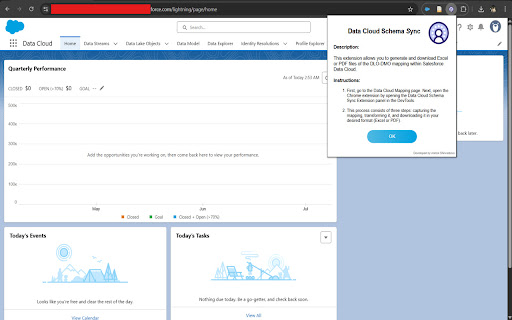
This extension allows you to generate and download Excel or PDF files of the DLO-DMO mapping within Salesforce Data Cloud.
As of June 2026, Data Cloud Schema Sync has 71 users and a 5.00/5 rating from 3 reviews in the Developer Tools category.
Usersdown 2.7 percent−2.7%
71
71
Ratingno change0%
5.00
3 reviews
Reviewsno change0%
3
Version
1.1
Manifest V3
History
3 snapshotsTracking since Apr 20, 2026.
View as table
| Date | Users | Rating | Reviews | Version |
|---|---|---|---|---|
| Apr 20, 2026 | 73 | 5.00 | 3 | 1.1 |
| May 5, 2026 | 70 | 5.00 | 3 | 1.1 |
| Jun 4, 2026 | 71 | 5.00 | 4 | 1.1 |
| Now | 71 | 5.00 | 3 | 1.1 |
Permissions & access
- Permissions
- tabsactiveTab
- Host access
- None declared
Screenshots


About
🚀 Salesforce Data Cloud Schema Sync | Chrome Extension 🔄
Simplify and export your DLO–DMO mappings with ease!

Overview:
Struggling with complex Data Lake Object (DLO) to Data Model Object (DMO) mappings in Salesforce Data Cloud? This Chrome Extension is designed to make your life easier by allowing you to capture, transform, and export your schema mappings to PDF or Excel formats in just a few clicks.

Whether you're a Salesforce admin, data architect, or working with Marketing Cloud, this tool helps eliminate the manual hassle and brings speed, accuracy, and collaboration to your workflow.

🔍 Key Features:
Capture DLO–DMO mappings from the Salesforce Data Cloud interface
Export mappings as PDF or Excel for easy validation and sharing
Streamline collaboration between teams
Reduce manual errors and improve documentation workflows

✅ Use Case:
Validating schema relationships manually is often complex and error-prone. This tool automates that process, making it ideal for quick reviews, audits, or sharing mappings across teams and stakeholders.

🛠️ How to Use:
Navigate to the Data Lake Object (DLO)
Open the Salesforce Data Cloud and go to the DLO you want to analyze.

Open the Extension from DevTools
Right-click on the page → Click on Inspect (or press Ctrl+Shift+I) → Go to the Schema Sync tab in DevTools.

Click “Review” in Salesforce
With the extension panel open, click the Review button in Data Cloud to bring up the mapping view.

Click "Capture Mapping"
Once the mapping is visible, click Capture Mapping in the extension.

Transform & Export
Click Transform Mapping, and you’ll get the option to download the mapping as a PDF or Excel file.

If you find this extension useful, please consider leaving a ⭐ rating and review. For feedback, feature requests, or contributions, feel free to reach out!
Technical
- Version
- 1.1
- Manifest
- V3
- Size
- 4.36MiB
- Min Chrome
- 88
- Languages
- 1
- Featured
- No
Metadata
- ID
- jllpicphkmjbbejghdhlnehdgfhbcded
- Developer ID
- u937d96e5dc361f425bf85e9e0c175979
- Developer Email
- [email protected]
- Created
- Apr 17, 2025
- Last Updated (Store)
- Apr 23, 2025
- Last Scraped
- Jun 4, 2026
- Website
- —
- Support URL
- —
- Privacy Policy
- —
Similar extensions
Alternatives to Data Cloud Schema Sync, ranked by description similarity.

Sitemap Builder
Salesforce Data 360 Sitemap Builder
438

Salesforce Metadata Exporter
Export Salesforce metadata (not data) as a ZIP file using the Metadata API. Requires active Salesforce session.
38
★ 5.0

Salesforce Explorer - Enhanced Setup
Enhance your Salesforce setup with checks and best practices
44
★ 5.0

Salesforce Package Generator
Generate deployment packages for Salesforce with ease
137
★ 5.0

Salesforce Metadata Navigator
Salesforce Metadata Navigator for Admins: Formula styler, Field Finder, Validation Rule search, Flow Manager, and List View export.
239
★ 5.0

Salesforce Field Metadata Exporter
Export Salesforce object and field metadata to CSV with advanced filtering. Filter by user permissions and system objects.
168

Salesforce Flow MetaData Downloader
Download & Analyse Salesforce flow MetaData with a single click directly from Salesforce Lightning.
2.0K
★ 5.0

SFDX Metadata Backup
Download Salesforce metadata, components, and configurations directly to your local machine with one click.
59
Data sourced from the Chrome Web Store · last verified Jun 4, 2026.