
Web Tutorial AI
A Chrome extension that provides AI assistance for any webpage with TTS support
As of June 2026, Web Tutorial AI has 1 users in the Workflow & Planning category.
Usersno change0%
1
1
Ratingno change0%
—
— reviews
Reviewsno change0%
—
Version
1.0
Manifest V3
History
2 snapshotsTracking since Apr 1, 2026.
Not enough history yet for this metric — the chart fills in as we collect more snapshots.
View as table
| Date | Users | Rating | Reviews | Version |
|---|---|---|---|---|
| Apr 1, 2026 | — | — | — | 1.0 |
| Apr 17, 2026 | — | — | — | 1.0 |
| Now | 1 | — | — | 1.0 |
Permissions & access
- Permissions
- activeTabscriptingstoragettsdownloadstabs
- Host access
- https://api.elevenlabs.io/*, https://openrouter.ai/*, https://api.perplexity.ai/*, https://api.search.brave.com/*, https://texttospeech.googleapis.com/*, https://webtutorialai.com/*, https://www.webtutorialai.com/*, https://webtutorial.ai/*, https://www.webtutorial.ai/*, https://generativelanguage.googleapis.com/*, https://export.arxiv.org/*, https://api.semanticscholar.org/*, https://api.openfda.gov/*, https://api.patentsview.org/*, https://tsdrapi.uspto.gov/*, https://google.serper.dev/*, https://api.exa.ai/*
Screenshots


About
Web Tutorial AI – Your AI Assistant Companion for Every Webpage
Achieve Your Web Tasks Quickly. Web Tutorial AI isn't just another chatbot. It’s a context-aware assistant that lives in your browser and understands exactly what you’re looking at. Whether you’re following a complex tutorial, analyzing data, or stuck on a technical task, Web Tutorial AI provides real-time guidance tailored to the page you're on.
Key Features:
Contextual Intelligence: Automatically interprets the active webpage to provide relevant answers without you needing to copy-paste.

Hold-to-Talk (STT/TTS): A seamless voice interface. Simply press and hold the "ASK" button to speak your query and release to send. Listen to AI responses with integrated Text-to-Speech.

Privacy-First Design: Your data belongs to you. All extension data is stored locally on your machine. We don't harvest, track, or sell your browsing habits.

Power User Controls: Fully customizable settings. Toggle Web Search, adjust Max Tokens, and set specific "Roles & Tasks" to refine the AI’s behavior.

Session Management: Step-by-step interactive progress tracking. Save your chats, download transcripts, or clear your history with a single click.

Roles & Tasks (Your AI Crew): Pick an expert and go—with 21 specialized AI roles and contextual task menus powered by MCP servers. Connect to live data sources like Google Cloud docs, FDA records, and patent databases so responses are grounded in real, up-to-date information. Tasks auto-adapt based on the page you're on, like generating YouTube timestamps or product price comparisons, with 7 roles working instantly with zero setup.

How it Works:
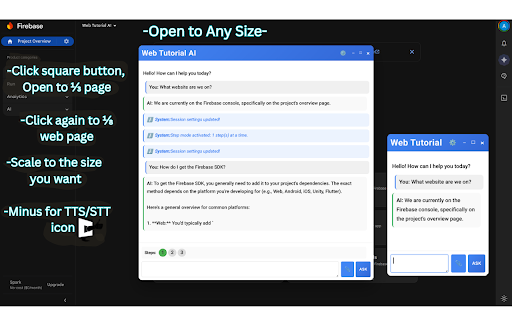
Open the extension on any webpage, The AI reads the web page and helps you with your task.

Commitment to Privacy: We believe in transparency. We don't collect your data—the only way we know how you're using the tool is if you choose to contact us through our built-in feedback feature.

AI Assistant sits on the webpage, Knows what is on the page and helps you with accomplish tasks
Technical
- Version
- 1.0
- Manifest
- V3
- Size
- 484KiB
- Min Chrome
- 88
- Languages
- 1
- Featured
- No
Metadata
- ID
- jllepkcbhbhamfaieifmjmcfffocmdfd
- Developer ID
- u48f0fd35eecfaeb6e8e2883a4e347daa
- Developer Email
- [email protected]
- Created
- Mar 30, 2026
- Last Updated (Store)
- Mar 30, 2026
- Last Scraped
- Jun 6, 2026
- Website
- webtutorial.ai
- Support URL
- https://www.webtutorial.ai
- Privacy Policy
- https://www.webtutorial.ai/privacy
Data sourced from the Chrome Web Store · last verified Jun 6, 2026.