
JSON Viewer · Open Source · No Tracking
Privacy-first JSON, YAML & XML viewer. Zero network calls, open source, and handles 10MB+ files without freezing.
As of June 2026, JSON Viewer · Open Source · No Tracking has 4 users and a 5.00/5 rating from 1 reviews in the Developer Tools category.
Usersno change0%
4
4
Ratingno change0%
5.00
1 reviews
Reviewsno change0%
1
Version
1.0.0
Manifest V3
History
2 snapshotsTracking since Jun 2, 2026.
Not enough history yet for this metric — the chart fills in as we collect more snapshots.
View as table
| Date | Users | Rating | Reviews | Version |
|---|---|---|---|---|
| Jun 2, 2026 | — | — | — | 1.0.0 |
| Jun 8, 2026 | — | — | — | 1.0.0 |
| Now | 4 | 5.00 | 1 | 1.0.0 |
Permissions & access
- Permissions
- activeTabscriptingstorage
- Host access
- None declared
Screenshots


About
JSON Viewer, YAML Viewer, and XML Viewer for Chrome.

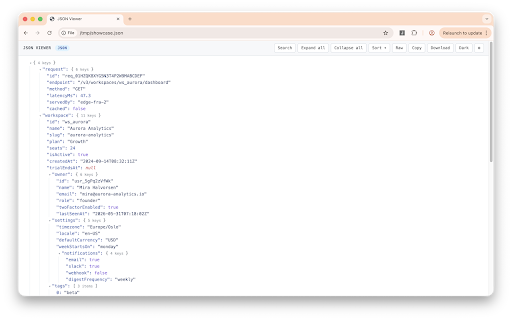
Format, inspect, search, and navigate JSON, YAML, XML, JSONP, API responses, local files, Kubernetes configs, GitHub Actions workflows, and other structured data using a fast expandable tree interface.

Built for developers, DevOps engineers, QA engineers, API consumers, and anyone who works with structured data every day.

────────────────────────────────────
WHY THIS EXISTS
────────────────────────────────────
Recent incidents involving popular browser extensions have reminded many developers how much trust they place in the tools they install.
This extension was built around a simple idea: a structured-data viewer should view structured data — and nothing else.

────────────────────────────────────
✓ ZERO NETWORK CALLS — EVER
────────────────────────────────────

Open Chrome DevTools. Open the Network tab. Use the extension.

Nothing happens.

No analytics.
No telemetry.
No tracking.
No advertising.
No donation popups.
No hidden requests.
No background communication of any kind.

The extension makes zero outbound network requests. Every action happens entirely on your device.

You can verify this yourself in seconds.

────────────────────────────────────
✓ OPEN SOURCE (MIT LICENSE)
────────────────────────────────────

Every line of code is publicly available.

No obfuscation.
No hidden logic.
No minified mystery code.

Audit it before installing.
Audit it after every update.
Fork it if you want.

GitHub:
github.com/connorleebo/json-viewer-extension

────────────────────────────────────
✓ NO REMOTE CODE
────────────────────────────────────

Everything ships inside the Chrome extension package.

No CDN dependencies.
No remote JavaScript.
No downloaded code.
No dynamically loaded scripts.

What you install is exactly what runs.

────────────────────────────────────
✓ MINIMAL PERMISSIONS
────────────────────────────────────

Only three permissions are required:

- activeTab — only after you click the extension
- scripting — used to render the viewer in the current tab
- storage — used only for your local theme preference

That's it.

No <all_urls>.
No tabs permission.
No cookies access.
No webRequest access.
No browsing history access.
No background page monitoring.

The extension cannot access pages unless you explicitly activate it.

────────────────────────────────────
✓ BUILT FOR REAL-WORLD FILES
────────────────────────────────────

- Renders 10MB+ JSON files without freezing the tab
- Lazy-loaded expandable tree viewer
- Continuous loading progress feedback
- Fast search with match counter
- Automatic node expansion while searching
- JSON, YAML, XML, and JSONP support
- Local file support
- Raw / Parsed toggle
- Alphabetical key sorting (A→Z, Z→A, or original order)
- Copy value
- Copy object as JSON
- Copy JSONPath
- Download as .json
- Light and dark themes
- Theme preference stored locally

────────────────────────────────────
✓ YAML SUPPORT
────────────────────────────────────

Perfect for:

- Kubernetes manifests
- GitHub Actions workflows
- Docker Compose files
- CI/CD configuration
- Infrastructure-as-Code projects
- Application configuration files

Navigate large YAML documents as an expandable tree instead of raw text.

────────────────────────────────────
✓ XML SUPPORT
────────────────────────────────────

Inspect XML documents using the same expandable interface.

Works with:

- XML APIs
- RSS feeds
- SOAP responses
- Configuration files
- Local XML documents

Supports XML files viewed through Chrome's built-in file viewer.

────────────────────────────────────
✓ FAST SEARCH & NAVIGATION
────────────────────────────────────

Quickly locate keys, values, properties, attributes, and nested objects.

Search results include:

- Match count
- Automatic expansion to matching nodes
- Keyboard-friendly navigation
- Large-document performance optimization

────────────────────────────────────
✓ DO-NO-HARM GUARANTEE
────────────────────────────────────

If content is not valid JSON, YAML, XML, or JSONP, the extension does nothing.

Your page remains exactly as Chrome rendered it.

No blank pages.
No destroyed content.
No forced overrides.

A small notification explains why parsing wasn't possible and leaves the page untouched.

────────────────────────────────────
PRIVACY DISCLOSURE
────────────────────────────────────

The only data stored is your theme preference.

Storage location:
chrome.storage.local

Stored data:
- Light/Dark theme preference

Not stored:
- Files
- Page contents
- URLs
- Search history
- Usage analytics
- Personal information

Nothing is synced.
Nothing is transmitted.
Nothing leaves your device.

You can disable local storage or clear preferences at any time.

Privacy Policy:
connorleebo.github.io/json-viewer-extension/privacy-policy.html

────────────────────────────────────
FOUND A BUG OR HAVE A FEATURE REQUEST?
────────────────────────────────────

GitHub Issues:
github.com/connorleebo/json-viewer-extension/issues

Privacy questions are welcome too.

────────────────────────────────────

Built by one developer who got tired of waiting for someone else to ship a clean alternative.

MIT Licensed.
Open Source.
No Tracking.
No Telemetry.
No Surprises.
Technical
- Version
- 1.0.0
- Manifest
- V3
- Size
- 77.95KiB
- Min Chrome
- 88
- Languages
- 1
- Featured
- No
Metadata
- ID
- jljkcfhlbilhnhidghiepnbamhdjnpjf
- Developer ID
- u415293a76e87e2c907a15fc89c7254c1
- Developer Email
- [email protected]
- Created
- Jun 1, 2026
- Last Updated (Store)
- Jun 1, 2026
- Last Scraped
- Jun 8, 2026
- Website
- —
Data sourced from the Chrome Web Store · last verified Jun 8, 2026.