
PAGE1 Speed Metrix
PAGE1 Speed Metrix: Page Insights extension
As of May 2026, PAGE1 Speed Metrix has 5 users and a 5.00/5 rating from 4 reviews in the Productivity category.
Usersno change0%
5
5
Ratingno change0%
5.00
4 reviews
Reviewsno change0%
4
Version
1.0
Manifest V3
History
2 snapshotsTracking since Apr 29, 2026.
View as table
| Date | Users | Rating | Reviews | Version |
|---|---|---|---|---|
| Apr 29, 2026 | — | 5.00 | 4 | 1.0 |
| May 26, 2026 | 8 | 5.00 | 4 | 1.0 |
| Now | 5 | 5.00 | 4 | 1.0 |
Permissions & access
- Permissions
- activeTabscriptingalarmsnotifications
- Host access
- None declared
Screenshots


About
Nâng cao trải nghiệm duyệt web của bạn và nhận những thông tin quý giá về hiệu suất trang web với tiện ích mở rộng Chrome PAGE1 Speed Metrix! Công cụ này cho phép bạn phân tích dễ dàng tốc độ và tối ưu hóa của bất kỳ trang web nào, cung cấp cho bạn các chỉ số hiệu suất quan trọng chỉ với một cú nhấp chuột.

1. Tính Năng
Phân Tích Tức Thì: Nhanh chóng đánh giá tốc độ tải và hiệu suất của bất kỳ trang web nào trực tiếp từ trình duyệt Chrome của bạn.

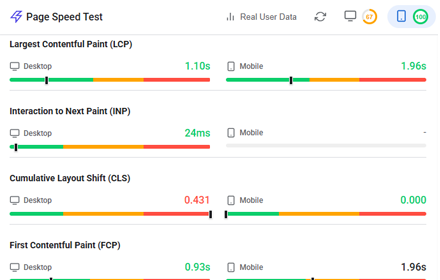
Chỉ Số Chi Tiết: Xem các thông tin chi tiết về các chỉ số hiệu suất quan trọng như First Contentful Paint (FCP), Time to Interactive (TTI) và nhiều hơn nữa.

Kiểm Tra Trên Di Động & Máy Tính: Đánh giá hiệu suất cho cả phiên bản di động và máy tính của trang web, cung cấp cái nhìn toàn diện.

Thông Tin Tối Ưu Hóa: Nhận các khuyến nghị hữu ích để cải thiện tốc độ trang web và trải nghiệm người dùng.

Chẩn Đoán Bên Thứ Ba: Xác định và phân tích tác động của các tập lệnh và tài nguyên bên thứ ba đến thời gian tải.

Giao Diện Thân Thiện: Tận hưởng giao diện sạch sẽ, trực quan, hiển thị các chỉ số và thông tin một cách dễ hiểu.

2. Cách Hoạt Động
Cài Đặt Tiện Ích: Nhấp vào "Thêm vào Chrome" để cài đặt tiện ích.
Mở Thanh Bên: Nhấp vào biểu tượng PAGE1 Speed Metrix trên thanh công cụ của trình duyệt để mở thanh phân tích.
Phân Tích: Tự động phân tích trang web hiện tại chỉ với một cú nhấp chuột vào biểu tượng.
Xem Kết Quả: Xem ngay các chỉ số hiệu suất chính và các đề xuất cải thiện.

----------------------------------------------------------------

Enhance your web experience and gain critical insights into website performance with the PAGE1 Speed Metrix Chrome Extension! This tool allows you to effortlessly analyze the speed and optimization of any website, providing you with valuable performance metrics at the click of a button.

1. Features
Instant Analysis: Quickly assess the loading speed and performance of any webpage directly from your Chrome browser.

Detailed Metrics: View comprehensive insights on essential performance indicators such as First Contentful Paint (FCP), Time to Interactive (TTI), and more.

Mobile & Desktop Testing: Evaluate performance for both mobile and desktop versions of websites, offering a complete view.

Optimization Insights: Receive actionable recommendations to enhance website speed and user experience.

Third-Party Diagnostics: Identify and analyze the impact of third-party scripts and resources on loading times.

User-Friendly Interface: Enjoy a clean, intuitive interface that displays key metrics and insights in an easy-to-understand format.

2. How It Works
Install the Extension: Click "Add to Chrome" to install the extension.
Open the Sidebar: Click the PAGE1 Speed Metrix icon in the browser toolbar to open the analysis sidebar.
Analyze: Automatically analyze the current webpage with a single click of the icon.
Review Results: Instantly view key performance metrics and suggestions for improvement.
Technical
- Version
- 1.0
- Manifest
- V3
- Size
- 68.13KiB
- Min Chrome
- 88
- Languages
- 1
- Featured
- No
Metadata
- ID
- jlbkjgoehgfdgbcokgblhjjoedblhmoj
- Developer ID
- u87a55341733bc6cf5665f6e44846ec72
- Developer Email
- [email protected]
- Created
- Jun 15, 2024
- Last Updated (Store)
- Jun 15, 2024
- Last Scraped
- May 26, 2026
- Website
- page1.vn
- Support URL
- https://page1.vn/lien-he/
- Privacy Policy
- https://page1.vn/chinh-sach-bao-mat-thong-tin/
Similar extensions
Alternatives to PAGE1 Speed Metrix, ranked by description similarity.

Page Load Timer
Measure the time taken for a page to fully load.
—

Page Load Timer
This extension measures and displays the page load time when activated.
—

Meta Tags Viewer
Displays all meta tags of the current webpage.
—

PageSpeed Insights
Page Load Speed Insights Chrome extension
1.0K
★ 4.0

Scroll to Top
Cuộn trang lên đầu một cách mượt mà.
—

Ads Check by SMIT
Sản phẩm của SMIT dành cho các nhà quảng cáo trên Facebook.
30.0K
★ 5.0
Website Page Speed Test - Core Web Vitals and Real User Data (CrUX) reports
Analyze website performance with Core Web Vitals, resource analysis, and optimization suggestions
158

Copy Clean Title
Copies the cleaned title of the current tab to the clipboard.
—
Data sourced from the Chrome Web Store · last verified May 26, 2026.