
GPT AI-Powered Email Assistant for Businesses
Don't spend all day answering the same customer questions over and over. Maximize your email productivity with a sophisticated AI…
As of May 2026, GPT AI-Powered Email Assistant for Businesses has 72 users and a 5.00/5 rating from 2 reviews in the Communication category.
Usersup 10.8 percent+10.8%
72
72
Ratingno change0%
5.00
2 reviews
Reviewsno change0%
2
Version
1.0.8
Manifest V3
History
2 snapshotsTracking since Apr 29, 2026.
View as table
| Date | Users | Rating | Reviews | Version |
|---|---|---|---|---|
| Apr 29, 2026 | 65 | 5.00 | 2 | 1.0.8 |
| May 26, 2026 | 68 | 5.00 | 2 | 1.0.8 |
| Now | 72 | 5.00 | 2 | 1.0.8 |
Permissions & access
- Permissions
- activeTabidentitystoragescriptingtabs
- Host access
- https://app.getgptmail.com/, *://mail.google.com/*, *://outlook.live.com/*, *://outlook.office.com/*, *://outlook.office365.com/*
Screenshots
About
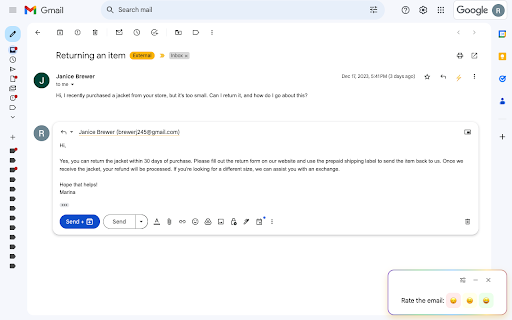
Don't spend all day answering the same customer questions over and over. Maximize your email productivity with a sophisticated AI email assistant available through Gmail that can draft a reply in 3 - 5 seconds using ChatGPT. The extension gets information from your website to give detailed answers so you don't have to go back and forth getting everything right. It takes less than a minute to set up. Start saving time now!


Key Features of GPT AI-Powered Email Assistant for Businesses:

- Customized AI Drafts: Generates complete email drafts using the ChatGPT API, tailored to your business for accurate and personalized responses.

- Understands Your Business: Gathers details from your website, so customers get relevant information they need. Writes emails that convey your unique business offerings and policies without you having to explain them again each time.

- Works Efficiently: Just click the button when you read an email in Gmail, and you'll get a draft response in seconds.

- You're In Control: Send, edit, or delete the draft. You always decide what you send to your customers. Add new information directly to the assistant whenever needed to answer questions correctly.

- Work With Your Team: Add multiple users to help your whole team save time and share information.


How to Use the GPT AI-Powered Email Assistant for Businesses:

#1 Install and Connect:

Install the extension from the extension store.

Click on the extension icon in your browser to log in and specify what website to gather information from.

#2 Seamlessly Draft Responses:

Open a customer email in Gmail.

Click the "Draft Response" button to generate a tailored reply in a few seconds.

The extension drafts a response that is accurate and specific to your unique business needs, using details from both the customer's query and your website.

#3 Edit and Send:

Review the auto-generated draft in the Gmail compose window.

Edit if you wish to add or change any details.

If you need to manually update the customer's account or order, you can still do that before sending the email.

Send the email as usual when you're satisfied with the draft.


Don't spend hours answering the same questions over and over -- put ChatGPT right in your inbox and save time while giving each customer the perfect response.

GPT AI-Powered Email Assistant for Businesses is developed independently and is not associated with OpenAI or Google.
Technical
- Version
- 1.0.8
- Manifest
- V3
- Size
- 63.0KiB
- Min Chrome
- 88
- Languages
- 1
- Featured
- No
Metadata
- ID
- jkpklefgobhhhlhlgiodfjmihgjolbcj
- Developer ID
- u43e946aeac65ee99981e15f36725d886
- Developer Email
- [email protected]
- Created
- Dec 23, 2023
- Last Updated (Store)
- Mar 12, 2024
- Last Scraped
- May 26, 2026
- Website
- getgptmail.com
- Support URL
- http://getgptmail.com
- Privacy Policy
- https://getgptmail.com/privacy
Similar extensions
Alternatives to GPT AI-Powered Email Assistant for Businesses, ranked by description similarity.
ChatGPT for Gmail by cloudHQ
Automatically write emails using ChatGPT for Gmail
30.0K
★ 4.4

GaiEMail (AI Email Assistant) - Generate Replies
Generate intelligent email replies in Gmail using AI. Save time with professional, contextual responses.
26
★ 5.0

Gmail GPTier - AI Email Assistant
AI-powered extension to analyze emails and generate intelligent replies
9
★ 5.0

AI Email Helper
Gmail assistant that generates responses using OpenAI Assistant API
3
Ghostwrite: ChatGPT Email Assistant
A ChatGPT powered AI email writing assistant.
30.0K
★ 3.9

AI Responder for Gmail™
Boost email productivity with AI. Supports Gemini, OpenAI, Groq & Local LLMs (Ollama). Private, secure & multi-language.
1
★ 5.0

GmailMate
This is an extension which connects chatgpt with Gmail
96
★ 5.0

Inbox SuperPilot
AI email drafts grounded in your docs. Connect Drive, Notion, or CRM — drafts replies citing your actual sources.
10
Data sourced from the Chrome Web Store · last verified May 26, 2026.