
ADHD Reader
专为ADHD设计的沉浸式阅读助手
As of July 2026, ADHD Reader has — users in the Productivity category.
Usersno change0%
—
—
Ratingno change0%
—
— reviews
Reviewsno change0%
—
Version
1.0.0
Manifest V3
History
1 snapshotsTracking since Jul 11, 2026.
Not enough history yet for this metric — the chart fills in as we collect more snapshots.
View as table
| Date | Users | Rating | Reviews | Version |
|---|---|---|---|---|
| Jul 11, 2026 | — | — | — | 1.0.0 |
| Now | — | — | — | 1.0.0 |
Permissions & access
- Permissions
- storage
- Host access
- https://api.anthropic.com/*
Screenshots

About
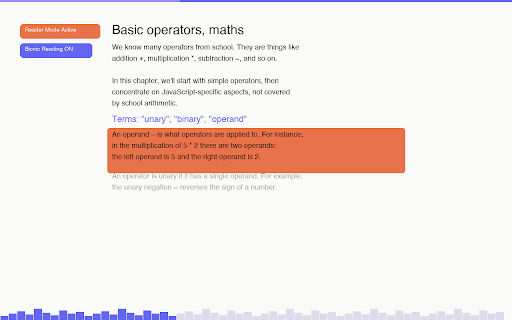
ADHD Reader transforms any webpage into a clean, distraction-free reading experience designed specifically for people with ADHD and focus challenges.

Core Features

Reader Mode — Strips away ads, sidebars, and clutter. One click to enter a clean reading overlay with just the content that matters.

Focus Mode — Dims everything except the paragraph you're reading. Navigate paragraph by paragraph with ↑ ↓ arrow keys or J / K shortcuts. Your eyes always know where to go.

Bionic Reading — Bolds the first letters of each word so your brain reads faster with less effort. Proven to improve reading speed and retention.

Progress Tracking — A subtle progress bar and animated city skyline at the bottom light up as you read, turning finishing an article into a satisfying experience.

Typography Controls — Adjust font, font size, line height, letter spacing, and paragraph spacing to find your ideal reading comfort.

AI Summary (Claude) — Generate a detailed, structured summary of any article in seconds usingciding whether an article is worth your full attention.
Inactivity Reminder — Been zoning out? ADHD Reader gently reminds you to come back after a period

Reading Position Memoe you left off on everypage.

Keyboard Shortcuts
- Alt+R — Toggle reader
- Alt+F — Toggle focus mode
- Alt+B — Toggle Bionic
- ↑ / ↓ or J / K — Navigate paragraphs

Languages — English and Chinese (中文) supported, switch anytime.
Technical
- Version
- 1.0.0
- Manifest
- V3
- Size
- 52.76KiB
- Min Chrome
- 88
- Languages
- 1
- Featured
- No
Metadata
- ID
- jkimdfdejjbhogmahdafeencejkbnlnh
- Developer ID
- u26b21d1a9836a30bb99b9c27153556f9
- Developer Email
- [email protected]
- Created
- Jul 10, 2026
- Last Updated (Store)
- Jul 10, 2026
- Last Scraped
- Jul 11, 2026
- Website
- —
- Support URL
- —
Data sourced from the Chrome Web Store · last verified Jul 11, 2026.