
Midcloud Browser - Sidebar Browser with Toolbar
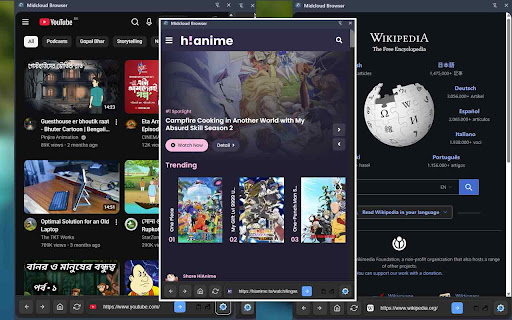
A Chrome extension with a sidebar browser featuring a bottom toolbar with home, reload, address bar, and settings.
As of June 2026, Midcloud Browser - Sidebar Browser with Toolbar has 41 users and a 5.00/5 rating from 2 reviews in the Functionality & UI category.
Usersup 86.4 percent+86.4%
41
41
Ratingno change0%
5.00
2 reviews
Reviewsno change0%
2
Version
2.6.0
Manifest V3
History
8 snapshotsTracking since Apr 6, 2026.
View as table
| Date | Users | Rating | Reviews | Version |
|---|---|---|---|---|
| Apr 6, 2026 | 22 | 5.00 | 2 | 2.6.0 |
| Apr 18, 2026 | 33 | 5.00 | 2 | 2.6.0 |
| Apr 23, 2026 | 26 | 5.00 | 2 | 2.6.0 |
| Apr 30, 2026 | 30 | 5.00 | 2 | 2.6.0 |
| May 7, 2026 | — | 5.00 | 2 | 2.6.0 |
| May 12, 2026 | 42 | 5.00 | 2 | 2.6.0 |
| May 24, 2026 | — | 5.00 | 2 | 2.6.0 |
| Jun 3, 2026 | 72 | 5.00 | 2 | 2.6.0 |
| Now | 41 | 5.00 | 2 | 2.6.0 |
Permissions & access
- Permissions
- sidePanelstorageactiveTabcontextMenusdeclarativeNetRequestdeclarativeNetRequestWithHostAccess
- Host access
- <all_urls>, https://*.youtube.com/*, https://youtube.com/*, https://youtu.be/*, https://*.facebook.com/*, https://facebook.com/*, https://*.fb.com/*, https://fb.com/*, https://*.messenger.com/*, https://messenger.com/*
Screenshots


About
Midcloud Sidebar adds a fast, lightweight mini sidebar in the Chrome side panel so you can explore the web without leaving your current tab context.

features:
* Integrated side panel browsing: Back, Forward, Reload, Home, address bar + Go.
* Smart input: Type a URL (auto protocol) or a search query (Google search).
*  Voice search: One‑click speech recognition (where supported).
*  Image search shortcut: Direct Google Images query from the home screen.
*  Favicon, page title, copy link, and “Open in new tab” actions for the current page.
*  Recent links: Automatic, privacy‑friendly list of your last sidebar visits (local, capped to 10).
*  Shortcuts grid: Add/remove your favorite sites (synced across devices).
*  Theming: Auto (system), Light, Dark.
*  Custom Home: Set any URL as the Home page.
*  Custom background: Upload an image or supply a URL for a blurred home backdrop; easily   clear/reset.
*  Media volume enhancements (optional): Default volume and mouse‑wheel volume control for  audio/video in the panel.
*  Privacy & storage: Uses Chrome sync for settings/shortcuts; uses local storage for transient UI data only.
Technical
- Version
- 2.6.0
- Manifest
- V3
- Size
- 721KiB
- Min Chrome
- 88
- Languages
- 1
- Featured
- No
Metadata
- ID
- jjoiomffmefckaojfllnjangamlnoacf
- Developer ID
- u93ad0943278c8b8f2d4b45afa0a2fa77
- Developer Email
- [email protected]
- Created
- Nov 15, 2025
- Last Updated (Store)
- Feb 17, 2026
- Last Scraped
- Jun 3, 2026
- Website
- insidever.com
- Privacy Policy
- —
Similar extensions
Alternatives to Midcloud Browser - Sidebar Browser with Toolbar, ranked by description similarity.
Page Sidebar | Open any page in side panel
Effortlessly open any website in your web browser's sidebar – streamline your workflow instantly!
20.0K
★ 4.3

Chrome Sidekick
Your AI Sidekick for Chrome — Web browser AI agent that automates workflows, explains pages, and extracts data.
1.0K
★ 4.5

Startboard
Open source start page for Chrome.
—
★ 5.0

Shortcut Sidebar
Access a variety of keyboard shortcuts from a sidebar. Ideal for tablet mode users.
8

Rei Sidebar
Arc-style sidebar for Chrome
—

Serenity
Multifunctional, calm and beautiful new tab extension
111
★ 5.0

Chrome Home - Beautiful New Tab
Beautiful new tab page with customizable widgets and NASA space backgrounds
24
★ 5.0

GetStarted - Minimal & Fast Startpage
Minimal & fast startpage for your browser.
117
★ 5.0
Data sourced from the Chrome Web Store · last verified Jun 3, 2026.