
Password Saver
Local encrypted password manager — no third parties
As of June 2026, Password Saver has — users in the Privacy & Security category.
Usersno change0%
—
—
Ratingno change0%
—
— reviews
Reviewsno change0%
—
Version
1.0.0
Manifest V3
History
1 snapshotsTracking since Jun 3, 2026.
Not enough history yet for this metric — the chart fills in as we collect more snapshots.
View as table
| Date | Users | Rating | Reviews | Version |
|---|---|---|---|---|
| Jun 3, 2026 | — | — | — | 1.0.0 |
| Now | — | — | — | 1.0.0 |
Permissions & access
- Permissions
- storagenotifications
- Host access
- <all_urls>
Screenshots



About
Local password manager with AES-256 encryption. No accounts, no cloud, no third parties. Your passwords never leave your device.

  Password Saver — Local Encrypted Password Manager

  Your passwords belong to you. Password Saver stores everything
  locally on your device, encrypted with AES-256-GCM. No account
  required. No cloud sync. No third-party servers. Ever.

  Very Secure
  • AES-256-GCM encryption with PBKDF2 key derivation (100,000 iterations)
  • Master password never stored — only used to derive your encryption key
  • All data lives exclusively in your browser's local storage
  • Session key cleared when you lock or close the browser

  Seamless experience
  • Automatically detects login forms and offers to save credentials
  • In-page bar appears when you focus a login field — one click to autofill
  • Detects password changes and updates your saved credentials automatically
  • Works on traditional forms and modern single-page apps (React, Vue, Angular)

  You have control over your passwords
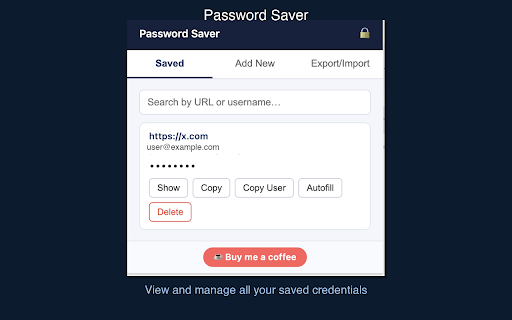
  • View, copy, or reveal any saved password
  • Search across all saved credentials
  • Manually add or edit credentials
  • Encrypted export/import — back up your vault or move to another device

  No account. No subscription. No tracking. Just secure, local password management.

  Support the project: ko-fi.com/ylamsaou
Technical
- Version
- 1.0.0
- Manifest
- V3
- Size
- 353KiB
- Min Chrome
- 88
- Languages
- 1
- Featured
- No
Metadata
- ID
- jjmoedicbnddblpdkkiloenpcokjjcdh
- Developer ID
- u7056c3e48ea963357d2c93d4d09c65de
- Developer Email
- [email protected]
- Created
- Jun 2, 2026
- Last Updated (Store)
- Jun 2, 2026
- Last Scraped
- Jun 8, 2026
- Website
- —
- Support URL
- —
Data sourced from the Chrome Web Store · last verified Jun 8, 2026.