
GetMark
Mark the pages you visit and manage them easily with GetMark.
As of June 2026, GetMark has 20 users and a 5.00/5 rating from 5 reviews in the Workflow & Planning category.
Usersdown 4.8 percent−4.8%
20
20
Ratingno change0%
5.00
5 reviews
Reviewsno change0%
5
Version
0.0.2
Manifest V3
History
3 snapshotsTracking since Apr 20, 2026.
View as table
| Date | Users | Rating | Reviews | Version |
|---|---|---|---|---|
| Apr 20, 2026 | 21 | 5.00 | 5 | 0.0.2 |
| May 5, 2026 | 19 | 5.00 | 5 | 0.0.2 |
| Jun 9, 2026 | 25 | 5.00 | 5 | 0.0.2 |
| Now | 20 | 5.00 | 5 | 0.0.2 |
Permissions & access
- Permissions
- storageactiveTab
- Host access
- None declared
Screenshots
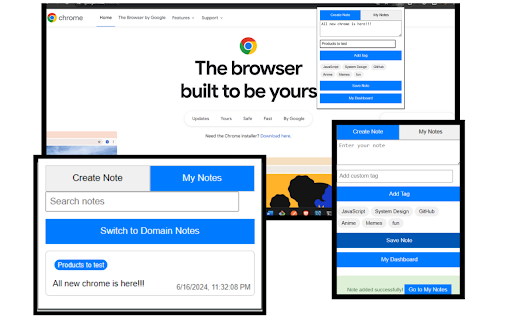
About
Unlock the full potential of your online research and productivity with GetMark, the ultimate note-taking companion for your browser. Whether you’re a student, professional, or just someone who loves to keep things organized, GetMark is designed to enhance your note-taking experience seamlessly.

Key Features:
•	Quick Note-Taking: Instantly capture notes while browsing any webpage. Just click on the GetMark icon, jot down your thoughts, and save them without leaving the page.
•	Organized Dashboard: View and manage all your notes from a single, user-friendly dashboard. Filter and search notes by keywords, URLs, or tags to find exactly what you need in seconds.
•	Tag Management: Organize your notes with customizable tags. Easily add, edit, and delete tags to keep your notes sorted and easily accessible.
•	Smart Filtering: Use powerful filters to quickly locate notes based on specific criteria such as text content, URL, and associated tags.
•	Sorting Options: Sort your notes by time, alphabetically, or by custom order to view them in a way that suits your workflow best.

How It Works:
1.	Take Notes: Click the GetMark icon in your browser toolbar to start taking notes on any webpage.
2.	View Dashboard: Access your dashboard by clicking the GetMark icon and selecting “View Notes”. Here, you can search, filter, and manage all your notes.
3.	Manage Tags: Add custom tags to categorize your notes. Click on tags in the dashboard to filter notes by specific topics or categories.
4.	Sort and Filter: Use the sorting and filtering options in the dashboard to find your notes quickly and efficiently.

Who Can Benefit?
•	Students: Capture important points during online research, lectures, or while reading articles.
•	Professionals: Keep track of meeting notes, project details, and useful web resources.
•	Researchers: Organize and retrieve references, ideas, and insights with ease.
•	Everyone: Improve your daily productivity by keeping all your notes organized and accessible.
Experience the convenience of having all your notes organized and within reach, right from your browser. Download GetMark today and revolutionize the way you take and manage notes online!
Technical
- Version
- 0.0.2
- Manifest
- V3
- Size
- 30.16KiB
- Min Chrome
- 88
- Languages
- 1
- Featured
- No
Metadata
- ID
- jjigjenboocbojhbfeohoicappjobekn
- Developer ID
- u51c7bbbc964b9531a6e0af7ea2a7de38
- Developer Email
- [email protected]
- Created
- Jun 28, 2024
- Last Updated (Store)
- Jun 13, 2025
- Last Scraped
- Jun 9, 2026
- Website
- —
- Support URL
- https://github.com/GHkrishna/Getmark
- Privacy Policy
- https://www.getmark.dev/privacy-policy.html
Similar extensions
Alternatives to GetMark, ranked by description similarity.

Make Notes
Quickly make and autosave notes on any webpage. Organize your web notes effortlessly
45

Web highlighter & take notes
Instantly highlight web content and take notes directly on any page.
51
★ 2.0

Flash Notes
A simple and efficient note-taking Chrome extension for quick thoughts and tasks.
3

TopiNote
Convenient notes for work or study online
4

Quick Notes
A simple note-taking app for Chrome
20

Markwise - Save, Organize & Find Anything Online
Save anything from the web—links and videos with timestamps—and find it instantly with AI. Your searchable knowledge base.
293
★ 3.7

Quick Notes
Take and manage notes on your browser
28
★ 4.7

NoteTracker
A beautiful and intuitive NoteTracker with a rich text editor, cool features, insert tables, create multiple note tabs, & autosave.
15
★ 5.0
Data sourced from the Chrome Web Store · last verified Jun 9, 2026.