
Harmonograph
Personal new tab for a freelance frontend developer.
As of June 2026, Harmonograph has 2 users in the Workflow & Planning category.
Usersno change0%
2
2
Ratingno change0%
—
— reviews
Reviewsno change0%
—
Version
1.0.3
Manifest V3
90-day change · In the last 90 days this extension 2 version updates.
History
6 snapshotsTracking since May 8, 2026.
View as table
| Date | Users | Rating | Reviews | Version |
|---|---|---|---|---|
| May 8, 2026 | — | — | — | 1.0.0 |
| May 12, 2026 | — | — | — | 1.0.0 |
| May 18, 2026 | 2 | — | — | 1.0.2 |
| May 24, 2026 | 5 | — | — | 1.0.3 |
| May 31, 2026 | 3 | — | — | 1.0.3 |
| Jun 6, 2026 | — | — | — | 1.0.3 |
| Now | 2 | — | — | 1.0.3 |
Permissions & access
- Permissions
- identitystorage
- Host access
- https://api.linear.app/*, https://www.googleapis.com/*, https://accounts.google.com/*, https://fonts.googleapis.com/*, https://fonts.gstatic.com/*
Screenshots


About
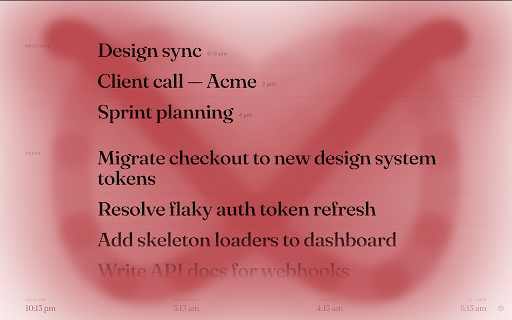
Harmonograph replaces your new tab with a focused view of today: your assigned Linear issues, your Google Calendar meetings, and a row of world clocks for the time zones you actually work across.

The background is a live harmonograph animation — a different figure on every tab, generated from two oscillating frequencies. The same mathematics as the physical device that draws Lissajous curves with pendulums and ink.

What's on screen
— Linear tasks assigned to you, sorted by in-progress → overdue → due today → priority
— Today's Google Calendar events, with conference links when available
— World clocks along the bottom

Settings
— Linear API key (read-only)
— Google Calendar with per-calendar selection
— Four themes: dark, warm, blue, red
— Configurable time zones and clock labels

Getting started
Connect Linear via a read-only Personal API key found under Settings → Security & Access → Personal API Keys. Connect Google Calendar through the settings panel — read-only calendar access only.

Open source. No data leaves your browser.
Technical
- Version
- 1.0.3
- Manifest
- V3
- Size
- 42.91KiB
- Min Chrome
- 88
- Languages
- 1
- Featured
- No
Metadata
- ID
- jjhoebkocjaeilafnbkafdekbpjgiaoc
- Developer ID
- ue14cc1e08ec9acfd7f545262ce54e2de
- Developer Email
- [email protected]
- Created
- May 7, 2026
- Last Updated (Store)
- May 14, 2026
- Last Scraped
- Jun 6, 2026
- Website
- https://harmonograph.app/
- Support URL
- —
- Privacy Policy
- —
Data sourced from the Chrome Web Store · last verified Jun 6, 2026.