
Dynamic Chromeland
Chrome version of dynamic island for increased productivity.
As of June 2026, Dynamic Chromeland has — users and a 4.00/5 rating from 4 reviews in the Productivity category.
Usersno change0%
—
—
Ratingno change0%
4.00
4 reviews
Reviewsup 33.3 percent+33.3%
4
Version
1.5.1
Manifest V3
90-day change · In the last 90 days this extension 1 version update.
History
8 snapshotsTracking since Apr 6, 2026.
View as table
| Date | Users | Rating | Reviews | Version |
|---|---|---|---|---|
| Apr 6, 2026 | 75 | 4.00 | 3 | 1.5.0 |
| Apr 18, 2026 | 103 | 4.00 | 3 | 1.5.0 |
| Apr 23, 2026 | 116 | 4.00 | 3 | 1.5.0 |
| Apr 30, 2026 | 121 | 4.00 | 3 | 1.5.0 |
| May 7, 2026 | 113 | 4.00 | 3 | 1.5.1 |
| May 12, 2026 | 110 | 4.00 | 3 | 1.5.1 |
| May 17, 2026 | 121 | 4.00 | 3 | 1.5.1 |
| May 24, 2026 | 120 | 4.00 | 3 | 1.5.1 |
| Now | — | 4.00 | 4 | 1.5.1 |
Changelog
- Apr 30, 2026description
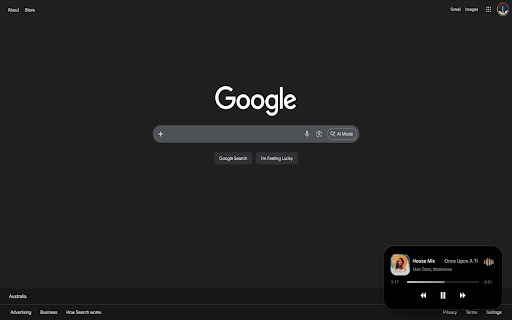
Inspired by Apple's Dynamic Island, Dynamic Chromeland brings a touch of modern design and convenience to your browser. Your media controls stay always within reach, no matter where you are in the browser. Whether you're watching a video or listening to music, you can play, pause, skip or seek with a single glance without searching for the audio tab.

The floating island integrates naturally into your browsing experience, offering quick access without distractions.


Key Features
- Real-time media information display
- One-click navigation to the audio source tab
- Minimalist, lightweight and responsive design
- Tabs stack for easy navigation to multiple audio source tabs
- Quick access to play/pause, skip, previous and seek controls
- Synchronized floating island visible across tabs and windows

How it Works
1. Play audio or video on YouTube, YouTube Music or Spotify
2. Floating island appears in the bottom-right corner of the page
3. Toggle the island using the extension icon or (⌥⇧D / Alt-Shift-D)
4. Click the island to return to the audio source tab
5. Control playback directly from the island
6. Double-click the island or press (⌥⇧F / Alt-Shift-F) to open the audio tabs stack
7. Select any row in the stack to switch to that audio tab

What's New (v1.5.0)
Introducing Tabs Stack
- Open the stack by double-clicking the island or using a keyboard shortcut (⌥⇧F / Alt-Shift-F)
- Quickly access all your active audio tabs in one place
- Displays audio details including platform icon, title and live playback activity
- See currently playing tabs at a glance, followed by your most recent ones
- Instantly switch between audio sources with a single click


Stay in control of your media — effortlessly. More to come.
Inspired by Apple's Dynamic Island, Dynamic Chromeland brings a touch of modern design and convenience to your browser. Your media controls stay always within reach, no matter where you are in the browser. Whether you're watching a video or listening to music, you can play, pause, skip or seek with a single glance without searching for the audio tab.

The floating island integrates naturally into your browsing experience, offering quick access without distractions.


Key Features
- Real-time media information display
- One-click navigation to the audio source tab
- Minimalist, lightweight and responsive design
- Tabs stack for easy navigation to multiple audio source tabs
- Quick access to play/pause, skip, previous and seek controls
- Synchronized floating island visible across tabs and windows

How it Works
1. Play audio or video on YouTube, YouTube Music or Spotify
2. Floating island appears in the bottom-right corner of the page
3. Toggle the island using the extension icon or (⌥⇧D / Alt-Shift-D)
4. Click the island to return to the audio source tab
5. Control playback directly from the island
6. Double-click the island or press (⌥⇧F / Alt-Shift-F) to open the audio tabs stack
7. Select any row in the stack to switch to that audio tab

What’s New (v1.5.1)
- Improved overall performance and experience
- Smoother audio waveforms


Stay in control of your media — effortlessly. More to come.
Permissions & access
- Permissions
- storagescriptingactiveTabtabswebNavigation
- Host access
- <all_urls>
Screenshots

About
Inspired by Apple's Dynamic Island, Dynamic Chromeland brings a touch of modern design and convenience to your browser. Your media controls stay always within reach, no matter where you are in the browser. Whether you're watching a video or listening to music, you can play, pause, skip or seek with a single glance without searching for the audio tab.

The floating island integrates naturally into your browsing experience, offering quick access without distractions.


Key Features
- Real-time media information display
- One-click navigation to the audio source tab
- Minimalist, lightweight and responsive design
- Tabs stack for easy navigation to multiple audio source tabs
- Quick access to play/pause, skip, previous and seek controls
- Synchronized floating island visible across tabs and windows

How it Works
1. Play audio or video on YouTube, YouTube Music or Spotify
2. Floating island appears in the bottom-right corner of the page
3. Toggle the island using the extension icon or (⌥⇧D / Alt-Shift-D)
4. Click the island to return to the audio source tab
5. Control playback directly from the island
6. Double-click the island or press (⌥⇧F / Alt-Shift-F) to open the audio tabs stack
7. Select any row in the stack to switch to that audio tab

What’s New (v1.5.1)
- Improved overall performance and experience
- Smoother audio waveforms


Stay in control of your media — effortlessly. More to come.
Technical
- Version
- 1.5.1
- Manifest
- V3
- Size
- 160KiB
- Min Chrome
- 88
- Languages
- 1
- Featured
- No
Metadata
- ID
- jjaokcmmobdagaaehlkjhdbloalhmjdj
- Developer ID
- u5a06de1189d14e2465bc348316d8d21a
- Developer Email
- [email protected]
- Created
- Nov 13, 2025
- Last Updated (Store)
- Apr 28, 2026
- Last Scraped
- Jun 15, 2026
- Website
- —
- Support URL
- —
- Privacy Policy
- —
Similar extensions
Alternatives to Dynamic Chromeland, ranked by description similarity.

Music Island - Dynamic Music Player Widget
Dynamic Island-style music player. Control Spotify, YouTube, YT Music & Deezer with a floating widget.
412
★ 3.7

Music Controller
Control and seek music playing in any Chrome tab from a popup. Supports Youtube only.
39
★ 5.0

YouTube Audio Mode – Distraction-Free Listening
Use this extension to hide visual clutter on YouTube and enjoy a clean, audio-first experience while listening.
11

Schmipper
Control volume levels of individual browser tabs - The Tab Volume Chaos Controller
3

VideoKit – YouTube Mini Player & Playback Control
Premium YouTube mini-player and playback controls.
15
★ 4.9

SoundCloud to MP3 Player
Use SoundCloud to MP3 Player to play music in background, control playback, and stream music online without switching tabs.
6.0K
★ 4.3

Tube+ mini YouTube Player
Compact YouTube mini Player with quick controls. Press Alt+M to open it instantly. Manage playback from any tab.
23

Audio Ducker
Automatically ducks background audio when active tab plays sound.
30
★ 5.0
Data sourced from the Chrome Web Store · last verified Jun 15, 2026.