
Tab Graveyard
Send tabs to the graveyard. Resurrect them when you're ready.
As of June 2026, Tab Graveyard has 9 users in the Workflow & Planning category.
Usersno change0%
9
9
Ratingno change0%
—
— reviews
Reviewsno change0%
—
Version
1.0.0
Manifest V3
History
7 snapshotsTracking since Apr 30, 2026.
View as table
| Date | Users | Rating | Reviews | Version |
|---|---|---|---|---|
| Apr 30, 2026 | — | — | — | 1.0.0 |
| May 7, 2026 | — | — | — | 1.0.0 |
| May 11, 2026 | 5 | — | — | 1.0.0 |
| May 17, 2026 | 8 | — | — | 1.0.0 |
| May 23, 2026 | 9 | — | — | 1.0.0 |
| May 30, 2026 | 8 | — | — | 1.0.0 |
| Jun 14, 2026 | 7 | — | — | 1.0.0 |
| Now | 9 | — | — | 1.0.0 |
Permissions & access
- Permissions
- contextMenusstoragetabsactiveTabalarms
- Host access
- None declared
Screenshots

About
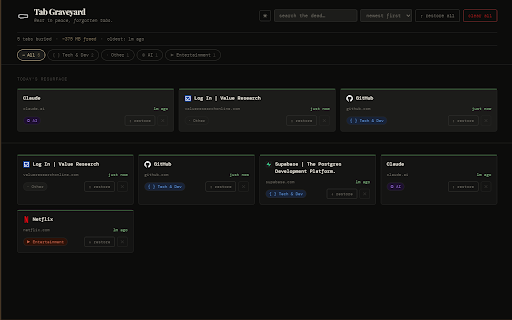
Tab Graveyard lets you bury tabs instead of closing them — keeping your browser clean without losing anything permanently.

🪦 Bury any tab in one click, or press Alt+Shift+B
⚰ Right-click any link to send it to the graveyard directly
🔍 Browse all buried tabs in a full graveyard page with search & filters
↑ Restore any tab instantly — it reopens exactly where you left it
📂 14 auto-categories: AI, News, Social, Finance, Health, Travel, and more
🗓 Daily 3 — resurfaces 3 random buried tabs each day so nothing gets forgotten
⏱ Auto-bury inactive tabs after a set time (15 min → 8 hrs)
💾 Export & import your graveyard as JSON for backup or migration

No account. No tracking. All data stays on your device.

Perfect for researchers, developers, and anyone who opens too many tabs.
Technical
- Version
- 1.0.0
- Manifest
- V3
- Size
- 73.77KiB
- Min Chrome
- 88
- Languages
- 1
- Featured
- No
Metadata
- ID
- jimlnmpjjddnenapofpfnpnjkdhjippj
- Developer ID
- u6853659f273fcd932012003d346a94ba
- Developer Email
- [email protected]
- Created
- Apr 29, 2026
- Last Updated (Store)
- Apr 29, 2026
- Last Scraped
- Jun 14, 2026
- Website
- —
- Support URL
- —
Data sourced from the Chrome Web Store · last verified Jun 14, 2026.