
RASTATAB
Color-code your tabs with a right-click, keyboard shortcuts, or voice. Compare products, apartments & more.
As of June 2026, RASTATAB has 6 users in the Productivity category.
Usersup 200.0 percent+200.0%
6
6
Ratingno change0%
—
— reviews
Reviewsno change0%
—
Version
6.1.4
Manifest V3
History
10 snapshotsTracking since Apr 6, 2026.
View as table
| Date | Users | Rating | Reviews | Version |
|---|---|---|---|---|
| Apr 6, 2026 | 2 | — | — | 6.1.4 |
| Apr 18, 2026 | — | — | — | 6.1.4 |
| Apr 23, 2026 | 3 | — | — | 6.1.4 |
| Apr 30, 2026 | 2 | — | — | 6.1.4 |
| May 7, 2026 | 3 | — | — | 6.1.4 |
| May 12, 2026 | 5 | — | — | 6.1.4 |
| May 17, 2026 | 6 | — | — | 6.1.4 |
| May 24, 2026 | 5 | — | — | 6.1.4 |
| May 30, 2026 | 7 | — | — | 6.1.4 |
| Jun 6, 2026 | 5 | — | — | 6.1.4 |
| Now | 6 | — | — | 6.1.4 |
Permissions & access
- Permissions
- activeTabcontextMenusstoragescriptingtabs
- Host access
- <all_urls>
Screenshots



About
RASTATAB — Color-Code Your Browser Tabs

Ever had 30 tabs open and they all look the same? RASTATAB lets you mark any tab with a color so you can instantly tell them apart.

🎨 HOW IT WORKS

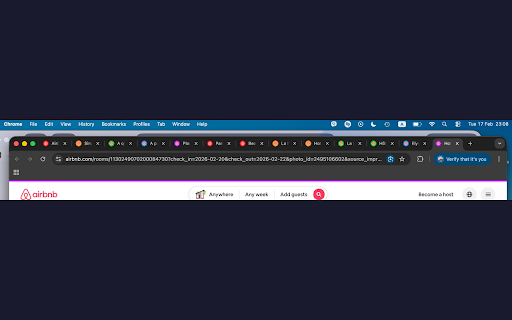
Right-click any page, pick a color, done. The tab's favicon gets a colored border and a thin banner appears at the top of the page. Scan your tabs at a glance — no clicking needed.

4 WAYS TO COLOR A TAB

- Right-click menu — simple and intuitive
- Popup — click the lion icon in your toolbar
- Keyboard shortcuts — Alt+1 through Alt+5 for instant coloring, Alt+R to cycle, Alt+0 to remove
- Voice commands — press Alt+M, say "green" and your tab turns green. The first voice-powered tab color extension.

🦁 5 VIVID COLORS

Red, Orange, Green, Blue, Purple — each designed to stand out on both light and dark browser themes.

💡 PERFECT FOR

- Apartment hunting with your partner — mark favorites, maybes, and rejects
- Comparing products on eBay, Amazon, or any marketplace
- Research across Wikipedia, news articles, or documentation
- Online shopping — track what you like across dozens of tabs
- Any time you need to sort through similar-looking tabs

⌨️ KEYBOARD SHORTCUTS

Alt+1 Red | Alt+2 Orange | Alt+3 Green | Alt+4 Blue | Alt+5 Purple
Alt+0 Remove color | Alt+R Cycle colors | Alt+M Toggle voice

🔒 PRIVACY

RASTATAB does not collect, store, or transmit any data. All color assignments are stored locally on your device. No accounts, no tracking, no analytics. Your browsing stays private.

⚡ LIGHTWEIGHT

No background processes, no memory bloat. RASTATAB only activates when you use it.

Simple. Fast. Free. Color-code your tabs like sticky notes.
Technical
- Version
- 6.1.4
- Manifest
- V3
- Size
- 46.83KiB
- Min Chrome
- 88
- Languages
- 1
- Featured
- No
Metadata
- ID
- jimbchbpadjdlljnkojifcabipcclfpn
- Developer ID
- u8216dc9f143961dafce55124b71c5c65
- Developer Email
- [email protected]
- Created
- Mar 5, 2026
- Last Updated (Store)
- Mar 5, 2026
- Last Scraped
- Jun 6, 2026
- Website
- —
- Support URL
- —
- Privacy Policy
- https://rastatab.carrd.co
Similar extensions
Alternatives to RASTATAB, ranked by description similarity.

TabTint — Custom Tab Colors
Tint your tabs with colors! Add temporary colors or create permanent rules for domains and URLs.
399
★ 3.0

Tab Colorizer Pro
Tab Icon colorization with persistence, domain-specific colors, and overlay modes. Pro subscription required.
360
★ 5.0

Tab Domain Highlighter for Chrome
Activate this extension to automatically highlight domains with colors across your open tabs with just one click.
39

Tabora
Create and manage custom banners for your browser tabs
3

Tab Manager
Organize tabs into color-coded groups with drag & drop. Save, restore, and share your tab collections effortlessly.
8
★ 5.0

Rename Tab
Rename Chrome tabs with persistent titles across page refreshes
58
★ 3.0

Tabforge – Smart Tab Manager
Smart tab manager to organize tabs, close duplicates, group tabs by domain, and search open tabs instantly.
3
★ 5.0

Tabris - Tab and Group Management
Manage Chrome tabs and groups easily
11
Data sourced from the Chrome Web Store · last verified Jun 6, 2026.