
Evenfall - private AI chat & notes
Ask Evenfall from any tab and save thoughts to your notes. Private by default: no access to your pages unless you turn it on.
As of July 2026, Evenfall - private AI chat & notes has — users in the Productivity category.
Usersno change0%
—
—
Ratingno change0%
—
— reviews
Reviewsno change0%
—
Version
0.1.0
Manifest V3
History
1 snapshotsTracking since Jul 19, 2026.
Not enough history yet for this metric — the chart fills in as we collect more snapshots.
View as table
| Date | Users | Rating | Reviews | Version |
|---|---|---|---|---|
| Jul 19, 2026 | — | — | — | 0.1.0 |
| Now | — | — | — | 0.1.0 |
Permissions & access
- Permissions
- sidePanelstoragecontextMenus
- Host access
- https://www.evenfall.ai/*
Screenshots


About
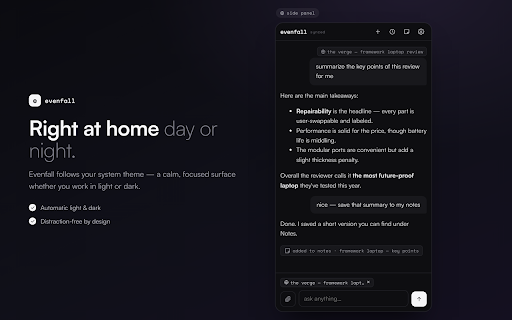
Evenfall in your browser: a private AI chat and notes side panel. Ask questions from any tab, save thoughts as you browse, and keep everything under your own account — with no tracking, no analytics, and no access to your pages unless you explicitly turn it on.

WHAT IT DOES

• Chat from any tab — open the side panel with the toolbar button or Ctrl+Shift+E (Cmd+Shift+E on Mac) and get streaming AI answers without leaving the page you're on.

• Right-click shortcuts — select text on any page and choose "Ask about this", "Translate", "Explain", or "Save selection to notes". On any page: "Summarize this page" or "Save page to notes".

• Notes — capture thoughts, snippets, and pages into your Evenfall notes. Synced to your account by default, or keep them on this device only.

• Page context, only when you ask — attach the text of the page you're reading to a specific message with one tap, so the AI can answer about what you're looking at.

• Your assistants — custom assistants from your Evenfall account are available in the extension (paid plans).

PRIVATE BY DEFAULT

The extension is built so that doing nothing is the private choice:

• No access to your pages unless you turn it on. Reading page text is an optional permission, off by default. Enabling it uses Chrome's own permission prompt, and turning it off revokes the permission at the browser level. Pages are never read automatically or in the background.

• Chat history stays on your device by default. Choose per your preference: local (kept only in this browser), synced (saved to your account), or ephemeral (nothing kept at all).

• No analytics, no trackers, no browsing history collection. The extension communicates only with evenfall.ai.

• Your conversations and notes are never used to train AI models and are never sold.

• Deleting is deleting. Remove a synced conversation or note and it's gone from the database.

Privacy policy: https://www.evenfall.ai/privacy-policy

HOW IT WORKS

The extension signs in with your existing Evenfall session — just log in at evenfall.ai and open the side panel. It stores no passwords or tokens of its own.

An Evenfall account is required (there's a free tier; some features, like image attachments and custom assistants, are part of paid plans). If you're new to Evenfall: it's a private AI chat app — direct answers from leading AI models, with automatic web search when a question needs fresh information, and a straightforward promise about your data. Learn more at https://www.evenfall.ai

PERMISSIONS, PLAINLY

• Side panel & storage — the extension's UI, plus your settings and any "local only" history and notes, kept on your device.
• Context menus — the right-click shortcuts described above; they act only when you click them.
• evenfall.ai access — to use your account session for chat and notes.
• Optional (off by default): reading the current tab — powers the page-context feature, requested only when you enable it in settings.

SUPPORT

Questions or issues? [email protected]
Technical
- Version
- 0.1.0
- Manifest
- V3
- Size
- 621KiB
- Min Chrome
- 116
- Languages
- 1
- Featured
- No
Metadata
- ID
- jhoglfnaoghdgogoigadkoollmfnailg
- Developer ID
- u933e2589f4bf3e5dfb36ae4c4f0d56e7
- Developer Email
- [email protected]
- Created
- Jul 18, 2026
- Last Updated (Store)
- Jul 18, 2026
- Last Scraped
- Jul 19, 2026
- Website
- evenfall.ai
- Support URL
- https://www.evenfall.ai/
- Privacy Policy
- https://www.evenfall.ai/privacy-policy
Data sourced from the Chrome Web Store · last verified Jul 19, 2026.