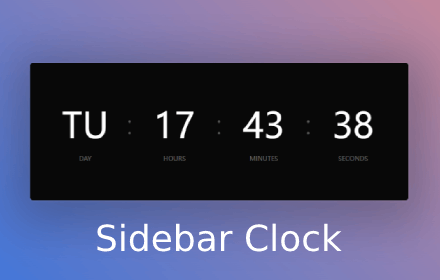
Sidebar Clock
A minimalist sidebar clock extension featuring clock, stopwatch, timer, and Pomodoro timer to help you manage time efficiently.
As of June 2026, Sidebar Clock has 1,000 users and a 4.00/5 rating from 4 reviews in the Accessibility category.
Usersdown 50.0 percent−50.0%
1.0K
1,000
Ratingno change0%
4.00
4 reviews
Reviewsno change0%
4
Version
1.1.14
Manifest V3
90-day change · In the last 90 days this extension lost 1.0K users.
History
3 snapshotsTracking since Apr 7, 2026.
View as table
| Date | Users | Rating | Reviews | Version |
|---|---|---|---|---|
| Apr 7, 2026 | 2.0K | 4.00 | 4 | 1.1.14 |
| Apr 19, 2026 | 1.0K | 4.00 | 4 | 1.1.14 |
| Jun 8, 2026 | 2.0K | 4.00 | 4 | 1.1.14 |
| Now | 1.0K | 4.00 | 4 | 1.1.14 |
Permissions & access
- Permissions
- sidePanelstorage
- Host access
- None declared
Screenshots



About
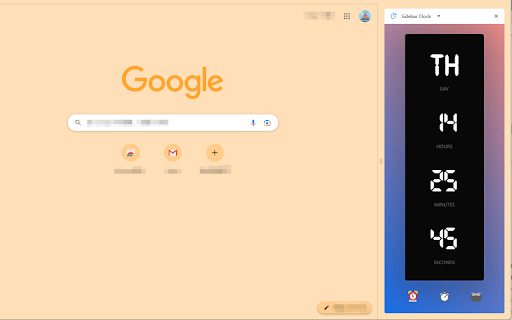
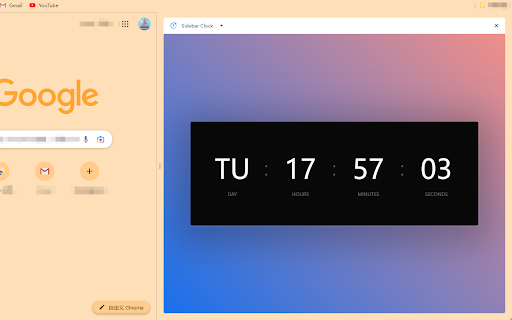
A minimalist sidebar clock with stopwatch, timer, and Pomodoro. Customizable fonts, themes, and persistent background tracking.

## Features

⏰ **Clock**
- Real-time display with day, hours, minutes, seconds
- 12H/24H format switch

⏱️ **Stopwatch**
- Start, pause, reset
- Background persistence - keeps running when sidebar is closed

⏲️ **Timer**
- Custom countdown (hours, minutes, seconds)
- Progress ring visualization
- Audio alert on completion
- Persistent state across sessions

🍅 **Pomodoro**
- Customizable work/break durations
- Default: 25min work / 5min break / 15min long break
- Adjustable long break interval (default: after 4 sessions)
- Session counter
- Background tracking - never miss a session
- Audio notifications

⚙️ **Settings**
- 3 monospace fonts: JetBrains Mono, Digital-7, Chivo Mono
- 5 themes: Dawn (blue-pink, default), Mist (fog blue), Sage (green), Pearl (warm ivory), Charcoal (dark)
- 12H/24H clock format
- Customizable Pomodoro durations
- All settings sync across devices

## Why Sidebar Clock?

✓ **Minimal** - No clutter, just time tools
✓ **Persistent** - Timers run in background
✓ **Private** - No data collection
✓ **Ad-free** - Pure functionality

## Quick Start

1. Click toolbar icon to open sidebar
2. Navigate: ⏰ Clock / ⏱️ Stopwatch / ⏲️ Timer / 🍅 Pomodoro / ⚙️ Settings
3. Customize fonts and themes in Settings

## Requirements
- Chrome 116+
- Works offline

## Changelog

### v1.2
- **New theme system**: 5 redesigned themes with oklch() gradients — Dawn (default), Mist, Sage, Pearl, Charcoal
- **Pomodoro settings**: Customizable work duration, short/long break, and long break interval
- Redesigned Pomodoro page with flat minimal style and progress ring
Technical
- Version
- 1.1.14
- Manifest
- V3
- Size
- 253KiB
- Min Chrome
- 114
- Languages
- 1
- Featured
- No
Metadata
- ID
- jhlfjalilcgcampkndjhlgkndedgoegg
- Developer ID
- u4880d5c9618fab5d0afd08a477f31c9c
- Developer Email
- [email protected]
- Created
- May 11, 2023
- Last Updated (Store)
- Mar 19, 2026
- Last Scraped
- Jun 8, 2026
- Website
- —
- Support URL
- —
- Privacy Policy
- https://extcreator.com/privacy
Similar extensions
Alternatives to Sidebar Clock, ranked by description similarity.

Toolbar Clock Icon, World Clocks, Alerts & Alarms, Timer, Stopwatch, Notes
A digital clock that displays the current time in the extension icon. Set World Clocks, Alarms, Timers, Stopwatch, and create Notes.
447
★ 4.8

Pomodoro Timer
A simple Pomodoro Timer.
1.0K
★ 5.0

Reader.
Reader Mode for Chrome
516
★ 4.3

Reminders
Create scheduled reminders of various types, such as notes, notifications, tasks, or opening a URL in a new tab.
50.0K
★ 3.6

TimeTrackr
TimeTrackr: Optimize your online time for maximum productivity. Track, categorize, and set goals to achieve work-life balance.
17
★ 5.0

Coffee Theme for Chrome
Dark coffee Chrome theme with rotating wallpapers, customizable clocks, top sites, and smooth new tab interface.
45
vOid skin for Soundcloud
A visual theme based on Spotify. Designed for Soundcloud
121
★ 4.8

Call Timer for Meet
This extension adds a timer to your Google Meet calls with customizable time limits and alerts.
70.0K
★ 3.8
Data sourced from the Chrome Web Store · last verified Jun 8, 2026.