
Porton Oscar Extension
Provides additional features to OSCAR users
As of June 2026, Porton Oscar Extension has 22 users in the Workflow & Planning category.
Usersup 29.4 percent+29.4%
22
22
Ratingno change0%
—
— reviews
Reviewsno change0%
—
Version
5.2.0
Manifest V3
90-day change · In the last 90 days this extension 2 version updates.
History
10 snapshotsTracking since Apr 9, 2026.
View as table
| Date | Users | Rating | Reviews | Version |
|---|---|---|---|---|
| Apr 9, 2026 | 17 | — | — | 5.0.0 |
| Apr 20, 2026 | 14 | — | — | 5.0.0 |
| Apr 25, 2026 | 16 | — | — | 5.1.0 |
| May 2, 2026 | 16 | — | — | 5.2.0 |
| May 9, 2026 | 17 | — | — | 5.2.0 |
| May 13, 2026 | 13 | — | — | 5.2.0 |
| May 19, 2026 | 15 | — | — | 5.2.0 |
| May 26, 2026 | 19 | — | — | 5.2.0 |
| Jun 2, 2026 | 20 | — | — | 5.2.0 |
| Jun 8, 2026 | 18 | — | — | 5.2.0 |
| Now | 22 | — | — | 5.2.0 |
Permissions & access
- Permissions
- cookies
- Host access
- *://*/oscar/*
Screenshots

About
Features of Our Plugin:

Smart Search: Effortlessly find patients by Name, HIN, DOB, or demographic number, making patient lookup a breeze.

Appointments Page Enhancement: Our extension streamlines the appointment management process by automatically identifying appointments with Preferred Pharmacy prescriptions. A visual indicator, in the form of a tick mark, is placed next to appointments where the patient's Preferred Pharmacy is configured.

Send Reports from Encounter & add to encounter:
You can easily send reports to patients directly from the encounter page, and it will also give you an option of adding to the encounter.

Portal Dashboard:

a. Patient Information Hub: Within this section, relevant patient details are presented. When users navigate through patient-related sections such as Documents, Master, e-forms, and email, a comprehensive overview of the patient's information is available. Clicking on the email button triggers the Messenger page, where the patient's email and name (extracted from OSCAR, or manually input if absent) are included. Users can compose emails efficiently with customizable subject and content.

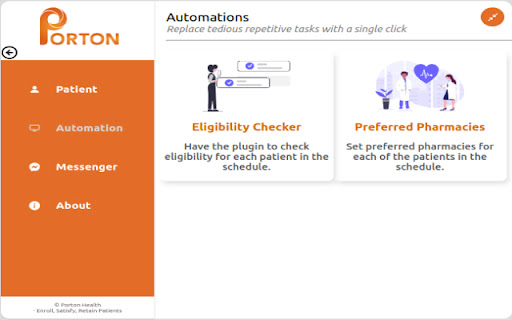
Automation Page:

a. Eligibility Checker: Operating on the Appointment page of OSCAR, this feature assesses patient eligibility. The resulting table categorizes patients as eligible (HIN registered) and insured (activated by the Clinic's Teleplan). This streamlines decision-making for patient care.

b. Set Preferred Pharmacy: This functionality organizes patients in the appointment list into two segments: those with a preferred pharmacy already set, and those without. Users can select patients and designate a preferred pharmacy by name, including the option to narrow the search by city. Setting the preferred pharmacy is a user-friendly process.

Messenger Page:
Send emails to patients seamlessly, whether you are on the appointment table page or any other relevant page. Automatically add emails to the patient's encounter with a subject line.We have also added some sample contents for you to choose from, making your communication with
patients are more convenient and efficient.

Settings Page:
This page empowers users to fine-tune plugin functionality, giving them the flexibility to choose whether to display the preferred pharmacy check icon on the appointment page or the presence of the smart box at the top. Users can easily toggle these options on or off based on their specific preferences.

About Page:
This section serves as an informational hub for the plugin. Users can gain insights into the plugin's capabilities and features. Furthermore, a valuable feedback mechanism is integrated, allowing users to contribute insights and suggestions for improvement.

Effortless Document and Form Sharing:

a. Document Sharing: Opening a document page for any patient triggers the appearance of a "send docs" button next to each document. With a simple click, documents are attached to the messenger page.

b. Form Sharing: When navigating the e-forms page for a patient, the extension introduces a "send e-form" button adjacent to each form. Upon selection, the chosen form is attached to the messenger page as a PDF.

Our plugin seamlessly integrates these features, enhancing the OSCAR experience for streamlined patient management, communication, and documentation.
Technical
- Version
- 5.2.0
- Manifest
- V3
- Size
- 572KiB
- Min Chrome
- 88
- Languages
- 1
- Featured
- No
Metadata
- ID
- jhaipacembdaidodclhgmbmmakpchjhe
- Developer ID
- ub95b34508d359f9a963b59eae274271d
- Developer Email
- [email protected]
- Created
- Dec 18, 2022
- Last Updated (Store)
- Apr 21, 2026
- Last Scraped
- Jun 8, 2026
- Website
- —
- Support URL
- https://www.portonhealth.com/
- Privacy Policy
- https://www.portonhealth.com/privacy-and-security/
Similar extensions
Alternatives to Porton Oscar Extension, ranked by description similarity.

Cortico Plug-in: Automate Your EMR
Automate tedious tasks in your EMR like messaging patients, sending files, and way more!
8.0K
★ 5.0

Eye2Send
Send documents from your CRM instantly!
91
★ 5.0

Standard Care Companion
A Chrome extension to automate copy and paste from EHRs to clinic forms
8

AnyRx Clinical Documentation BETA
A Chrome extension for clinical text templates, THIS EXTENSION IS FOR BETA TESTING
66
★ 5.0

PhyxUp Health
Patient registration and notes tool for therapists
14
★ 5.0

Enter
Use Enter with your favorite EMR
78

Vibrant Chrome Extension
Track, order, and access lab reports in your EHR.
115
★ 5.0

Eye2M
Add patients to funnels right from your CRM!
40
Data sourced from the Chrome Web Store · last verified Jun 8, 2026.